

Stop iPad Screen From Automatically Dimming - MacRumorsOpen MenuShow RoundupsShow Forums menuVisit ForumsOpen Sidebar
Skip to Content

Stop iPad Screen From Automatically Dimming

by

If you've ever been reading, following instructions, or watching video on your iPad only to have the screen dim at the most inconvenient moment, you're not alone.
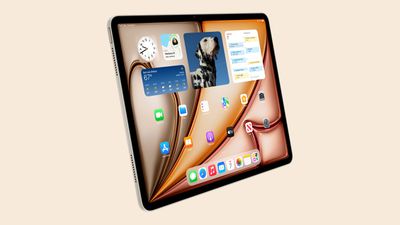
ipad air design starlight
Automatic dimming helps preserve battery life, but it can be frustrating when you need your screen to stay bright and active. Fortunately, you can prevent your iPad screen from dimming automatically, and all it involves is a change in settings.

The following steps show you how it's done.

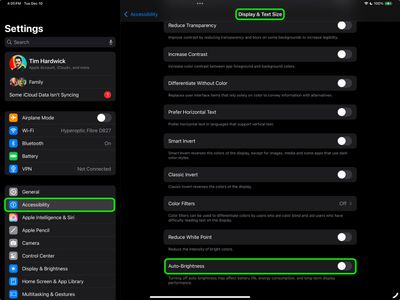
  1. Open the Settings app on your iPad.
  2. Tap Accessibility.
  3. Select Display & Text Size.
  4. Scroll down to the bottom and toggle off the switch next to Auto-Brightness.
settings

Now that you have disabled Auto-Brightness, which relies on the ambient light sensor to make adjustments, you'll have to use the manual route the next time that you want change the brightness of the screen.
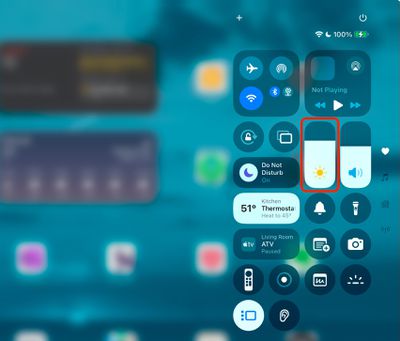
control center
The easiest way to do this is to invoke the Control Center by swiping down diagonally from the top right-hand corner of your iPad. Then drag the brightness slider with your finger to adjust it to your preference. Alternatively, you can adjust the brightness slider found in Settings ➝ Display & Brightness.

Night Shift

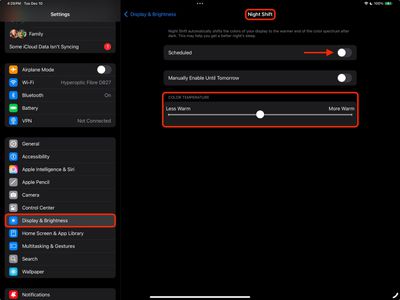
If your screen tends to look dimmer at nighttime, it's possible that the Night Shift feature is enabled. Designed to reduce eye strain during the evening hours, Night Shift automatically adjusts the colors of the iPad display to make them look warmer. If this is something you'd prefer not to see, go to Settings ➝ Display & Brightness, then tap Night Shift, and disable the schedule by turning off the switch.
settings
You can also optionally change the Color Temperature of the screen on the fly using the slider, which makes it Less Warm or More Warm.


Popular Stories

macOS 27 on MacBook Pro

Apple Says macOS 27 Won't Be Compatible With These Macs

Wednesday June 3, 2026 8:29 am PDT by
During WWDC 2025, Apple revealed that macOS 26 Tahoe would be the final major macOS version for Intel-based Macs. macOS 27 will be compatible with Apple silicon Macs only, meaning that you will need a Mac with an M-series chip or a MacBook Neo with an A18 Pro chip in order to install the software update. Apple will unveil macOS 27 during its WWDC 2026 keynote this Monday, June 8, and the...
MacBook Neo on Yellow Feature

MacBook Neo is So Popular That Apple Reportedly Doubled Production

Wednesday June 3, 2026 9:24 am PDT by
On an earnings call in late April, Apple's CEO Tim Cook said that customer response to the MacBook Neo was "off the charts," and the popularity of the laptop has reportedly led the company to significantly boost production. Apple supply chain analyst Ming-Chi Kuo this week said he believes that MacBook Neo shipments to Apple were doubled from an initial target of 5 million units to 10...
iphone 18 pro blue%402x

iPhone 18 Pro: Dark Cherry, Light Blue, and Dark Gray Chassis Leaked [Update]

Thursday June 4, 2026 5:18 am PDT by
Update: Since publication, new information has come to light suggesting the images have been AI-manipulated and are not in fact iPhone 18 Pro chassis parts. The original article follows. The color options Apple is reportedly planning for the upcoming iPhone 18 Pro and ‌iPhone 18 Pro‌ Max have appeared online today in the form of images of chassis parts of unknown authenticity....













