

How to Switch Focal Lengths in Portrait Mode on iPhone 11 Pro - MacRumorsOpen MenuShow RoundupsShow Forums menuVisit ForumsOpen Sidebar
Skip to Content

How to Switch Focal Lengths in Portrait Mode on iPhone 11 Pro

by

Apple's Portrait Mode has become a popular way of taking impressive shots using a depth-of-field effect known as bokeh, allowing iPhone users to shoot a photo that keeps the subject sharp with a blurred background.

And now, exclusive to the iPhone 11 Pro and iPhone 11 Pro Max thanks to the triple-lens camera, you can switch between focal lengths in Portrait mode to get the best shot for your chosen scene.
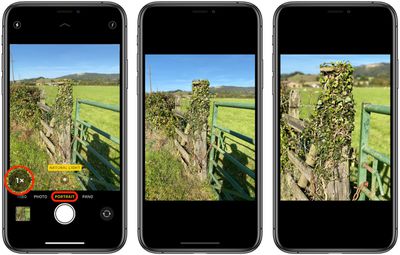
portrait mode iphone 11 pro

To use Portrait Mode, open the Camera app and swipe to Portrait mode. Portrait Lighting effects will appear at the bottom of the viewfinder.

To change the focal length, tap the circular 1x button in the bottom-left of the viewfinder. 1x corresponds to the wide lens, and 2x switches to the telephoto lens.

You can see the difference between the two modes in the second and third images above, but in general the 2x mode seems to be better for capturing people, while the 1x lens is better for shooting smaller objects.

Apple has widened the aperture of the iPhone 11 Pro's telephoto lens to f/2.0 from f/2.4 in the iPhone X and XS. This allows more light to hit the sensor, which should translate to better Portrait Mode results in lower lighting conditions.

Don't forget, you can now also switch to the front-facing camera and get a selfie in Portrait Mode, too.


Related Forum: iPhone

Top Rated Comments

firewire9000 Avatar
88 months ago
That’s so cool! I really liked the portrait photos taken by the XR because of the wide angle.
Score: 2 Votes (Like | Disagree)
Suxamethonium Avatar
88 months ago

So the tele is the closest to a “nifty fifty” lens on a dslr?
Yep, which makes the 13mm really wide!
Score: 1 Votes (Like | Disagree)
88 months ago
So the tele is the closest to a “nifty fifty” lens on a dslr?
Score: 1 Votes (Like | Disagree)
alpi123 Avatar
88 months ago

Anyone know the equivalent millimeters each of the lens’ are?
It's written in the camera app.
Ultra Wide - 13mm
Wide - 26mm
Tele - 52mm
Score: 1 Votes (Like | Disagree)
firewire9000 Avatar
88 months ago

Does this mean with the pros you don’t have to stand as far for portrait?
One thing I didn’t like about the xs vs xr.
That’s right.
Score: 1 Votes (Like | Disagree)

Popular Stories

Apple Wallet

iOS 27 Will Add Two New Apple Wallet Features to Your iPhone

Monday June 1, 2026 12:15 pm PDT by
Apple is set to unveil iOS 27 during its WWDC 2026 keynote on Monday, June 8, and the update will reportedly include two new Apple Wallet features. First, iOS 27 will reportedly let users create their own digital passes by scanning items like movie tickets, concert passes, and gym membership cards. Many apps already offer Apple Wallet passes, but now users will be able to create a custom...
Dynamic Island iPhone 18 Pro Feature

iPhone 18 Pro Battery Capacities Allegedly Leaked

Tuesday June 2, 2026 1:54 am PDT by
Battery capacities for Apple's upcoming iPhone 18 Pro have allegedly surfaced, and the numbers suggest only a modest increase over the iPhone 17 Pro. According to prolific Weibo-based leaker Digital Chat Station, Apple is testing the iPhone 18 Pro with different battery capacities for the China and U.S. versions of the device, similar to last year's iPhone 17 Pro models. The Chinese model is ...
macOS 27 on MacBook Pro

Apple Says macOS 27 Won't Be Compatible With These Macs

Wednesday June 3, 2026 8:29 am PDT by
During WWDC 2025, Apple revealed that macOS 26 Tahoe would be the final major macOS version for Intel-based Macs. macOS 27 will be compatible with Apple silicon Macs only, meaning that you will need a Mac with an M-series chip or a MacBook Neo with an A18 Pro chip in order to install the software update. Apple will unveil macOS 27 during its WWDC 2026 keynote this Monday, June 8, and the...













