

Switching from Android to iPhone is a lot easier than it used to be. With the release of iOS 26, Apple has streamlined the process of transferring your eSIM from an Android device, and in most cases you won't need to contact your carrier for a QR code.
Transferring an eSIM from iPhone to iPhone has been relatively simple since iOS 18, but Android-to-iPhone transfers have remained unnecessarily complicated. Thankfully, iOS 26 changes that.
What You'll Need
Before you begin, make sure you have the following:
- A supported carrier, such as AT&T, T-Mobile, or Verizon in the U.S.
- An iPhone 11 or later running iOS 26.
- A compatible Android smartphone running Android 16 or later.
- Both devices connected to Wi-Fi with Bluetooth enabled.
Keep in mind that not all Android devices support this feature yet, so it's best to check with your phone's manufacturer to confirm compatibility.
Transfer Your eSIM From Android to iPhone
Once your new iPhone is set up, follow these steps to transfer your phone number:
- Place both phones next to each other so you can see prompts on both screens.
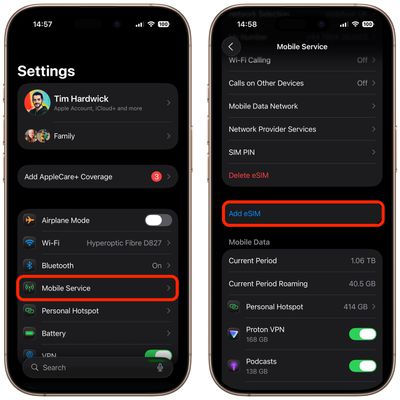
- On your iPhone, open Settings and tap Set Up Cellular (or if you already have another SIM, go to Settings ➝ Cellular/Mobile Service ➝ Add eSIM).

- Tap Transfer from Android, then tap Continue. A QR code will appear on your iPhone screen.
- Use your Android camera to scan the QR code.
- On your Android device, select the phone number you want to transfer and tap Transfer.
- If prompted, tap Yes to use the transferred SIM as your primary eSIM.
- When complete, tap Done on your iPhone and tap OK.
- Make a test call to verify cellular connectivity works.
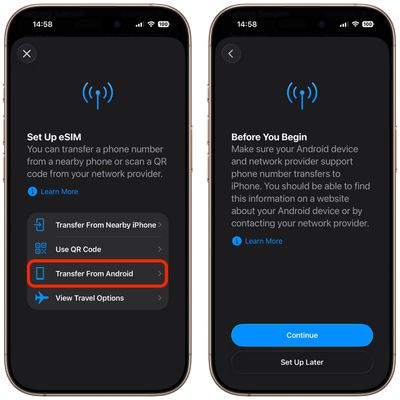
Your Android eSIM will be deactivated automatically once the transfer completes.
Can't Scan the QR Code?
If scanning the QR code doesn't work, you can try an alternative pairing method in iOS 26:
- On your iPhone, select Other Options beneath the QR code.
- On your Android device, go to Google services ➝ All services and tap Pair with iPhone or iPad.
- Select Transfer eSIM.
- Enter the session ID and pairing code displayed on your iPhone, then tap Next.
- Select your phone number and tap Transfer.
- Confirm with Yes if asked about making it your primary eSIM.
- Tap Done on your iPhone when finished.
If neither method works, you'll need to contact your carrier for assistance with the transfer.



















