How to Use Audio Sharing on iPhone and iPad - MacRumorsOpen MenuShow RoundupsShow Forums menuVisit ForumsOpen Sidebar
Skip to Content

How to Use Audio Sharing on iPhone and iPad

by

Apple's Audio Sharing feature on iPhone and iPad lets you share your device's Bluetooth audio with a second pair of wireless headphones, allowing two of you to listen to the same music together while running, or enjoy a movie on a plane without disturbing those around you, for example.
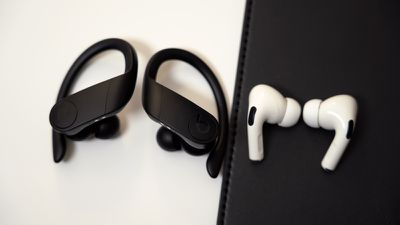
powerbeatsproairpodsdesignbothearbuds

Compatibility Check

To get started with Audio Sharing, first make sure that the headphones and iOS device that you plan to use are compatible with the feature. According to Apple, Audio Sharing is supported by the following models:

  • AirPods (first, second, and third-generation)
  • AirPods Pro
  • AirPods Max
  • Powerbeats Pro
  • Powerbeats 3
  • Beats Solo Pro
  • Beats Solo 3 Wireless
  • Beats Studio 3 Wireless
  • BeatsX
  • Beats Flex
  • Beats Fit Pro
  • iPhone 8 and later
  • iPad Pro (12.9-inch) 2nd gen and later
  • ‌iPad Pro‌ (11-inch)
  • ‌iPad Pro‌ (10.5-inch)
  • ‌iPad‌ (5th gen and later)
  • iPad Air (3rd gen)
  • iPad mini (5th gen and later)
  • iPod touch (7th gen)

Next, check that the iOS device that will be hosting the audio is running iOS 13.1 or later. You can check that your device is up-to-date by launching the Settings app and going to General -> Software Update. Once you've done that, you're ready to start audio sharing. Here's how it works.

How to Use Audio Sharing in iOS
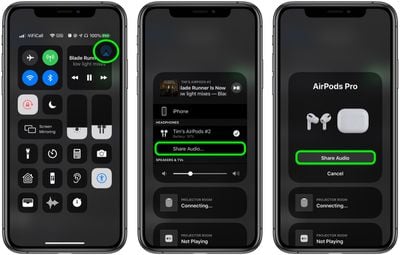
control center

  1. With your AirPods on, start playing audio on your iPhone or ‌iPad‌.
  2. Launch Control Center by swiping down from the top-right corner of the screen.
  3. In Control Center's audio playback controls, tap the icon with the triangle and three circles.
  4. Now, bring your friend's AirPods, inside their case, close to your device, and flip the lid open.
  5. You should see a prompt on your device's screen offering to Share Audio with the second pair of AirPods.

When you've successfully connected, the iPhone or ‌iPad‌ hosting the audio controls the volume level on both pairs of headphones, but both people listening can also use any headphone controls they may have to change volume independently.


Related Roundups: AirPods 4, AirPods Pro 3
Related Forum: AirPods

Popular Stories

european union eu

EU iPhone Users Get AirPods-Like Pairing and Notification Forwarding for Third-Party Wearables in iOS 26.5

Monday May 11, 2026 1:50 pm PDT by
iOS 26.5 introduces several interoperability changes for third-party wearables, which means European iPhone users have access to new capabilities when using non-Apple accessories. To comply with the EU's Digital Markets Act, Apple is letting third-party wearables access some features that have historically been limited to the Apple Watch and AirPods. Proximity pairing - Third-party...
AirPods Hearing Aid Thumb 1

Apple Watch Hypertension Alerts and AirPods Hearing Aid Feature Expand to More Countries

Tuesday May 12, 2026 10:53 am PDT by
Apple today said Hearing Aid features are now available for the AirPods Pro 2 and AirPods Pro 3 in Italy, Romania, and Czechia, while Hypertension alerts have expanded to Israel. The Hearing Aid option allows the AirPods Pro to be used as an over-the-counter alternative to a traditional set of hearing aids. The AirPods Pro can improve sound to mitigate mild to moderate hearing loss,...
airpods pro 3 pink

Your Next AirPods Will Have Eyes

Friday May 15, 2026 8:39 am PDT by
Apple's fourth-generation AirPods Pro could well watch the world for you, with the upcoming earbuds widely tipped to have built-in cameras. Bloomberg's Mark Gurman reports that the camera-equipped AirPods Pro have already reached "advanced" testing, suggesting that the design is virtually locked in and mass production is imminent. Each earbud is expected to feature a tiny built-in infrared...