

 Google Photos for iOS offers users several picture and video sharing options like live albums, shared libraries, and shared albums, and now Google has built a messaging service into its Photos app that makes it possible to share individual snaps and video clips as part of an ongoing conversation.
Why Add a Messaging Service to a Photos App?
Previously, sharing individual photos through the app was done by creating an album for the photo and sharing a link to it, but user feedback suggested to Google that this sharing option could be a simpler experience, so it's adding an option to share individual photos as part of an ongoing, private conversation. You can like photos or comment in the conversation, and you can save photos or videos to your own gallery.
Google says the new messaging feature isn't designed to replace the chat apps you already use, but it hopes that by including an option, users will find sharing moments with friends and family easier than before. Here's how it works.
How to Share Media in a Google Photos Chat Thread
- Launch the Google Photos app on your iPhone or iPad.
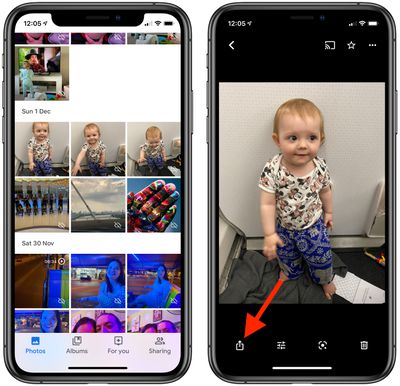
- Tap a picture in your library that you want to share.
- Tap the Share icon (the square with an arrow pointing out).

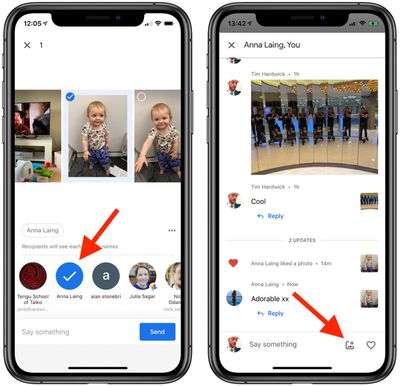
- Type in the name or email address of the person with whom you want to share the photo, or select a contact from the Share Sheet options. You can also start a group chat by adding as many people as you like.
- Type a message to accompany the photo, then tap Send.
- You can keep up with the chat thread that you just created via the Sharing tab. You can easily share more photos in the conversation using the picture symbol next to the message input field at the bottom of the chat thread.
The person you shared the photo with will receive an email notifying them, and if they've got the Google Photos app installed on their device, they'll receive an alert inviting them to join the chat.





















Top Rated Comments