

Safari's popular Reader Mode has received a significant overhaul in iOS 18, introducing new features designed to enhance the reading experience for users. The revamped Reader Mode aims to make it easier for readers to navigate and preview content on their iPhones and iPads, offering a more streamlined and efficient way to read online articles.

A longstanding feature in Safari, Reader Mode allows users to view web pages in a simplified format, stripping away ads, videos, and other distractions to focus solely on the text and images. This clean interface has been a favorite among users who prefer a more streamlined reading experience, especially for longer articles or text-heavy websites.
With the iOS 18 update, Apple has addressed user feedback and modernized Reader Mode with a redesigned interface that offers improved readability and customization options, allowing you to tailor your reading experience to your preferences.
- Before you activate Reader Mode in Safari, look for the words "Reader Available" in the address bar, which briefly appear when viewing compatible webpages.
- Tap the Page menu (the box with two lines) in the left-hand side of the address bar.
- Tap Show Reader.
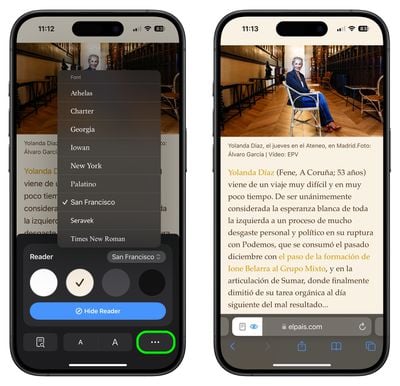
- To adjust text size, font, and background color to your preference, tap the highlighted Reader icon.

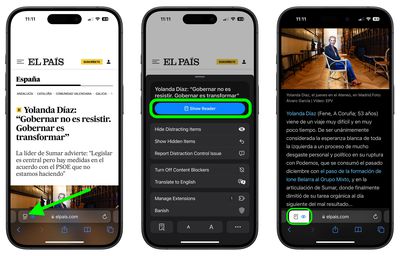
Note that you can also access the Listen to Page feature from this popup panel (note: Only for English language articles), while tapping on the ellipsis icon shows the rest of Safari's settings like Show IP Address, Request Desktop Website, and Hide Toolbar.
The new Reader Mode is currently available in several English-speaking regions, including Australia, Canada, Ireland, New Zealand, South Africa, the United Kingdom, and the United States. This regional rollout suggests that Apple may be fine-tuning the feature before a broader international release.
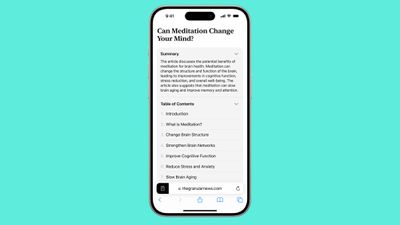
While the current update focuses on enhancing the core Reader Mode experience, Apple has plans for even more advanced features in the future, as part of its Apple Intelligence feature set. A table of contents for long articles and a quick summary feature will be included in an update later this year.




















