

iOS 18: Find Your Passwords on iPhone - MacRumorsOpen MenuShow RoundupsShow Forums menuVisit ForumsOpen Sidebar
Skip to Content

iOS 18: Find Your Passwords on iPhone

by

With iOS 18, Apple introduced its first dedicated Passwords app, which corrals all of your saved logins and passwords within a simple interface and secures them behind your biometric authentication.
Generic iOS 18 Passwords Feature
The Passwords app is automatically added to your device when you update to iOS 18, iPadOS 18, or macOS Sequoia, and it replaces the passwords section in the Settings app on iPhone/iPad and in System Settings on Mac. Its clean, straightforward design puts a search bar front and center, making it easy to find exactly what you need.
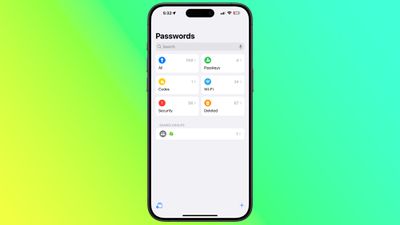
ios 18 passwords app

Passwords app in iOS 18

If you've been using ‌iCloud‌ Keychain, all your saved logins and passwords are seamlessly available after authenticating with Face ID or Touch ID. The app organizes your data into clear categories: passwords and logins (found under "All"), Passkeys, two-factor authentication codes, Wi-Fi passwords, security alerts, and even recently deleted logins.
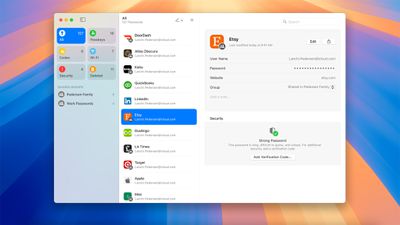
macOS Sequoia Passwords app

Passwords app in macOS Sequoia

Navigating the app is intuitive — select any category to explore its contents, and tap an individual entry to view details. Each login includes fields for the app or website name, username, password, verification codes, associated websites, and notes. A handy one-tap option lets you quickly update any password directly from the app.

In addition to storing your passwords and login credentials, the Passwords app can also generate verification codes for additional sign-in security. You can also share Wi-Fi passwords using QR codes when other sharing methods aren't available, or for when you want to share the network details with several people. Click the links for all the details.


Popular Stories

macOS 27 on MacBook Pro

Apple Says macOS 27 Won't Be Compatible With These Macs

Wednesday June 3, 2026 8:29 am PDT by
During WWDC 2025, Apple revealed that macOS 26 Tahoe would be the final major macOS version for Intel-based Macs. macOS 27 will be compatible with Apple silicon Macs only, meaning that you will need a Mac with an M-series chip or a MacBook Neo with an A18 Pro chip in order to install the software update. Apple will unveil macOS 27 during its WWDC 2026 keynote this Monday, June 8, and the...
MacBook Neo on Yellow Feature

MacBook Neo is So Popular That Apple Reportedly Doubled Production

Wednesday June 3, 2026 9:24 am PDT by
On an earnings call in late April, Apple's CEO Tim Cook said that customer response to the MacBook Neo was "off the charts," and the popularity of the laptop has reportedly led the company to significantly boost production. Apple supply chain analyst Ming-Chi Kuo this week said he believes that MacBook Neo shipments to Apple were doubled from an initial target of 5 million units to 10...
iphone 18 pro blue%402x

iPhone 18 Pro: Dark Cherry, Light Blue, and Dark Gray Chassis Leaked [Update]

Thursday June 4, 2026 5:18 am PDT by
Update: Since publication, new information has come to light suggesting the images have been AI-manipulated and are not in fact iPhone 18 Pro chassis parts. The original article follows. The color options Apple is reportedly planning for the upcoming iPhone 18 Pro and ‌iPhone 18 Pro‌ Max have appeared online today in the form of images of chassis parts of unknown authenticity....













