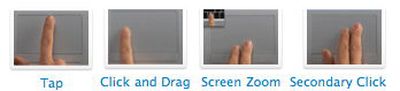
With the introduction of the MacBook Air, Apple has introduced a full multi-touch trackpad into their laptop line. Now, this has actually been a more gradual introduction than has been suggested, since the MacBook trackpads have long been able to recognize two points of contact. A very popular short-cut available to MacBook owners is the two-finger scroll. By placing two fingers on the trackpad and moving up/down or left/right, users have been able to quickly scroll through Mac OS X windows. Apple also offers various trackpad tap and drag options, though these are disabled by default.
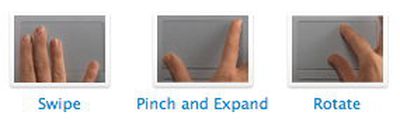
With the introduction of the MacBook Air, Apple has added three brand new gestures to the MacBook trackpad. The gestures include:
And reintroduced us to the more advanced trackpad tap and drag features that are available on current MacBooks:
The new gestures work in existing Apple applications such as Finder, iPhoto and Safari, but carry slightly different functionality in each application. This Youtube video is one of the best demonstrations on how to use these new gestures in these applications, including showing how one can use the "swipe" gesture to drill down and up different folder levels in Finder. In my brief time playing with the new MacBook Air, it became clear that you would quickly become used to these useful shortcuts.
The basis of Apple's multi-touch trackpad is the gesture language pioneered by Fingerworks for their multi-touch devices. Fingerworks was acquired by Apple in July 2005, and has been continuing their work. Apple has clearly simplified the number of available gestures to shorten the learning curve, but it opens up the possibility for Apple to add more gesture shortcuts for common tasks, such as copy, paste, expose, and spaces.
The availability of multi-touch input on the Mac also opens up the possibilities for innovative new applications and games, such as this concept multi-touch skateboarding game. We have also heard that Apple is planning on incorporating the multi-touch trackpad in future MacBooks, such as the impending MacBook Pro revisions. It's unclear if existing MacBooks and MacBook Pros trackpads can be upgraded to incorporate this new behavior.