

Apple TV 6.1 Software Update Makes Hiding Channels Easier - MacRumorsOpen MenuShow RoundupsShow Forums menuVisit ForumsOpen Sidebar
Skip to Content

Apple TV 6.1 Software Update Makes Hiding Channels Easier

by

Alongside the launch of iOS 7.1, Apple today updated its Apple TV software to version 6.1, adding a much-requested feature that allows users to hide unwanted channel icons from the main screen without needing to access the Parental Controls menu. The hiding feature joins an already existing rearranging feature, letting users further customize their Apple TV home screens as the number of channels has grown significantly in recent months.
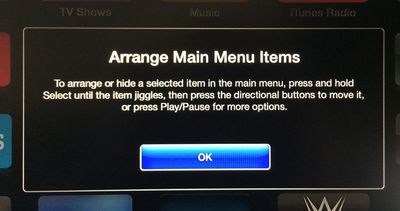
appletvarrange
Arranging or hiding icons can be initiated by selecting an item in the main menu and then pressing and holding on the Select button of the remote control until the icon jiggles, much as how icon rearranging functions within iOS. Icons can be moved using directional buttons, with Play/Pause available for more options.
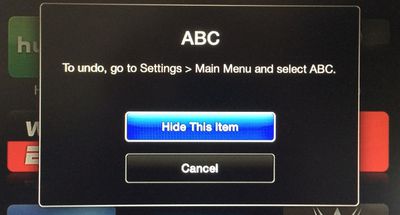
appletvhideitems
The Apple TV software was last updated to version 6.0.1 in October, following the release of the 6.0 software in September, which brought several new features including iTunes Radio and AirPlay from iCloud. Earlier this week, the Apple TV gained a new iTunes Festival channel ahead of SXSW.

Users can download the Apple TV 6.1 software through the Apple TV’s over-the-air update mechanism found in Settings --> General –-> Software Update.

Apple has also updated the Remote app for iOS devices to version 4.2, adding a feature that allows users to browse purchased movies and TV shows within the app and then play them on the Apple TV. The update also includes the ability to control iTunes Radio on the Apple TV and offers bug fixes and stability improvements. [Direct Link]


Top Rated Comments

dearfriendx Avatar
159 months ago
Sweet! An easy way for a grown man to hide 8 Disney channels
Score: 16 Votes (Like | Disagree)
musika Avatar
159 months ago
Add this feature to iOS for iPhone and iPad!
Score: 13 Votes (Like | Disagree)
GenesisST Avatar
159 months ago
Finally! No more annoying posts about not being able to hide apps (when you could, in a convoluted way)!
Score: 11 Votes (Like | Disagree)
Northgrove Avatar
159 months ago
BRB, hiding 80% of all icons...
Score: 8 Votes (Like | Disagree)
159 months ago
Safari feels.... oh sorry, wrong device.
Score: 8 Votes (Like | Disagree)
KylePowers Avatar
159 months ago
Neato.

Now release an App Store and a dope 4th gen AppleTV :D
Score: 5 Votes (Like | Disagree)

Popular Stories

Apple Card iPhone 16 Pro Feature

Apple Card Promo to Offer Free AirPods Pro 3

Friday May 15, 2026 8:59 am PDT by
Starting as early as next week, customers who sign up for an Apple Card at Apple's retail stores in the U.S. will receive $249 cash back when they purchase AirPods Pro 3, according to Bloomberg's Mark Gurman. The promotion has yet to be officially announced by Apple, so exact terms and conditions are not available at this time. AirPods Pro 3 are priced at $249 in the U.S., so customers who...
Apple WWDC25 iOS 26 CarPlay Light mode 250609

Six Popular iPhone Apps Now Available on CarPlay

Thursday May 14, 2026 9:10 am PDT by
Apple's CarPlay system for accessing iPhone apps on a vehicle's dashboard screen has received six popular apps in recent weeks: ChatGPT, Perplexity, Grok, Google Meet, WhatsApp, and the indie artist streaming platform Audiomack. Make sure you have the latest version of each app and they will automatically appear on CarPlay. ChatGPT Starting with iOS 26.4, CarPlay supports voice-based...
ipad mini 7 blue

OLED iPad Mini: Release Date, Pricing, and What to Expect

Thursday May 14, 2026 5:08 am PDT by
According to the latest rumors, Apple is close to launching its next-generation iPad mini. So what should we expect from the successor to the iPad mini 7 that Apple released over a year ago? Read on to find out. Processor and Performance Apple is working on a next-generation version of the iPad mini (codename J510/J511) that features the A19 Pro chip, according to information found in code...













