

Google is in the process of updating all of its apps with its new Material Design interface guidelines, and as of today, the Google app for iOS has been updated with the new look. Material Design, which Google says is based on ink and paper, uses grid-based layouts, responsive animations, and depth effects to create clean, touchable interface elements.
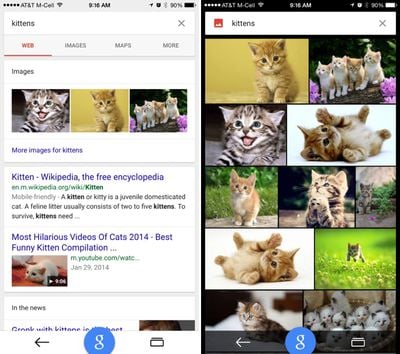
Along with adding new Material Design animations, the Google app has been updated to take advantage of the larger screens on the iPhone 6 and 6 Plus and it now displays bigger photos in image search.
Google's update includes more than just design changes, as the app has been completely rebuilt. There's a new "Google" button that lets users search with just one tap anywhere in the app, and Google Maps integration has been added, letting users check out interactive maps and Google Street View within the app. A new "recents" button is also designed to let users keep track of the searches they've conducted.
Introducing the new Google app
Completely rebuilt to bring you the best of Google:
- Recents--see & return to your recently visited pages
- Google button--start a new search with just one tap
- Google Maps--explore interactive maps, nearby places & Street View right inside the app (for iPhone)New look and feel:
- Beautiful new Material Design animations
- Bigger photos in image search
-Looks great on the new iPhone 6 & 6 Plus
Google can be downloaded from the App Store for free. [Direct Link]





















Top Rated Comments
I can't wait for Gmail and Google Calendar to be redesigned and released.
* Default iOS Calendar: Does not handle invites and does not allow me set notifications per account. Thanks, Google, for nuking Exchange support. This used to work so well.
* Fantastical: Relies on iOS syncing the calendar, adds two times to every event I create
* Sunrise: Uses a proprietary invite system, caused me quite a few problems
* Calendars by Readdle: Does not appear to handle invites
* Gmail: Allows response to invites but terrible app overall
* Inbox: Great app, currently does not handle calendar invites at all
And to add to all of that:
* iCloud calendars don't handle invites well at all, can't accept updates to events using native apps. Whole pile of cross-platform invite issues here.
* Built in 'Birthdays' calendar neglects anniversaries. Google's Birthday calendar has both but does not have any event notifications set for them.
Head, meet wall.