

Apple Releases watchOS 3 With App Dock, Instant Launching, New Watch Faces, Breathe, and More - MacRumorsOpen MenuShow RoundupsShow Forums menuVisit ForumsOpen Sidebar
Skip to Content

Apple Releases watchOS 3 With App Dock, Instant Launching, New Watch Faces, Breathe, and More

Apple today released watchOS 3, the newest version of the operating system that runs on the Apple Watch. watchOS 3 is a significant update to the watchOS operating system, introducing an overhauled interface, new apps, new watch faces, and impressive performance improvements.

watchOS 3 can be downloaded through the dedicated Apple Watch app on the iPhone by going to General -> Software Update. To install the update, the Apple Watch must have 50 percent battery, it must be placed on the charger, and it must be in range of the iPhone. watchOS 3 is available for all Apple Watch models, but requires an iPhone running iOS 10 to install, which was also released today.
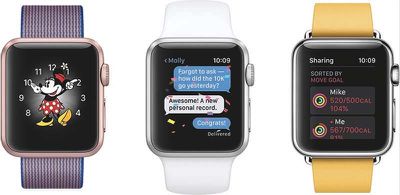
WatchOS3_trio
watchOS 3 features a new dock that houses your favorite and recently used apps so they're quicker to access. Up to 10 apps saved to the dock are kept up to date at all times and are able to launch instantly, cutting down on app loading times.

Navigation is improved in watchOS 3, with left and right swipes able to change the watch face. Upward swipes bring up the Control Center, while a downward swipe opens the Notification Center. Pressing the side button brings up the new dock.


There are new Activity sharing features in watchOS 3, along with workouts and activities for wheelchair users. A new "Breathe" app guides you through daily deep breathing sessions to cut down on stress, and there are new Reminders, Find My Friends, and Heart Rate apps.

Three new watch faces are available, an SOS feature can automatically call emergency services, and an Apple Watch can be used to unlock a password protected Mac with new Continuity functionality. A revamped Messages app makes it easier to reply to incoming texts, plus there's a new "Scribble" feature for writing replies on the Apple Watch face with a finger.

For more details on what's new in watchOS 3, make sure to check out our full watchOS 3 roundup.

Related Roundup: Apple Watch 11
Buyer's Guide: Apple Watch (Caution)

Popular Stories

youtube iphone apple watch health ad 2026

New Apple Ad Sells the iPhone and Apple Watch Health Pairing

Thursday April 23, 2026 11:18 am PDT by
Apple has published a new ad to appeal to customers in the market for an iPhone and Apple Watch pairing, highlighting the insights it can offer for your health. Titled simply "Health with iPhone + Apple Watch," the half-minute ad focuses on a woman waiting in line at a cafe who begins receiving unsolicited health and fitness advice from other people in the queue, as well as local residents,...
watchos 26 gradient light

This New Apple Watch Face Is Coming in watchOS 26.5

Friday April 24, 2026 5:51 am PDT by
iOS 26.5 and watchOS 26.5 will have a new Pride Luminance wallpaper and Apple Watch face when the updates are released in the coming weeks, according to Bloomberg's Mark Gurman. In a brief tweet, Gurman revealed that Pride Luminance will "Celebrate the vibrancy and individuality of the LGBTQ+ community and customize your watch face with colors from Pride flags." iOS 26.5 has been in...
modular ultra training load

watchOS 27 to Offer New Watch Faces, Including 'Modular Ultra' Variant

Monday May 4, 2026 5:58 am PDT by
For watchOS 27, Apple is testing new Apple Watch faces, and one of them is a simpler version of an existing Apple Watch Ultra watch face that could be coming to standard Series models. Writing in his latest Power On newsletter, Bloomberg's Mark Gurman reports that Apple is testing multiple new faces for watchOS 27, code-named "Orchid." One of them is said to be a "simplified take" on the...

Top Rated Comments

macduke Avatar
126 months ago
I like this update. I hardly ever used that side button for contacts. This app drawer concept makes a lot more sense. It seems to work well, but some existing third party apps need to be updated to support it, I think?

WARNING: If you work a lot with your Apple Watch on, especially if you wear gloves, turn off the 911 S.O.S. feature, or at least set it to swipe to confirm you want to call. I changed mine right away because I was worried about accidentally setting it off (especially since I have a toddler), and when I was framing a wall the other night wearing my leather work gloves, it set off the S.O.S. 6-7 times from accidental "holding" of the side button. Like I said, I was lucky I had turned on the "swipe to confirm" functionality or the police would have made an unpleasant visit.
Score: 7 Votes (Like | Disagree)
mdelvecchio Avatar
126 months ago
Why does one have to update to iOS 10 to get WatchOS 3?

From what I've heard iOS 10 slows down the iPhone 6. So I'm basically stuck with WatchOS 2...

Well done Apple.

I very much regret having bought this overpriced, slow piece of rubbish.
what childish nonsense. iOS 10 is fine on a 6. not updating on a 6 because you're afraid of a slowdown is insane....you'll be missing out on actual value you could have now, today.
Score: 7 Votes (Like | Disagree)
xraydoc Avatar
126 months ago
Why does one have to update to iOS 10 to get WatchOS 3?

iOS 10 would slow down my iPhone 6. So I'm basically stuck with WatchOS 2...

Well done Apple.

I very much regret having bought this overpriced, slow piece of rubbish.
It's dependent on the watch.app for the iPhone, so they need to be updated together.

iOS 10 won't slow down your iP6.
Score: 6 Votes (Like | Disagree)
CrazyDaveinNeb Avatar
126 months ago
apparently I still had the beta profile on watch. removed and rebooted the watch and got the download
Score: 3 Votes (Like | Disagree)
126 months ago
Why does one have to update to iOS 10 to get WatchOS 3?

From what I've heard iOS 10 slows down the iPhone 6. So I'm basically stuck with WatchOS 2...

Well done Apple.

I very much regret having bought this overpriced, slow piece of rubbish.
Not slowing my 6 down at all. (Unnecessary Snark Deleted)
Score: 3 Votes (Like | Disagree)
jtropeano Avatar
126 months ago
Why does one have to update to iOS 10 to get WatchOS 3?

iOS 10 would slow down my iPhone 6. So I'm basically stuck with WatchOS 2...

Well done Apple.

I very much regret having bought this overpriced, slow piece of rubbish.
Nah. You'll be good on iOS 10 w your iPhone 6. Check geekbench scores here:
Score: 3 Votes (Like | Disagree)















