

Microsoft Outlook for iOS Gains Add-Ins Including Translator, Trello, Evernote and More - MacRumorsOpen MenuShow RoundupsShow Forums menuVisit ForumsOpen Sidebar
Skip to Content

Microsoft Outlook for iOS Gains Add-Ins Including Translator, Trello, Evernote and More

by

microsoftaddinsTo celebrate the two-year anniversary of Outlook Mobile, Microsoft is today introducing a major feature for the iOS version of the Outlook email app -- add-ins. For the first time, add-ins are able to be used with the mobile version Outlook, mirroring functionality available on the desktop.

Add-ins can help you get more done on the go, and save you valuable time spent switching between apps. This is why we introduced add-ins for Outlook on Windows, Mac (in Insiders) and on the web--and are now bringing them to iOS. Support for Android is coming soon.

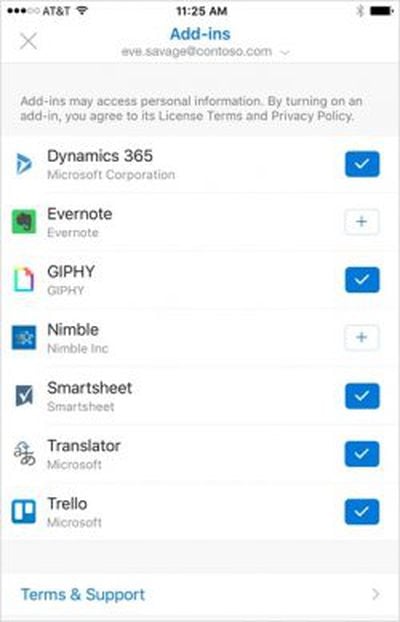
Microsoft is adding a wide range of add-ins, that will let users do things like translate messages into different languages, automatically add actions to Trello, add email clips to Evernote, insert GIFs, and more. A full list of what Microsoft is adding is below:

  • Dynamics 365 to get real time insights about your business contacts and their organization, right in your inbox, so you can focus on the selling and have more meaningful interactions.
  • Translator to help you read messages in your preferred language, across devices, with support for 60 languages.
  • Nimble to help you get prepared for meetings and engage effectively with business intelligence about your email contacts and their organizations, right in email.
  • Trello to turn your email into actionable items, keep track of projects, and make sure emails don't go unseen.
  • Evernote to capture what's on your mind and stay organized by clipping emails from Outlook to a project notebook in Evernote.
  • Smartsheet to help you manage and automate work so you can get work assigned, updated, and completed more quickly.
  • GIPHY to easily add GIFs to your emails and make "Congratulations" a little more fun!

Microsoft is letting developers create additional add-ins for iOS, with instructions available from the Office Dev Center.

Microsoft Outlook can be downloaded from the App Store for free. [Direct Link]

Top Rated Comments

silvetti Avatar
123 months ago
No offense, but that's pretty old and no longer relevant, and was - at the time - bordering on FUD. I did read that "news" at the time and found none of it to be fully accurate, at the time, and even less so now. I did read the Accompli privacy policy at the time, and again after MS purchased/rebranded the app and I felt that the privacy policy was pretty clear, and chose to not use the app and opt to review it again. I did appreciate the - in my words and opinion - "chicken little" perspective that Winkelmeyer and others took at the time, but IMHO the Accompli app was not new in its approach as iOS device owners including myself use many apps that transmit and store credentials; I read the privacy policy and decide whether it works for me, and I don't understand why anyone wouldn't read a TOS/privacy policy before using something. While Winkelmeyer may have had good intentions, a read of the privacy policy would have cleared up concerns of potential users as it did for me.

That written, I own two Exchange Servers and also use Office 365 for Business. I read MS's own technical, and regularly updated, documentation - start here: https://technet.microsoft.com/en-us/library/mt684947(v=exchg.160).aspx - and the link at the bottom provides one on a far-more-detailed background. I have now used and also monitor the activities of the app, and it's performing exactly as how MS has described in their TechNet documentation, and have no concerns at this point with the new app. No FUD intended…

To be fair, my only concern about this type of app remains - the ability to disable remote images, as one can do with the stock Mail app. A fair counter here is that once one gets a spam email to an account, it's pretty much game over now that you're on a spambot list…
For many companies with intellectual property (like the one I work for, Pharma) having your credentials stored in the cloud is a no-no.
Also maybe it changed but there was no way to set force complex passcode to access the app and no way to limit the possibility to save attachments to your private Dropbox/OneDrive for example.
So basically no prevention loss.
These are all minor things for smaller companies but in companies with 100k plus employees this becomes a problem and fast.
Score: 2 Votes (Like | Disagree)
silvetti Avatar
123 months ago
This app is useless on most big sized companies for security reasons.

You can read about it here:
https://blog.winkelmeyer.com/2015/01/warning-microsofts-outlook-app-for-ios-breaks-your-company-security/
Score: 2 Votes (Like | Disagree)
123 months ago

(... 300+ words MORE saying nothing + 2 blog posts on how nice 2FA is + 1 blog posts that re-re-confirms that Microsoft sends user's credentials to the cloud and uses them to access the user's mailbox... )
I don't get what is so difficult for you to understand, nor why you feel that blathering on changes the facts.

Simple facts still standing, since they come from Microsoft:
[LIST=1]
* user's login and password are sent to the cloud
* the cloud accesses the user's mailbox and stores its contents

Everything else is just about "look how safely we store your user credentials and mailbox contents, you can even use 2 factor authentication!", and "we delete your cached mailbox after 3 days, we swear". Do you honestly not see the problem? IF MICROSOFT WANTED, OR IF THEY DID SOMETHING WRONG (BOTH OF WHICH HAVE HAPPENED IN THE PAST), YOU'RE HOSED.

Sending user credentials to the cloud is dangerous
, not to say ANATHEMA. It's that simple, man!

So let's try again to simplify. Can you negate any of those 2 numbered points I wrote? You don't need yet 300+ words MORE!
If you can negate them, then tell Microsoft to correct their tech and marketing articles.
If you can NOT, then I don't know why are we still talking about this. You trust something that others don't or even can't. Congrats!
[doublepost=1486370252][/doublepost]
... so if you want to argue on this matter give me something that's not 2 frickin' years old from a reputable source that can be cited. I'm done with this, I just don't see anything you have to offer here having any weight whatsoever.
Well, the Microsoft tech note that confirms all of this is from July 2016. Is that reputable and recent enough? :D

And once again, I am not offering anything. The offered info comes from Microsoft. That is the problem!
Score: 1 Votes (Like | Disagree)
123 months ago
No offense, but that's pretty old and no longer relevant, and was - at the time - bordering on FUD. I did read that "news" at the time and found none of it to be fully accurate, at the time, and even less so now.

...

I read MS's own technical, and regularly updated, documentation - start here: https://technet.microsoft.com/en-us/library/mt684947(v=exchg.160).aspx - and the link at the bottom provides one on a far-more-detailed background. I have now used and also monitor the activities of the app, and it's performing exactly as how MS has described in their TechNet documentation
I don't get it. The linked blog post's main beef is with Microsoft's server storing your credentials and your mails. Your link to Microsoft documentation confirms that this is so. They say that it's safe and yadda yadda, but you have to trust that.

So, why do you call it "FUD"?

If you want to trust it, great for you, but I can perfectly see how another company or individual might want not to trust it. You know, this is Microsoft we're talking about here.
[doublepost=1486318376][/doublepost]
It's like they couldn't decide between "add-on" and "plugin" so they settled on "add-in". Do we really need another word for that? Jesus ****ing Christ.
Wait for "extension"... or "complement"... ;)
Score: 1 Votes (Like | Disagree)
123 months ago
Or wunderlist..... which Microsoft owns.
How come there is no add-in for Mircrosofts own OneNote?
Score: 1 Votes (Like | Disagree)
123 months ago
My work has a signature I'm required to include. iOS Mail remains my main mail app.
I'd be surprised if the sys admin of your work would allow you to use this security breach of an app. Unless it stops saving login data (including password!!) on Microsoft servers, the usage of this app should be avoided at any cost.
Score: 1 Votes (Like | Disagree)

Popular Stories

iCloud iPhone 17 Pro

iPhone Users Who Pay for iCloud Storage Get Two New Perks on iOS 27

Thursday July 2, 2026 6:10 am PDT by
If you pay for certain iCloud+ storage plans beyond the 5GB that Apple offers for free, you will receive two more perks on iOS 27 at no additional cost. A summary of the two new iCloud+ perks on iOS 27:Increased daily usage limits for some new Apple Intelligence features, including image generation in the revamped Image Playground app. HomeKit Secure Video cameras receive generated video...
Apple Event Logo

Apple Just Released a New Product

Thursday July 2, 2026 8:04 am PDT by
Apple's first product release of summer 2026 occurred this week, but do not get too excited, as it is merely the Beats Solo Buds in a new color. Beats Solo Buds are now offered in orange through Best Buy in the U.S., with availability set to expand to 7-Eleven stores in Japan on July 4. Apple already offered orange Solo Buds in India for free with the purchase of an iPhone 15 or iPhone 15 ...
iPhone 4 on Black Feature

Apple Facing One of Its Worst Leaks Since the iPhone 4

Thursday July 2, 2026 9:53 am PDT by
Apple supplier Tata Electronics recently suffered a cyberattack that resulted in thousands of confidential files being published on the dark web, and this reportedly included some photos and documents related to the upcoming iPhone 18 Pro. We have elected not to share any of the leaked photos in this story due to the illegal nature in which they were obtained, but they can easily be found...














