

Apple Warns iCloud Users Some Disabled Services Were Accidentally Re-enabled in iOS 10.3 - MacRumorsOpen MenuShow RoundupsShow Forums menuVisit ForumsOpen Sidebar
Skip to Content

Apple Warns iCloud Users Some Disabled Services Were Accidentally Re-enabled in iOS 10.3

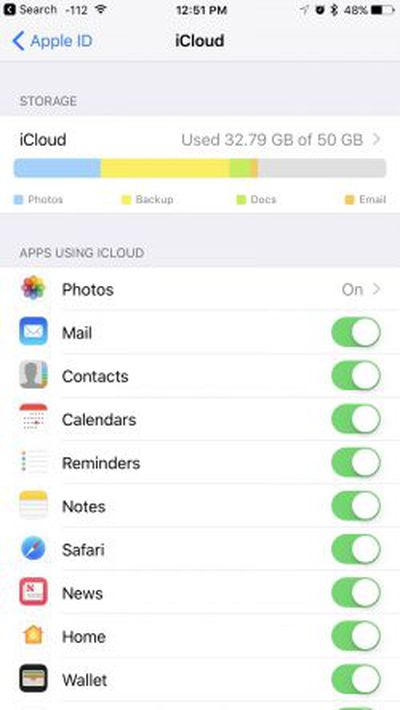
icloudsettingsApple today sent out emails to a small number of iCloud users, warning them that a bug in iOS 10.3 may have caused some iCloud services that had been disabled to be mistakenly re-enabled.

The email asks iCloud users to revisit their iCloud settings to make sure to turn off any service that might have been turned on through the iOS 10.3 update.

It's not entirely clear which iCloud services might have been affected, but MacRumors reader Karl, who sent us the email, said that he typically disables iCloud Mail. Following the update, he found the Mail option turned back on.

We discovered a bug in the recent iOS 10.3 software update that impacted a small number of iCloud users. This may have inadvertently reenabled some iCloud services that you had previously disabled on your device.

We suggest you go to iCloud settings on your iOS device to make sure that only the services you'd like to use are enabled.
Learn more about how to manage your iCloud settings or contact AppleCare with any questions.

The iCloud team

iOS 10.3, released on March 27, introduced a new Apple Filesystem among other major features like Find My AirPods, plus it included an overhauled iCloud storage breakdown, which may explain why some iCloud services were mistakenly turned back on.

To check which iCloud services are enabled on your iOS device, open the Settings app and scroll down to the "iCloud" section. A list of apps and services using iCloud is front and center, and anything that was enabled via iOS 10.3 can be turned off using the toggle buttons.

A wide range of first and third-party apps and services use Apple's iCloud feature, including Photos, Mail, Contacts, Calendars, Reminders, Notes, Safari, News, and more.

Update: According to Apple, iCloud Photo Library, iCloud Keychain, and Find My iPhone were not affected by the issue. The bug has been fixed in the iOS 10.3.1 update, so those who have not yet updated to iOS 10.3 but choose to update to iOS 10.3.1 will not be impacted by the bug. Apple has not shared how many users were affected by the bug but says not everyone who updated to iOS 10.3 will experience it.


Tag: iCloud

Popular Stories

iCloud General Feature Redux

Apple Faces £3 Billion UK Trial Over iCloud Lock-In Claims

Thursday May 7, 2026 1:56 pm PDT by
Apple was not able to narrow the scope of a UK lawsuit accusing it of locking 40 million UK consumers into iCloud, to the detriment of third-party cloud storage providers. British consumer group Which? first filed the lawsuit in late 2024, and is asking for £3 billion for UK Apple customers. Apple wanted to exclude non-paying iCloud users from the lawsuit, but the tribunal denied Apple's...
Apple Card iPhone 16 Pro Feature

Apple Card Promo to Offer Free AirPods Pro 3

Friday May 15, 2026 8:59 am PDT by
Starting as early as next week, customers who sign up for an Apple Card at Apple's retail stores in the U.S. will receive $249 cash back when they purchase AirPods Pro 3, according to Bloomberg's Mark Gurman. The promotion has yet to be officially announced by Apple, so exact terms and conditions are not available at this time. AirPods Pro 3 are priced at $249 in the U.S., so customers who...
Apple WWDC25 iOS 26 CarPlay Light mode 250609

Six Popular iPhone Apps Now Available on CarPlay

Thursday May 14, 2026 9:10 am PDT by
Apple's CarPlay system for accessing iPhone apps on a vehicle's dashboard screen has received six popular apps in recent weeks: ChatGPT, Perplexity, Grok, Google Meet, WhatsApp, and the indie artist streaming platform Audiomack. Make sure you have the latest version of each app and they will automatically appear on CarPlay. ChatGPT Starting with iOS 26.4, CarPlay supports voice-based...

Top Rated Comments

Apple_Robert Avatar
119 months ago
Good on Apple for being proactive and emailing those who might have been affected.
Score: 12 Votes (Like | Disagree)
radioisotope Avatar
119 months ago
Can we just have one update that fixes more than it breaks?
Score: 11 Votes (Like | Disagree)
myrtlebee Avatar
119 months ago

To check which iCloud services are enabled on your iOS device, open the Settings app and scroll down to the "iCloud" section.
This is no longer the way to do it (at least on my iPhone since 10.3). You have to open the Settings app and then tap your name at the top, then press "iCloud" in that menu. There's no longer an "iCloud" section to select on the main Settings menu.
Score: 10 Votes (Like | Disagree)
mudflap Avatar
119 months ago
For me they removed random albums out of their folders and i had to manually drop them back into their folders. I guess i should be glad the albums werent removed all together this time around!

Never trust Apple with cloud services
More than 300 million iCloud accounts in the wild—can you imagine what would happen if Apple were as bad at cloud computing as some you believe they are?
Score: 8 Votes (Like | Disagree)
itsmilo Avatar
119 months ago
For me they removed random albums out of their folders and i had to manually drop them back into their folders. I guess i should be glad the albums werent removed all together this time around!

Never trust Apple with cloud services
Score: 7 Votes (Like | Disagree)
EM2013 Avatar
119 months ago
They tend to have the silliest bugs despite going through 6-7 betas.
Score: 6 Votes (Like | Disagree)














