

Razer Launches New Core X External Graphics Enclosure, Adds Mac Support to Razer Core Lineup - MacRumorsOpen MenuShow RoundupsShow Forums menuVisit ForumsOpen Sidebar
Skip to Content

Razer Launches New Core X External Graphics Enclosure, Adds Mac Support to Razer Core Lineup

by

Razer today announced the launch of its latest external graphics enclosure, the Core X, and alongside the debut of the new accessory, the company is also adding Mac support to its enclosure lineup.

Both the new Core X and the existing Core V2 external graphics enclosure are now compatible with all Macs that offer support for Thunderbolt 3, including the MacBook Pro, iMac, and iMac Pro.
razercorex1
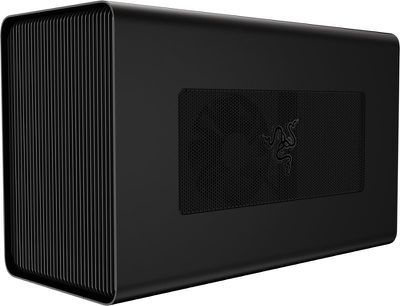
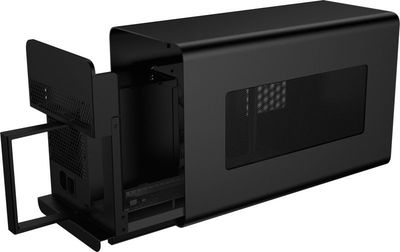
The Razer Core X, which also works with Windows machines, has been designed based on customer feedback Razer received after releasing the Core V2. Users wanted a wider external graphics enclosure able to fit larger 3 slot PCIe graphics cards, which the Core X delivers along with better cooling capabilities.


Razer designed the Core X to be future proof with the aforementioned larger enclosure and a 650W power supply that offers enough power to support all graphics cards on the market today and those coming in the future. While this is larger than the Core V2, Razer still designed it with desktop use in mind, so it's relatively slim and compact.
razercorex2
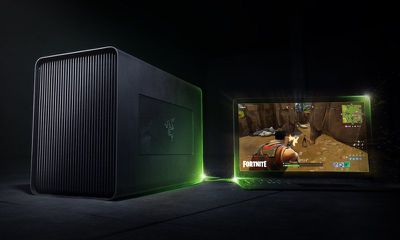
For those unfamiliar with Razer's Core series, the enclosures are designed to add additional graphics power to a Mac or a PC for tasks like gaming and system intensive workflows. With an external graphics enclosure, a machine not normally capable of handling GPU-intensive tasks can be hooked up to a powerful GPU. You will, of course, need to purchase a GPU alongside the Razer Core accessories - these are just enclosures.
razercorex3
To use the Razer Core X with a Mac, the machine must be running macOS 10.13.4 or later, and the Razer Core X needs to be equipped with an AMD Radeon card. It is not compatible with NVIDIA cards when used with a Mac at this time.

Pairing the Core X to a Mac is as simple as plugging the accessory into the Thunderbolt port on a compatible machine, with no restarting or fussing with settings needed. 100W passthrough charging is supported, so even the 15-inch MacBook Pro can charge when plugged into the Core X.

Razer designed the Core X to be more affordable than the slimmer V2 enclosure, and it is priced at $299. It can be purchased directly from the Razer Store starting today. Razer is also continuing to sell the Core V2 for $499.


Tag: Razer

Top Rated Comments

104 months ago
Wow. It looks good and it’s cheaper!
Score: 8 Votes (Like | Disagree)
iZac Avatar
104 months ago
i find it strangely amusing that every aspect of the PC industry has shrunk unbelively small, but the GPU still holds the line.

At this rate we’ll be sliding Mac mini’s into a 2019 Mac Pro GPU enclosure, like slices of bread into a toaster.
Score: 6 Votes (Like | Disagree)
104 months ago
Good to see a lower price and both Windows and Mac support. I’m hoping eGPU support continues to improve as its a really useful feature.
Score: 6 Votes (Like | Disagree)
104 months ago
Good looking piece of kit. At $300 it's still a dubious value proposition- unless you're comparison shopping against higher-spec versions of the same lineup from Apple (i.e. base-model MBP vs high end MBP). In that light, you might conceivably get away with (much) more GPU power for less cash, even with the expense of this box.

Pity that TB2 models are left in the dust, but such is the way of things.
Score: 4 Votes (Like | Disagree)
ikir Avatar
104 months ago
I need a Thunderbolt 2 version so I can bypass the unstable D300 cards in my 2013 Mac Pro. The D300s have the same fault as the D500 and D700s that Apple are replacing, but Apple won't admit it and fix them.
Maybe the dust in the years... anyway any eGPU is hardware compatible just need Thunderbolt 2-3 Apple adapter. Sadly there is not support in lastest macOS version, but there is an hack for this: https://egpu.io/forums/mac-setup/script-fr34ks-macos-egpu-sh-one-script-all-solutions-fully-automated/
Score: 3 Votes (Like | Disagree)
AndyUnderscoreR Avatar
104 months ago
I need a Thunderbolt 2 version so I can bypass the unstable D300 cards in my 2013 Mac Pro. The D300s have the same fault as the D500 and D700s that Apple are replacing, but Apple won't admit it and fix them.
Score: 3 Votes (Like | Disagree)

Popular Stories

Apple Card iPhone 16 Pro Feature

Apple Card Promo to Offer Free AirPods Pro 3

Friday May 15, 2026 8:59 am PDT by
Starting as early as next week, customers who sign up for an Apple Card at Apple's retail stores in the U.S. will receive $249 cash back when they purchase AirPods Pro 3, according to Bloomberg's Mark Gurman. The promotion has yet to be officially announced by Apple, so exact terms and conditions are not available at this time. AirPods Pro 3 are priced at $249 in the U.S., so customers who...
Apple WWDC25 iOS 26 CarPlay Light mode 250609

Six Popular iPhone Apps Now Available on CarPlay

Thursday May 14, 2026 9:10 am PDT by
Apple's CarPlay system for accessing iPhone apps on a vehicle's dashboard screen has received six popular apps in recent weeks: ChatGPT, Perplexity, Grok, Google Meet, WhatsApp, and the indie artist streaming platform Audiomack. Make sure you have the latest version of each app and they will automatically appear on CarPlay. ChatGPT Starting with iOS 26.4, CarPlay supports voice-based...
ipad mini 7 blue

OLED iPad Mini: Release Date, Pricing, and What to Expect

Thursday May 14, 2026 5:08 am PDT by
According to the latest rumors, Apple is close to launching its next-generation iPad mini. So what should we expect from the successor to the iPad mini 7 that Apple released over a year ago? Read on to find out. Processor and Performance Apple is working on a next-generation version of the iPad mini (codename J510/J511) that features the A19 Pro chip, according to information found in code...













