

Waze for iOS Updated With CarPlay Support - MacRumorsOpen MenuShow RoundupsShow Forums menuVisit ForumsOpen Sidebar
Skip to Content

Waze for iOS Updated With CarPlay Support

by

Popular Google-owned mapping app Waze was today updated with support for CarPlay on devices running iOS 12. The iOS 12 update allows third-party mapping apps to be used with CarPlay for the first time, providing an alternative to the built-in Apple Maps app.

With CarPlay support, iPhone users who prefer to use Waze for mapping purposes can do so through the CarPlay interface, something that was not possible with iOS 11.
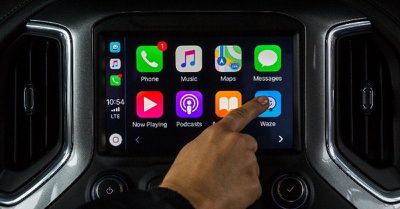
wazeapplecarplay
Waze is a popular app because it provides detailed information on traffic, ongoing construction, crashes, and other issues that can result in travel delays.

Google Maps, another popular Apple Maps alternative, was also updated with CarPlay support last week.

Waze can be downloaded from the App Store for free. [Direct Link]

Tag: Waze

Top Rated Comments

spazzcat Avatar
98 months ago
Any pictures or videos of how it looks?

The Apple Maps UI on CarPlay is horrendous - see my earlier post about that. I'm curious if Waze is a big improvement or not.

My post from last week about how bad CarPlay's UI is. ('https://forums.macrumors.com/threads/review-mazdas-carplay-support-a-welcome-addition-for-iphone-users.2139310/#post-26501760')
Been using carplay for awhile and like it a lot, not sure what you are expecting a map to look like?
Score: 5 Votes (Like | Disagree)
98 months ago
Can someone explain to me how Waze is better than Google Maps?
Or Apple maps please?

Never used Waze but read everywhere how it's better and everyone can't wait until on CarPlay, so wouldn't like to know thanks
Score: 3 Votes (Like | Disagree)
98 months ago
I never thought this day would come
Score: 2 Votes (Like | Disagree)
OlliFlamme Avatar
98 months ago
Uggh - I don't want Waze on my radio screen, I like it on my phone. Even when I move the waze app off carplay, it still takes over my radio. Anyone know how to make it so waze won't use carplay? It's awful.
[doublepost=1537944618][/doublepost]I agree, help ! I can't get the map back on the phone screen, only on head unit screen.
Considering the sound issue:

Why not simply kill the app? I mean quit it...? Or do you háve to use waze while driving? Kinda would be strange to have Carplay and be able to use Waze without it.

If you wanna get rid of Waze on CarPlay:

Settings / General / CarPlay / tap your car model and press the minus.

Attachment Image
Score: 1 Votes (Like | Disagree)
Switched2aMac Avatar
98 months ago
Anyone know why they didn’t include the speedometer on the app? I thought I turned it off on my phone but it’s on. I read somewhere that there are some limitations when connected to CarPlay.

If that’s the case it’s a stupid move. I like Waze and really like the speedometer feature. Maybe a future update will allow it?
Score: 1 Votes (Like | Disagree)
DynaFXD Avatar
98 months ago
Can someone explain to me how Waze is better than Google Maps?
As others mention, it is crowd-sourced traffic information that will dynamically alter your route to take the shortest path around obstructions. It has pretty easy map editing to share your local knowledge around areas if you so choose, and also allows interaction, rankings, and social features with with other Wazers, but that is hardly required. Waze and other such services are a prime reason that back roads get deluged in traffic when there is an accident on a main road. Our area completely locked up with cars on secondary roads a year or so back. I'm still on the fence about smart traffic routing as local neighborhoods can get royally s***wed by the propeller heads and their location agnostic algorithms in such instances. But I digress.
Score: 1 Votes (Like | Disagree)
















