

Unlike the previous 2014 model, the 2018 Mac mini has user-upgradeable RAM. The repair experts at iFixit are now selling a do-it-yourself RAM upgrade kit for the 2018 Mac mini that can save you hundreds of dollars.
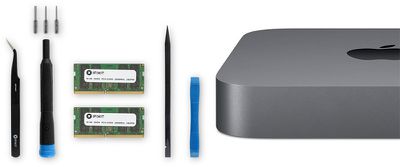
The upgrade kit includes 16GB or 32GB of 2,666MHz DDR4 RAM, the same type of memory Apple uses in the 2018 Mac mini, along with all of the tools and bits needed to complete the upgrade: an iFixit opening tool, a spudger, angled tweezers, a precision bit driver, and three types of 4mm Torx precision bits.
2018 Mac mini models are equipped with 8GB of RAM by default, but they can be configured with 16GB or 32GB of RAM on Apple's online store for an extra $200 or $600 respectively. By comparison, iFixit charges $164.99 for its 16GB kit and $324.99 for its 32GB kit, reflecting savings of $35 and $275 respectively.
Three things to keep in mind:
- This is iFixit-branded RAM that matches Apple's specifications.
- If you ever need in-warranty service on your 2018 Mac mini, and Apple detects that you opened up the computer, the Genius Bar may deny service. However, iFixit says this is illegal in the United States under the Magnuson-Moss Warranty Act.
- There is a risk of damaging the Mac mini if the upgrade is not completed carefully.
Those interested in proceeding can follow iFixit's 2018 Mac mini RAM replacement guide.
iFixit also sells the 16GB RAM modules individually for $159.99 each.




















Top Rated Comments
Replace the memory before you drink the savings. /s
I do not consider the RAM user replaceable, as you have to almost completely disassemble your Mac.
What I consider user replaceable RAM is where you can easily upgrade it without voiding the warranty, or otherwise risking your Mac (Like the 2012 Mac Mini and the 2017 iMac)
While opening machines with exclusively non-serviceable parts is one thing, it's important to remember that the Mac Mini memory configuration is designed to be upgraded.
To clarify: If you damage your machine while working inside of it, that damage isn't covered, and we can all agree that it shouldn't be. If your 3rd party memory fails, that isn't covered, and we can all agree that it shouldn't be. Aside from that, there are zero issues to be wary of.
You may want to keep your old memory around as a test stick, as it's great for proving that your memory isn't the problem. The act of opening your system and servicing it doesn't void your warranty, and there are no breakable seals you'll encounter, just be careful in there and you'll be totally fine.
Source: ACMT ('https://support.apple.com/en-us/HT205332')