

Google today announced a new privacy-focused auto-delete option for automatically removing Location History and Web & App Activity after a set period of time.
You can now choose to delete your information manually, every three months, or every 18 months. With these settings enabled, Google will regularly clear out your data at the three month mark or the 18 month mark.
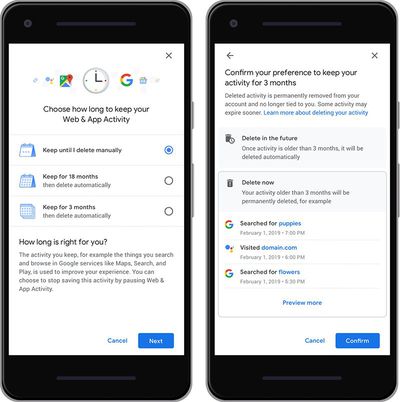
Prior to this change, Google allowed Location History and Web & App Activity to be disabled or manually deleted, but there were no controls for regular deletion, which may encourage more people to use these features.
Google's Location History feature tracks the locations that you've visited, while Web & App Activity tracks websites you've visited and apps that you've used. Google uses this information for recommendations and cross device syncing.
Google says the new controls for Location History and Web & App Activity will be rolling out "in the coming weeks," and has suggested the auto-delete functionality will be coming to additional features in the future.






















Top Rated Comments
Whilst I am currently happy to use Google and benefit from the services they provide me, if I choose to delete my data I definitely want to know that the data has indeed been deleted. That's not a delete, just a disconnect.
UPDATE - Even the original article by Google on this topic doesn't make it clear where you actually access these controls. Is this at the Google website when you're logged into your account? Why is it showing it on a mobile device? Makes it look like an app interface.
UPDATE #2 - I suspect this is what you see when you log into your Google account on a mobile device. Just poorly presented here and by Google.
What DOES worry me is what might happen with that data in the future. There's a real chance of discrimination rising up. Medically, socially, culturally, really anything.