

Apple Adding Swipe Keyboard Named QuickPath to iPhone and iPad - MacRumorsOpen MenuShow RoundupsShow Forums menuVisit ForumsOpen Sidebar
Skip to Content

Apple Adding Swipe Keyboard Named QuickPath to iPhone and iPad

by

Apple today at WWDC 2019 announced that iPhones and iPads are getting a native swipe-based keyboard named QuickPath.
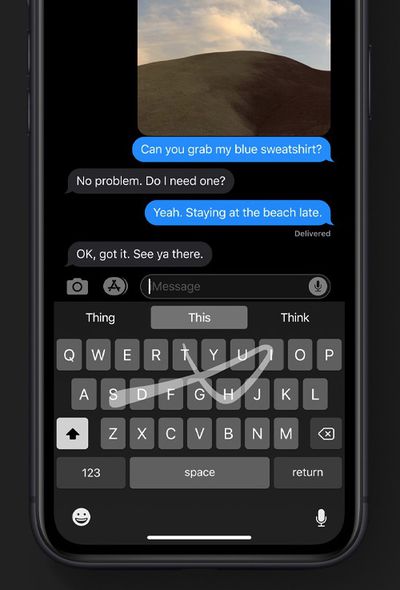
quickpath swipe keyboard iphone
The new QuickPath keyboard enables allows you to swipe your finger from one letter to the next to type without removing your finger from the keyboard to enter a word, allowing for easier one-handed typing. Apple's website confirms that the keyboard is available in both iOS 13 and iPadOS.

"Simply swipe from one letter to the next without lifting your finger to enter a word," says Apple. "On‑device machine learning recognizes the path you draw and converts it for you, making one‑handed typing a breeze."

At launch, QuickPath supports English, Simplified Chinese, Spanish, German, French, Italian, and Portuguese keyboards.

Swipe-based keyboards have been available on the iPhone and iPad since iOS 8 added support for third-party keyboards from the App Store, such as SwiftKey, but this is the first native solution to come from Apple.


Top Rated Comments

techfreak23 Avatar
93 months ago
I want hand written recognition keyboard on iPad and iPhone, for English.

Sadly hard to replicate text selection feature. That one is in particular super handy.
That will be the biggest loss in my opinion by getting rid of 3D Touch. They have the trackpad mode if you long press on the space bar, but it doesn’t allow you to select text... Also, Haptic Touch is trash compared to 3D Touch.
[doublepost=1559592424][/doublepost]
They are mostly replacing those with long press essentially (for example, tapping and holding the space bar already does the same kind of thing even in iOS 12 as 3D Touch does for cursor movement).
That “trackpad” by holding the space bar just allows you to scroll through text, but it doesn’t let you select text like 3D Touch does. Long press won’t work for text selection and having to use two fingers to select text would be terrible on the phone. I don’t see how they will replicate that functionality if they take out 3D Touch. If they had a solution for that, they would have demoed it today... That’s a huge loss to those of us that use 3D Touch heavily on the keyboard...
Score: 1 Votes (Like | Disagree)
scrapesleon Avatar
93 months ago
Sign in with Apple the best thing right now
Score: 1 Votes (Like | Disagree)

Popular Stories

TMRS 196 Siris Make or Break Moment Thumb 2

The MacRumors Show: What to Expect at WWDC 2026

Friday June 5, 2026 9:58 am PDT by
On this week's episode of The MacRumors Show, we talk through all of the major rumors surrounding Apple's announcements at WWDC 2026. Subscribe to The MacRumors Show YouTube channel for more videos The event's tagline, "All Systems Glow," is widely seen as a hint at Siri's new design. Bloomberg's Mark Gurman has reported that Apple is rebuilding Siri as a full chatbot to compete with...
WWDC26 Mock Feature 2

Will Apple Launch New Hardware at WWDC Next Week?

Friday June 5, 2026 7:56 am PDT by
Apple has several hardware releases in the pipeline, but will we see any of them unveiled at this year's Worldwide Developers Conference? WWDC is primarily a software event where new versions of iOS, iPadOS, macOS, watchOS, tvOS, and visionOS take center stage, but it's not unusual for Apple to introduce new hardware during the developer conference. Take WWDC 2017, for example, where Apple...
macOS 27 Wishlist What Do You Want From Apple at WWDC 2026 Feature

macOS 27 Wishlist: What Do You Want From Apple at WWDC 2026?

Thursday June 4, 2026 2:54 pm PDT by
We have four days to go until Apple's WWDC keynote event begins on Monday, June 8. iOS 27 has been the focus of most of the rumors, but we're also going to get a new version of macOS, macOS 27. Some of the same features that are coming in iOS 27 will come to macOS 27, like the new version of Siri and the dedicated Siri app, but we want to hear from MacRumors readers. What are you hoping to...














