

Logitech today announced that existing Circle 2 Home Security Cameras are being updated with HomeKit Secure Video support.
HomeKit Secure Video is designed to offer up a more secure way to manage the footage captured by in-home security cameras.
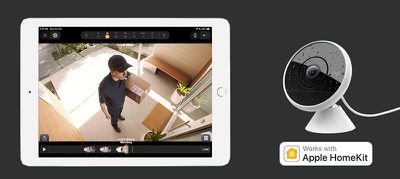
The Logitech Circle 2 camera will leverage the iPad, Apple TV, or HomePod (whichever is set up as a Home Hub) to analyze video on your devices. Video feeds are encrypted end-to-end and uploaded to iCloud where you and you alone can see the footage.
HomeKit Secure Video will send notifications if activity is detected so recordings can be reviewed, and Apple is providing 10 days of iCloud storage for video content that does not count against data plan limits.
Using Apple's HomeKit Secure Video does, however, require a higher-end iCloud storage plan with either 200GB or 2TB of storage. A single camera can be connected with the 200GB plan, while up to five cameras can use HomeKit Secure Video with the 2TB plan.
In the United States, 200GB of storage is priced at $2.99 per month, while 2TB of storage is priced at $9.99 per month.
When HomeKit Secure Video was announced, Apple said that Logitech, Eufy, and Netatmo would be among the first companies to support it. Official support for HomeKit Secure Video came in iOS 13.2, which means companies can now begin rolling out the feature.
HomeKit Secure Video for the Logitech Circle 2 camera requires a beta firmware update that Logitech is rolling out today.





















Top Rated Comments
The best bit is this is the beginning, it’s only going to improve.
On the other hand, it's very reasonable for someone to break into my home and destroy the evidence that they were there by destroying a NAS.
Having an offsite copy of your data is data protection 101.
The clips have little icons indicating what has been detected (ie a car). You can then select it and tap the share icon which very quickly brings up the share sheet. It is actually pretty neat.
One should never buy something on the hopes that they will release what they say they will. Only give companies money when they are actually selling what they promised to. This
Also, don't hold your breath waiting.