

Widgets in iPadOS 14 Limited to Today View in Landscape Mode - MacRumorsOpen MenuShow RoundupsShow Forums menuVisit ForumsOpen Sidebar
Skip to Content

Widgets in iPadOS 14 Limited to Today View in Landscape Mode

In iOS 14 for iPhone and iPod touch, widgets can be pinned in different sizes on any home screen page, providing useful information at a glance. The same can't be said for iPad.
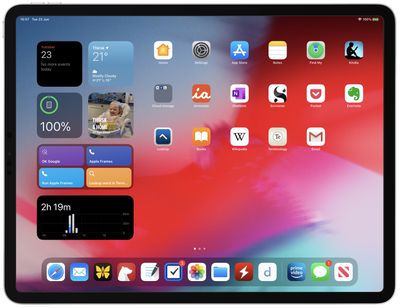
ipados 14 widgets
In iPadOS 14, the use of widgets is limited to the Today View sidebar that only appears on the first screen of apps when viewing in landscape mode. When viewed in portrait mode, Widgets disappear along with the Today View and the user's apps are automatically rearranged in a typical grid to fill the screen.

In other respects, ‌Widgets‌ in iPadOS 14 share the same new functionality as widgets in iOS 14. Users can create a Smart Stack of widgets, which uses machine learning to surface the right widget based on time, location, and activity. ‌Widgets‌ also can be customized for work, travel, sports, entertainment, and other areas of interest.

Currently, the App Library feature is missing in iPadOS 14, although it could possibly appear in a later beta. Apart from this and the limitation of widgets, iPadOS 14 shares the same new features as iOS 14, along with some additional ones that make better use of the larger screen, including new interface functionality for stock apps, universal Search, new Apple Pencil features, and more.


Related Forum: iOS 14

Top Rated Comments

75 months ago
Love the logic. Small screen - large widgets, large screen - no widgets
Score: 83 Votes (Like | Disagree)
sfwalter Avatar
75 months ago
This is the most disappointing news from WWDC. I have that large screen real estate and I can't take *full* advantage of this. I wonder what Apple's reasoning behind this could be. Hopefully, it's only an early beta issue. Probably not but one could only hope.
Score: 27 Votes (Like | Disagree)
75 months ago

This is the most disappointing news from WWDC. I have that large screen real estate and I can't take *full* advantage of this. I wonder what Apple's reasoning behind this could be. Hopefully, it's only an early beta issue. Probably not but one could only hope.
I get the sense that it is coming and its just not ready yet for the first beta.
Score: 21 Votes (Like | Disagree)
gleepskip Avatar
75 months ago

Mac should also allow widgets on the desktop screen.
Everything old is new again


Attachment Image
Score: 16 Votes (Like | Disagree)
ob81 Avatar
75 months ago
Imagine being able to take advantage of your full iPad screen with the widgets. Not blown up iPhone versions, but versions made for an 11” screen. That would be something.
Score: 8 Votes (Like | Disagree)
75 months ago
Lame, I don’t want 3/4 of my screen real-estate taken up by static and boring icons.
Score: 7 Votes (Like | Disagree)

















