

Apple Seeds Seventh Beta of watchOS 7.4 to Developers - MacRumorsOpen MenuShow RoundupsShow Forums menuVisit ForumsOpen Sidebar
Skip to Content

Apple Seeds Seventh Beta of watchOS 7.4 to Developers

Apple today seeded the seventh beta of an upcoming watchOS 7.4 update to developers for testing purposes, with the new beta coming one week release of the sixth beta and over two months after the launch of watchOS 7.3 with "Time to Walk" functionality, expanded ECG availability, and a new Unity watch face.
7
To install the ‌watchOS 7.4 beta, developers need to download the proper configuration profile from the Apple Developer Center. Once the profile is in place, the watchOS 7.4 beta can be downloaded through the dedicated ‌Apple Watch‌ app on the iPhone by going to General > Software Update.

To update to the new software, the ‌Apple Watch‌ needs to have 50 percent battery life, it must be placed on the charger, and it must be in range of the ‌‌‌‌‌‌iPhone‌‌‌‌‌‌.

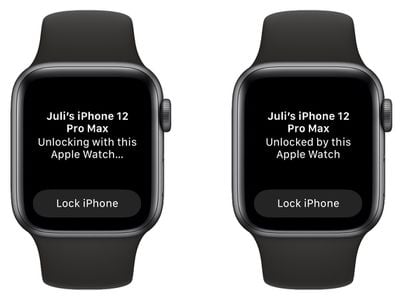
Alongside iOS 14.5, watchOS 7.4 introduces a new "Unlock with Apple Watch" feature that lets an iPhone with Face ID use an unlocked and authenticated Apple Watch as a secondary authentication measure when you're wearing a mask, alleviating the need to enter a passcode to unlock the iPhone.
iphone apple watch unlock
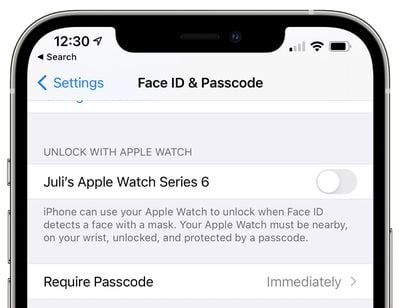
‌Face ID‌ does not work when wearing a mask, but this new Apple Watch feature provides an easy but still secure way to access the iPhone without the hassle of a passcode. It's similar to the Apple Watch unlocking on Mac and can be enabled in the Settings app under ‌Face ID‌ & Passcode.

An unlocked Apple Watch paired with ‌Face ID‌ can unlock the iPhone when a mask is worn, but it's only for mask usage. The Apple Watch cannot be used to authenticate Apple Pay or App Store purchases, nor can it be used to unlock apps that require a ‌Face ID‌ scan. In these situations, the mask will need to be removed or a passcode/password will need to be used instead.
iphone apple watch unlock 2
When the Apple Watch unlocks the iPhone, you'll feel a haptic tap on the wrist and will receive a notification on the watch, similar to how it works when using the watch to unlock a Mac.

For those who use Apple Fitness+, the watchOS 7.4 update combined with iOS 14.5 and iPadOS 14.5 enables AirPlay 2 for Apple Fitness+, so workouts can be streamed to an ‌AirPlay‌ 2-enabled TV or set-top box. Apple Watch metrics do not show up on the screen when AirPlayed, however, and that feature is limited to iPhone/iPad/Apple TV.


Related Roundup: Apple Watch 11
Buyer's Guide: Apple Watch (Caution)

Popular Stories

youtube iphone apple watch health ad 2026

New Apple Ad Sells the iPhone and Apple Watch Health Pairing

Thursday April 23, 2026 11:18 am PDT by
Apple has published a new ad to appeal to customers in the market for an iPhone and Apple Watch pairing, highlighting the insights it can offer for your health. Titled simply "Health with iPhone + Apple Watch," the half-minute ad focuses on a woman waiting in line at a cafe who begins receiving unsolicited health and fitness advice from other people in the queue, as well as local residents,...
watchos 26 gradient light

This New Apple Watch Face Is Coming in watchOS 26.5

Friday April 24, 2026 5:51 am PDT by
iOS 26.5 and watchOS 26.5 will have a new Pride Luminance wallpaper and Apple Watch face when the updates are released in the coming weeks, according to Bloomberg's Mark Gurman. In a brief tweet, Gurman revealed that Pride Luminance will "Celebrate the vibrancy and individuality of the LGBTQ+ community and customize your watch face with colors from Pride flags." iOS 26.5 has been in...
modular ultra training load

watchOS 27 to Offer New Watch Faces, Including 'Modular Ultra' Variant

Monday May 4, 2026 5:58 am PDT by
For watchOS 27, Apple is testing new Apple Watch faces, and one of them is a simpler version of an existing Apple Watch Ultra watch face that could be coming to standard Series models. Writing in his latest Power On newsletter, Bloomberg's Mark Gurman reports that Apple is testing multiple new faces for watchOS 27, code-named "Orchid." One of them is said to be a "simplified take" on the...

Top Rated Comments

Johnny907 Avatar
67 months ago

??

I’m enthusiastic and test every beta. If you want to contribute positively, you can test as well and post your experiences.

I like to post early so that people know whether it is safe to install or not. I always make clear that it’s an “early” review.
You come across like an overzealous sycophant, which kills your credibility. While I get excited when new betas drop, I give them at least half a day of use before commenting on them. I launch the majority of apps I use daily, from activity to audible to pandora and spotify to various others just to ensure they all work as expected. I also watch battery usage, as I have milestones for how much all of my daily activities and uptime should diminish battery life. Deviation either way from usual patterns is noted.
Basically, I wait until I have an actual informed opinion before making that opinion known.
Whether you label it an “early review” or not, two minutes of use is not enough time to form a valid opinion other than “well it does/doesn’t turn on.” As for it being “a beast,” I take it this is just more hyperbole as the update process wasn’t any more involved than previous betas, and performance after rebooting has been essentially identical to the last beta.
Score: 3 Votes (Like | Disagree)
67 months ago

This beta is an ABSOLUTE BEAST. It took a long time to install, but once the Apple logo was gone it took off like a wild horse. Fast so far and everything looks like it should. In early testing, A+ on this one. Thank you Apple for including us in the beta test!!
Can't possibly "test" in two minutes. You're implying that it's faster? Hard to believe. I mean, if it's the same...it's the same. Of course Apple includes developers in beta testing. How else would one develop an app for new software?
Score: 3 Votes (Like | Disagree)
ISKOTB Avatar
67 months ago

This beta is an ABSOLUTE BEAST. It took a long time to install, but once the Apple logo was gone it took off like a wild horse. Fast so far and everything looks like it should. In early testing, A+ on this one. Thank you Apple for including us in the beta test!!
I agree!
Score: 1 Votes (Like | Disagree)














