Useful Mac Apps Worth Checking Out - April 2022
Mac apps often don't receive as much attention as apps designed for iPhones and iPads, so we have a regular video series that is designed to highlight some of the useful Mac apps that we've come across over the past few months. Our April picks feature apps for quickly accessing websites, adjusting external display settings from the menu bar, using a Windows-like "alt-tab" tool, and more.
- WebCatalog (Free) - WebCatalog is a handy app that's designed to turn websites into desktop apps so you can access all of your favorite website content in one handy place. It offers up self-contained, distraction-free windows and is an alternative to using browser tabs. WebCatalog is free to use, but it offers a limited number of apps. To unlock unlimited apps, you need to pay $40.
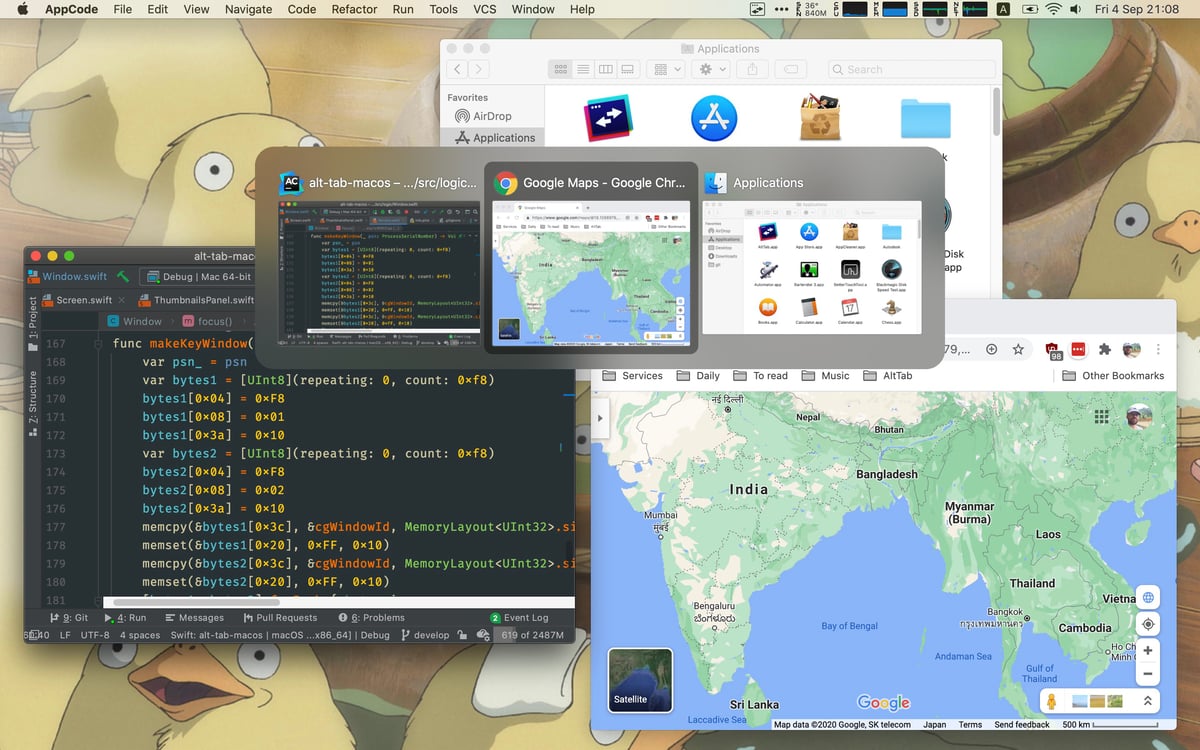
- AltTab (Free) - AltTab is a simple app that is based on the Windows "alt-tab" windows switcher. With the tool, you can customize your controls to mimic how alt tab works on Windows, quickly swapping between your open app windows and manipulating them with simple keyboard commands.
- MonitorControl (Free) - As the name suggests, MonitorControl is a straightforward menu bar app that lets you adjust the parameters of an external display. You can tweak brightness, contrast, volume, and more.
- Raycast (Free) - Raycast is kind of an all-in-one extendable launcher or Spotlight replacement app that offers a bunch of features for writing scripts, activating shortcuts, searching for files, controlling your system, writing quick notes, opening links, launching apps, tracking clipboard history, and much more.
- CleanShot X ($29) - CleanShot X is a screen capture tool that's ideal for taking screenshots and videos. It's simple to capture whatever you want on your screen, annotate it, and send it off, plus there's a cloud component that saves everything in one spot. It can do screen recordings and capture screenshots even if the content doesn't fit all on one screen. There's a $29 one-time payment option that unlocks a year of updates, or users can pay $8 per month for continual updates.
Know of a great Mac app that we haven't highlighted yet? Let us know in the comments below and we might feature it in a future video. For more of our Mac app picks, check out our Mac apps archive.
Popular Stories
Bloomberg's Mark Gurman has high expectations for Apple's first foldable iPhone.
In his Power On newsletter today, he said the foldable iPhone will be "the most significant overhaul in the iPhone's history."
"iPhone 4, iPhone 6 and iPhone X were clearly a big deal, but this is a whole new design," he said.
Like Samsung's Galaxy Z Fold 7, the foldable iPhone will reportedly open up like ...
iOS 26.5 is now available for developers, and while it doesn't include any new Siri capabilities, there are some major changes for the European Union, and smaller tweaks for features available worldwide.
Suggested Places
In the Maps app, there's a new "Suggested Places" feature that recommends locations to visit based on trending places nearby and recent searches. When Apple launches ads in ...
Apple today added the MacBook Air (13-inch, 2017) to its "vintage" products list, meaning the device is now only eligible for repairs at Apple Stores and Apple Authorized Service Providers if parts remain available.
The MacBook Air (13-inch, 2017) was the final MacBook Air model released before Apple redesigned the laptop and gave it a Retina display in 2018.
Apple also added all iPad...
Popular Stories
Bloomberg's Mark Gurman has high expectations for Apple's first foldable iPhone.
In his Power On newsletter today, he said the foldable iPhone will be "the most significant overhaul in the iPhone's history."
"iPhone 4, iPhone 6 and iPhone X were clearly a big deal, but this is a whole new design," he said.
Like Samsung's Galaxy Z Fold 7, the foldable iPhone will reportedly open up like ...
iOS 26.5 is now available for developers, and while it doesn't include any new Siri capabilities, there are some major changes for the European Union, and smaller tweaks for features available worldwide.
Suggested Places
In the Maps app, there's a new "Suggested Places" feature that recommends locations to visit based on trending places nearby and recent searches. When Apple launches ads in ...
Apple today added the MacBook Air (13-inch, 2017) to its "vintage" products list, meaning the device is now only eligible for repairs at Apple Stores and Apple Authorized Service Providers if parts remain available.
The MacBook Air (13-inch, 2017) was the final MacBook Air model released before Apple redesigned the laptop and gave it a Retina display in 2018.
Apple also added all iPad...