Apple Removes Network Locations Feature in macOS Ventura
In addition to redesigning the System Settings app on macOS Ventura, Apple has removed the app's longstanding Network Locations feature, as noted by Jason Snell at Six Colors. The feature allowed users to quickly switch between different sets of Wi-Fi, Ethernet, and other network settings depending on their location, such as home or work.
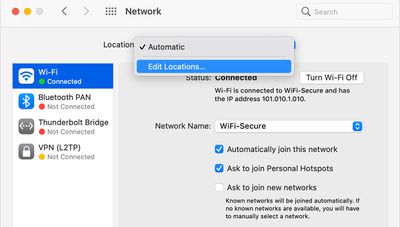
Given that macOS Ventura is still in beta, there is always a chance that Network Locations could return at some point, but this seems unlikely given that Apple marked Tyler Loch's bug report about the feature's absence as "works as currently designed."
In a support document, Apple says the Network Locations feature could be useful in circumstances such as those listed below:
- You use the same type of network (such as Ethernet) at work and at home, but the settings you use at work don't allow your Mac to automatically connect to the same type of network at home.
- Your Mac connects to more than one type of network service (such as both Wi-Fi and Ethernet) at work and at home, but at work you want your Mac to try connecting to the Ethernet network first, and at home you want your Mac to try connecting to the Wi-Fi network first. In other words, you want to set a different service order for each location.
- Your Mac isn't connecting to your network and you want to quickly reset your network settings for testing purposes, without losing your current network settings.
Snell says Apple's command-line tool "networksetup" is still present in the latest macOS Ventura beta, so a third-party developer could step in and release an app to replace the Network Locations functionality removed in the System Settings app.
Popular Stories
Bloomberg's Mark Gurman has high expectations for Apple's first foldable iPhone.
In his Power On newsletter today, he said the foldable iPhone will be "the most significant overhaul in the iPhone's history."
"iPhone 4, iPhone 6 and iPhone X were clearly a big deal, but this is a whole new design," he said.
Like Samsung's Galaxy Z Fold 7, the foldable iPhone will reportedly open up like ...
iOS 26.5 is now available for developers, and while it doesn't include any new Siri capabilities, there are some major changes for the European Union, and smaller tweaks for features available worldwide.
Suggested Places
In the Maps app, there's a new "Suggested Places" feature that recommends locations to visit based on trending places nearby and recent searches. When Apple launches ads in ...
New images of an alleged iPhone 18 Pro prototype and screen protectors have emerged from multiple sources, adding weight to earlier reports that Apple plans to significantly shrink the Dynamic Island later this year.
An X user called @earlyappleleaks recently shared an image purportedly showing a prototype iPhone 18 Pro with a noticeably smaller Dynamic Island. In the picture, the flashlight ...
Popular Stories
Bloomberg's Mark Gurman has high expectations for Apple's first foldable iPhone.
In his Power On newsletter today, he said the foldable iPhone will be "the most significant overhaul in the iPhone's history."
"iPhone 4, iPhone 6 and iPhone X were clearly a big deal, but this is a whole new design," he said.
Like Samsung's Galaxy Z Fold 7, the foldable iPhone will reportedly open up like ...
iOS 26.5 is now available for developers, and while it doesn't include any new Siri capabilities, there are some major changes for the European Union, and smaller tweaks for features available worldwide.
Suggested Places
In the Maps app, there's a new "Suggested Places" feature that recommends locations to visit based on trending places nearby and recent searches. When Apple launches ads in ...
New images of an alleged iPhone 18 Pro prototype and screen protectors have emerged from multiple sources, adding weight to earlier reports that Apple plans to significantly shrink the Dynamic Island later this year.
An X user called @earlyappleleaks recently shared an image purportedly showing a prototype iPhone 18 Pro with a noticeably smaller Dynamic Island. In the picture, the flashlight ...
























