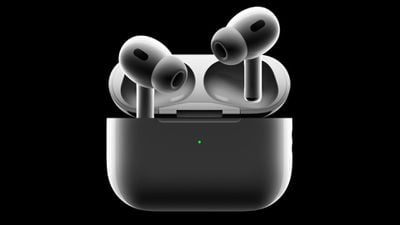
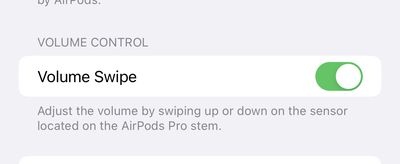
In the iOS 16.1 beta, Apple is giving users of the second-generation AirPods Pro the ability to disable touch controls for volume.
One feature of the new AirPods Pro is that users can increase or decrease volume by swiping up or down on the touch sensors on the individual stems. While some users may find the feature convenient, others may not. On iOS 16.0.2, the current public release of iOS 16, users cannot disable touch controls for volume.
In the iOS 16.1 beta, there is a new toggle inside the Accessibility page for the second-generation AirPods Pro to enable or disable touch controls for volume. As before, users can customize the press-and-hold functionality of the AirPods Pro stems, including to switch among Active Noise Cancellation, Transparency mode, and Off, or to invoke Siri.
iOS 16.1 is available for developers and members of Apple's public beta program, with a public release expected in October. In addition to the new toggle for the AirPods Pro, iOS 16.1 will include changes to the battery indicator and more.
Bloomberg's Mark Gurman has high expectations for Apple's first foldable iPhone.
In his Power On newsletter today, he said the foldable iPhone will be "the most significant overhaul in the iPhone's history."
"iPhone 4, iPhone 6 and iPhone X were clearly a big deal, but this is a whole new design," he said.
Like Samsung's Galaxy Z Fold 7, the foldable iPhone will reportedly open up like ...
iOS 26.5 is now available for developers, and while it doesn't include any new Siri capabilities, there are some major changes for the European Union, and smaller tweaks for features available worldwide.
Suggested Places
In the Maps app, there's a new "Suggested Places" feature that recommends locations to visit based on trending places nearby and recent searches. When Apple launches ads in ...
New images of an alleged iPhone 18 Pro prototype and screen protectors have emerged from multiple sources, adding weight to earlier reports that Apple plans to significantly shrink the Dynamic Island later this year.
An X user called @earlyappleleaks recently shared an image purportedly showing a prototype iPhone 18 Pro with a noticeably smaller Dynamic Island. In the picture, the flashlight ...
Apple is planning to launch at least three new "Ultra"-class devices this year, according to Bloomberg's Mark Gurman.
Writing in this weekend's "Power On" newsletter, Gurman explained that while the low-end of Apple's product lineups are now well-served by the Apple Watch SE, iPad 11, and MacBook Neo, there is "a more significant shift underway" toward higher-end, "Ultra" devices. Apple is...
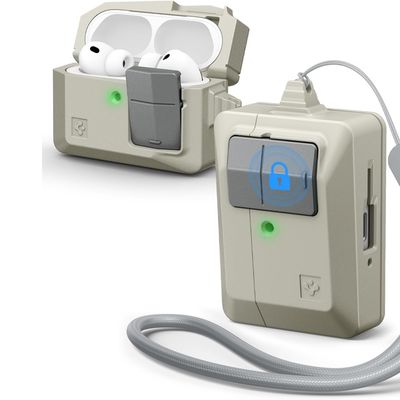
Accessory maker Spigen this week expanded its lineup of case options that are designed to look like vintage Apple Macs. The clever new Classic LS AirPods Pro 3 Case resembles a the iconic Apple Macintosh mouse, so it goes well with Spigen's Mac-style iPhone cases.
Priced at $25 from Amazon, the case features the stone color that was used for the Classic Macintosh, along with a gray mouse...
Tuesday March 24, 2026 12:31 pm PDT by Juli Clover
Apple today released new firmware for the AirPods Pro 2, AirPods Pro 3, and the AirPods 4. The firmware has a version number of 8B39, up from 8B34 on the AirPods Pro 3, 8B28 on the AirPods Pro 2, and 8B21 on the AirPods 4.
There is no word on what's included in the firmware, but Apple has a support document with limited notes. Most updates are limited to bug fixes and performance...
I wonder if it's your sleeves or cuffs making that accidental swipe.
That is why I wear my watch on the left wrist configured with the crown to the left. My gloves for yard work and weight training were playing havoc with that volume function, and also pushing on the crown too, most distracting. I was overjoyed to find out that I could set it up this way and avoid it happening. It works so well in winter too. Not having that option, I could have seen dropping the AW.
You can? Also I do it by mistake ALL THE TIME. I don’t know how but I always manage to somehow adjust the volume from my watch, either all the way down or up. Happens to my echos plying music or my AirPods
I wonder if it's your sleeves or cuffs making that accidental swipe.
Apple should make other features available not this one....here we just dont swipe if we dont want to adjust the volume from the airpods themselves. In 2 days i never from mistake swipe and adjust the volume while trying to do different things
Not sure I fully agree with this. There can be some differently abled users who have a hard time not accidentally changing the volume of their pods when trying to remove or put in the pod. I see it as good to have the option to disable swipe volume control.