Astropad Studio Gains Apple Pencil Hover Integration on M2 iPad Pro - MacRumorsOpen MenuShow RoundupsShow Forums menuVisit ForumsOpen Sidebar
Skip to Content

Astropad Studio Gains Apple Pencil Hover Integration on M2 iPad Pro

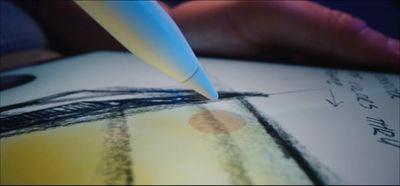
Astropad today announced an update to the Astropad Studio app, which adds support for the Apple Pencil hover feature that Apple introduced with the new M2 iPad Pro models. Astropad Studio is designed to allow you to draw on your Mac using your iPad, so the hover gesture can be used with the macOS software on the ‌iPad‌.

m2 ipad pro apple pencil hover
Astropad says that users have been asking for ‌Apple Pencil‌ hover support for years, and it is one of the last features that Wacom tablets offered that the ‌iPad‌ did not. With the hover option, the ‌iPad‌ serves as a more feature rich Wacom alternative for digital artists.

The update adds 3D gestures for panning, zooming, and rotating the 3D canvas, along with support for new default shortcuts. There are also a range of new Magic Gestures that use combinations of tap, touch, and the ‌Apple Pencil‌ to trigger actions. Per-app custom gestures are available, so users can set up different gesture sets for apps like Photoshop and Blender, and there is a new one-finger tap gesture.

Astropad Studio is currently offering a 30 percent discount off annual subscriptions with the promo code FESTIVE. Subscriptions are priced at $70/year. Astropad's Luna Display software has also been updated with ‌Apple Pencil‌ hover for the ‌M2‌ ‌iPad Pro‌ models.

Related Forum: iPad Accessories

Popular Stories

astropad main image

MacRumors Giveaway: Win a Mac Mini to Run AI Agents With Astropad's 'Workbench' App

Friday May 1, 2026 10:09 am PDT by
For this week's giveaway, we've teamed up with Astropad to offer MacRumors readers a chance to win a Mac mini to use with Astropad's new Workbench app. For those unfamiliar with Astropad, it is the company behind Astropad Studio and Luna Display. Astropad Studio lets you use an iPad as a drawing tablet connected to a Mac and Luna Display turns an iPad into a secondary display for a Mac, so...
Apple Card iPhone 16 Pro Feature

Apple Card Promo to Offer Free AirPods Pro 3

Friday May 15, 2026 8:59 am PDT by
Starting as early as next week, customers who sign up for an Apple Card at Apple's retail stores in the U.S. will receive $249 cash back when they purchase AirPods Pro 3, according to Bloomberg's Mark Gurman. The promotion has yet to be officially announced by Apple, so exact terms and conditions are not available at this time. AirPods Pro 3 are priced at $249 in the U.S., so customers who...
Apple WWDC25 iOS 26 CarPlay Light mode 250609

Six Popular iPhone Apps Now Available on CarPlay

Thursday May 14, 2026 9:10 am PDT by
Apple's CarPlay system for accessing iPhone apps on a vehicle's dashboard screen has received six popular apps in recent weeks: ChatGPT, Perplexity, Grok, Google Meet, WhatsApp, and the indie artist streaming platform Audiomack. Make sure you have the latest version of each app and they will automatically appear on CarPlay. ChatGPT Starting with iOS 26.4, CarPlay supports voice-based...

Top Rated Comments

46 months ago
Good to see more apps supporting hover feature. Unfortunately it is available only on the newest iPad Pro.
Score: 2 Votes (Like | Disagree)
46 months ago

Maybe I’m too old school but I like the textural feel and resistance of actually pressing against a screen rather than just hovering over it like a hologram.
Hover is not for drawing or painting, it's for previewing an effect before touching the screen. For example, it's imperative for clone stamping, where you frequently need to preview the precise alignment before starting to paint, especially when you're cloning along sharp edges. For inking you're not going to benefit from the hover feature.
Score: 1 Votes (Like | Disagree)
DrJR Avatar
46 months ago

It is a good feature on my new 12.9" iPad Pro. The Pencil feels like a wand.

Is Apple working on 'continuity trackpad' for iPad where I can easily-quickly use my iPad as a large trackpad for my Mac when I need it.
That would be cool!
Score: 1 Votes (Like | Disagree)
szw-mapple fan Avatar
46 months ago

You still need to press the screen even with hover. Hover just gives you feedback on the position of the pencil before it touches the screen.
Sounds like a feature like this would work great with a haptic engine in the pencil.
Score: 1 Votes (Like | Disagree)
airbatross Avatar
46 months ago
I love it on my M2 iPad.. It's like mouse hover on websites - the ability to preview a brush on a drawing app or navigating menus without pressing is awesome.. Also makes it easier to touch the exact position you want..
Score: 1 Votes (Like | Disagree)
nwcs Avatar
46 months ago
Maybe I’m too old school but I like the textural feel and resistance of actually pressing against a screen rather than just hovering over it like a hologram.
Score: 1 Votes (Like | Disagree)