iOS 16.4 Expands Duplicate Image Detection to iCloud Shared Photo Library
In addition to new emojis, web push notifications, and a range of other features, the iOS 16.4 update expands support for detecting duplicate images to iCloud Shared Photo Library.
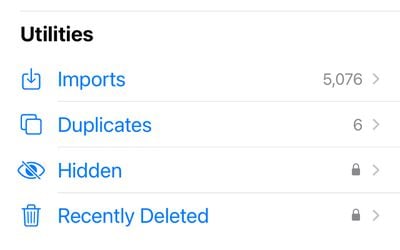
With iOS 16, Apple added a duplicate detection function for the Photos app. If you have duplicate images, the Photos app displays a "Duplicates" folder in the Utilities album section. From there, you can merge all of your duplicate images together.
At launch, the duplicate detection option did not work with iCloud Shared Photo Library, but that's changing with the iOS 16.4 update. According to Apple, after installing iOS 16.4, you will be able to detect duplicate photos and videos in iCloud Shared Photo Library, merging them to cut down on unnecessary extra images.
iOS 16.4 is set to be released to the public as soon as next week. The update also includes VoiceOver support for maps in the Weather app, a fix for an issue that could cause Ask to Buy requests to fail to appear on a parent's device, a bug with Matter-compatible thermostats, and additional Crash Detection optimizations for iPhone 14 models.
Popular Stories
Bloomberg's Mark Gurman has high expectations for Apple's first foldable iPhone.
In his Power On newsletter today, he said the foldable iPhone will be "the most significant overhaul in the iPhone's history."
"iPhone 4, iPhone 6 and iPhone X were clearly a big deal, but this is a whole new design," he said.
Like Samsung's Galaxy Z Fold 7, the foldable iPhone will reportedly open up like ...
iOS 26.5 is now available for developers, and while it doesn't include any new Siri capabilities, there are some major changes for the European Union, and smaller tweaks for features available worldwide.
Suggested Places
In the Maps app, there's a new "Suggested Places" feature that recommends locations to visit based on trending places nearby and recent searches. When Apple launches ads in ...
Apple today added the MacBook Air (13-inch, 2017) to its "vintage" products list, meaning the device is now only eligible for repairs at Apple Stores and Apple Authorized Service Providers if parts remain available.
The MacBook Air (13-inch, 2017) was the final MacBook Air model released before Apple redesigned the laptop and gave it a Retina display in 2018.
Apple also added all iPad...
Popular Stories
Bloomberg's Mark Gurman has high expectations for Apple's first foldable iPhone.
In his Power On newsletter today, he said the foldable iPhone will be "the most significant overhaul in the iPhone's history."
"iPhone 4, iPhone 6 and iPhone X were clearly a big deal, but this is a whole new design," he said.
Like Samsung's Galaxy Z Fold 7, the foldable iPhone will reportedly open up like ...
iOS 26.5 is now available for developers, and while it doesn't include any new Siri capabilities, there are some major changes for the European Union, and smaller tweaks for features available worldwide.
Suggested Places
In the Maps app, there's a new "Suggested Places" feature that recommends locations to visit based on trending places nearby and recent searches. When Apple launches ads in ...
Apple today added the MacBook Air (13-inch, 2017) to its "vintage" products list, meaning the device is now only eligible for repairs at Apple Stores and Apple Authorized Service Providers if parts remain available.
The MacBook Air (13-inch, 2017) was the final MacBook Air model released before Apple redesigned the laptop and gave it a Retina display in 2018.
Apple also added all iPad...