Here's What It Looks Like When You Install a visionOS Update on Apple Vision Pro
The Vision Pro is set to come out tomorrow, and Apple has already released a visionOS 1.0.2 update, which means there will be a day-one update that Vision Pro owners need to install.
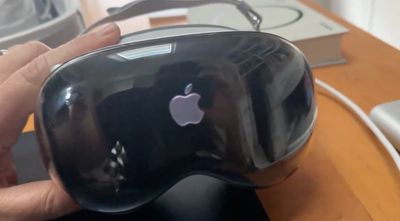
CNET's Scott Stein today shared a video that demonstrates what the Vision Pro looks like when an update is installed. While the update is in progress, there's a bar on the front display that slowly fills up as the update is installed, and when it's done, an Apple logo is shown during a restart.
Apple plans to regularly update the software on the Vision Pro going forward, and we are expecting to see visionOS 2.0 unveiled at WWDC in June.
Popular Stories
Bloomberg's Mark Gurman has high expectations for Apple's first foldable iPhone.
In his Power On newsletter today, he said the foldable iPhone will be "the most significant overhaul in the iPhone's history."
"iPhone 4, iPhone 6 and iPhone X were clearly a big deal, but this is a whole new design," he said.
Like Samsung's Galaxy Z Fold 7, the foldable iPhone will reportedly open up like ...
iOS 26.5 is now available for developers, and while it doesn't include any new Siri capabilities, there are some major changes for the European Union, and smaller tweaks for features available worldwide.
Suggested Places
In the Maps app, there's a new "Suggested Places" feature that recommends locations to visit based on trending places nearby and recent searches. When Apple launches ads in ...
New images of an alleged iPhone 18 Pro prototype and screen protectors have emerged from multiple sources, adding weight to earlier reports that Apple plans to significantly shrink the Dynamic Island later this year.
An X user called @earlyappleleaks recently shared an image purportedly showing a prototype iPhone 18 Pro with a noticeably smaller Dynamic Island. In the picture, the flashlight ...
Popular Stories
Apple today provided developers with the fourth betas of upcoming watchOS 26.4 and visionOS 26.4 betas for testing purposes. The software comes a week after Apple released the third betas.
The software updates are available through the Settings app on each device, and because these are developer betas, a free developer account is required.
watchOS 26.4 adds a new Average Bedtime metric to ...
Apple today seeded the release candidate versions of upcoming watchOS 26.4, tvOS 26.4 and visionOS 26.4 updates for testing purposes. The software comes a week after Apple released the fourth betas. Release candidates are the final updates that will be provided to the public in the near future if no final bugs are discovered.
The software updates are available through the Settings app on...
X-Plane, which is advertised as being the "world's most advanced flight simulator," is coming to Apple's Vision Pro in the next month or so.
The upcoming visionOS 26.4 update adds support for NVIDIA's CloudXR 6.0 platform, and this will enable Vision Pro users to wirelessly stream immersive PC games from NVIDIA RTX-powered servers via Wi-Fi, including the flight simulator X-Plane 12. Accordin...