Belkin Releases MagSafe Mount for Using iPhone Camera With Apple TV - MacRumorsOpen MenuShow RoundupsShow Forums menuVisit ForumsOpen Sidebar
Skip to Content

Belkin Releases MagSafe Mount for Using iPhone Camera With Apple TV

Apple today began selling Belkin's new iPhone Mount with MagSafe for Apple TV 4K on its online store in the U.S. and other countries.
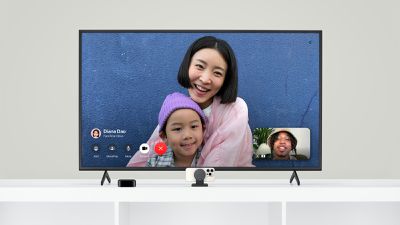
Belkin Apple TV MagSafe Mount
This accessory allows you to mount your iPhone to the top of your TV, or it can be placed on the stand below. Then, you can conveniently use your iPhone's rear camera for FaceTime video calls on any Apple TV 4K model running tvOS 17 or later.

Key features of the mount, as listed on Apple's online store:

Mount directly to your TV or display up to 4 inches (10.1 cm) in depth

Works as standalone mount on desktop or a TV stand

Tilt from –20 to +30 degrees to adjust to your environment

Easily flip iPhone orientation to stream or record in portrait or landscape

Keyhole mounts and mounting bracket included for added stability

Designed for Continuity Camera–supported apps

Belkin already offered a very similar version of this mount for use with the iMac and Apple's external displays, but it is currently listed as unavailable on Apple's online store. Apple continues to sell a version of the mount for MacBooks.

Priced at $49.95 in the U.S., the TV version of the mount ships in one business day.

Related Roundup: Apple TV
Tag: Belkin
Buyer's Guide: Apple TV (Don't Buy)

Popular Stories

General visionOS watchOS and tvOS Betas Feature Redux

Apple Releases Second watchOS 26.6, tvOS 26.6 and visionOS 26.6 Betas

Monday June 15, 2026 10:06 am PDT by
Apple today provided developers with the second betas of upcoming watchOS 26.6, tvOS 26.6, and visionOS 26.6 betas for testing purposes. The software comes three weeks after Apple seeded the first betas. The software updates are available through the Settings app on each device, and because these are developer betas, a free developer account is required. There's no word on what's in the...
f 5d631a2d7714517b0b0137e38aadf744d175cb3e

Apple Releases First iOS 27, iPadOS 27, and macOS 27 Betas to Developers

Monday June 8, 2026 11:40 am PDT by
Following the WWDC 2026 keynote event, Apple has seeded the first betas of iOS 27, iPadOS 27, macOS 27, watchOS 27, tvOS 27, and visionOS 27 to developers for testing purposes. Registered developers can opt in to betas and download the software through the Settings app on each device. The software includes many of the new features that were shown off earlier today, though some of what...
Apple TV 2025 Thumb 2 Sans Text

Apple Announces tvOS 27 With These New Features

Monday June 8, 2026 2:00 pm PDT by
Apple barely touched on tvOS 27 during its WWDC 2026 keynote today, but the update exists, and it adds some new features to the Apple TV. In a slide that was shown very briefly during the keynote, Apple revealed some of tvOS 27's new features and enhancements: A redesigned Podcasts app Smoother app launches and animations Faster AirPlay connectivity with other Apple devices Smart ...

Top Rated Comments

Joe Mac User Avatar
31 months ago

any Apple TV 4K model running tvOS 17 or later
Point of clarity: The Continuity Camera feature only works with 2nd Generation or Later Apple TV 4K models. I think the article should be clarified to reflect this, even if the PR doesn't have the info.

https://support.apple.com/guide/tv/use-facetime-atvb3cced7cd/tvos
Score: 8 Votes (Like | Disagree)
alexandr Avatar
31 months ago

So what happens when it goes to the lock screen?
You get up :)
Score: 6 Votes (Like | Disagree)
HobeSoundDarryl Avatar
31 months ago

Can people hear you if your TV is in a large room?
Start a video (selfie) recording, prop it against your TV now, get to where you would normally be for a FaceTime/Zoom call, pretending you are talking to someone by saying a few words, then go get your iDevice, play the video and hear for yourself. There's nothing like a real test to absolutely answer a question like this. Otherwise, you'll get a mix of "no problem for me" to "problem for me."

Note you can also use buds for the audio portion, just like FaceTiming on a computer.
Score: 4 Votes (Like | Disagree)
31 months ago

Wasn't there a rumour a few years ago that FaceTime would have an algorithm that makes it look as if the eyes of the person speaking were looking straight at you, even if that person was looking at the screen? The rumour just vanished?
That’s already built into iOS, but I’m not sure if it does on tvOS.

Attachment Image
Score: 3 Votes (Like | Disagree)
31 months ago
I found a really great little mount for like $25 that works on my TV, iMac and even MacBook:

https://www.amazon.com/dp/B0C1RHB3NQ?ref=ppx_yo2ov_dt_b_product_details&th=1

The larger body of it anchors it to a TV or desktop monitor (and will stand upright on a table) Then for a MacBook, you pop out the smaller part with the magnetic mount and just clip that onto the top of the display. Been using for a couple weeks now and it's really quite nicely made. Everything else I'd found were single-purpose mounts like this dumb Belkin thing, meaning you're supposed to buy a separate one for each device.

[edit: I just realized the magnetic mount can actually be swapped out for an Apple MagSafe charger if you want. Very cool.]

FaceTime over Apple TV is pretty fun. The Center Stage feature follows you around the room, and will even reframe if a second person enters the frame.
Score: 3 Votes (Like | Disagree)
HobeSoundDarryl Avatar
31 months ago

If FaceTime on ATV would work I could see this accessory working for some.
It does work with newer AppleTVs.
Score: 3 Votes (Like | Disagree)


















