

Six Bartender Alternatives to Manage Your Mac's Menu Bar - MacRumorsOpen MenuShow RoundupsShow Forums menuVisit ForumsOpen Sidebar
Skip to Content

Six Bartender Alternatives to Manage Your Mac's Menu Bar

Popular Mac menu bar management utility Bartender was recently quietly sold to another company, a fact that only came to light after app monitoring service MacUpdater alerted users that updates to the app from version 5.0.52 could be potentially unsafe due to the lack of transparency surrounding the situation.
bartender app
The original developer has since acknowledged the sale. However, the new Bartender owner is a largely unknown entity that has reportedly hiked Bartender's purchase options, and is alleged to have added code to the app that may be associated with collecting analytics data on users.

Given that Bartender requires extensive permissions to operate in macOS, including screen recording, the whole event has understandably left many users concerned about privacy. Fortunately, Bartender is not the only app of its kind. So unless Apple ever gets round to integrating better menu bar management into macOS, here are some alternative menu bar utilities that are worth considering.

  • Vanilla (Free) – Simple app that lets you hide menu bar icons. Just hold Command and drag icons between hidden and visible sections. Vanilla Pro ($10) adds keyboard shortcuts, a removed section, start at login, and an auto-hide option after 5 seconds.
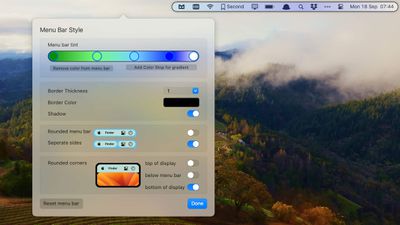
  • Ice (Free) – Menu bar management tool that hides items, offers an always-hidden section, show on hover, show on click, show on scroll or swipe, automatic rehide, and app menu overlap correction. Also includes hotkeys, launch at login, and options to change menu bar appearance.
  • Hidden Bar (Free) – Lightweight tool that lets you drag a divider between icons in the menu bar to separate hidden and shown sections. Includes launch at login, auto-hide durations, show/hide global shortcut, and full menu bar mode.
  • iBar (Free) – This tool hides menu bar icons which can be revealed in a floating bar that extends below the notch on MacBook Air and MacBook Pro.
  • Barbee ($3.99) – Management tool with similar interface to Bartender. Includes sections for shown, hidden, and always hidden items, as well as extensive menu bar appearance settings. Also offers ability to quickly search your menu bar items in a Spotlight-style floating window.
  • OnlySwitch (Free) – More than just a menu bar management tool, OnlySwitch offers a broad range of customizable toggle switches designed to offer quick access to system and other settings, such as hide desktop icons, dark mode, hide MacBook notch, mute mic, and more.

If you are a BetterTouchTool user, Andreas Hegenberg has a thorough tutorial on how the utility can be used to hide menu bar items. Know of a great Mac menu bar management tool that we haven't highlighted? Let us know in the comments below and we might append it to this article.


Popular Stories

iOS 27 on iPhone 17 1

iOS 27 Will Add These New Features to Your iPhone

Saturday May 2, 2026 8:43 am PDT by
Apple is expected to unveil iOS 27 during its WWDC 2026 keynote on June 8, and there are already many rumored features and changes for iPhones. The first developer beta of iOS 27 will likely be available immediately following the keynote, and a public beta typically follows in July. Following beta testing, the software update should be released to all users with a compatible iPhone in...
Apple Event Logo

Apple Just Released a New Accessory

Monday May 4, 2026 8:13 am PDT by
Apple today released a new Pride Edition Sport Loop for the Apple Watch. The band features a rainbow design with 11 colors of woven nylon yarns. The new Pride Edition Sport Loop is available to order now on Apple.com and in the Apple Store app in 40mm, 42mm, and 46mm sizes, and it will be available at Apple Store locations starting later this week. In the U.S., the band costs $49. There...
Apple MacBook Pro M4 hero

Why You Might Want to Wait to Buy a MacBook Pro

Friday May 1, 2026 3:43 pm PDT by
Apple refreshed the 14-inch and 16-inch MacBook Pro with M5 Pro and M5 Max models in March 2026, but depending on your needs and interests, you might want to skip this generation because there's something better in the works. The M5 Pro and M5 Max MacBook Pro models have faster chips, but the same design that Apple has used since 2021. An updated design with new display technology and faster ...

Top Rated Comments

pdaholic Avatar
25 months ago
I like how the article has vanilla and ice apps next to each other.
Score: 60 Votes (Like | Disagree)
25 months ago
I used one of these apps for years, but last year I found the easiest and best solution that is app-less. Usually I want all those menu bar items up all the time… but what I don’t want is the giant spacing and padding between them.
Behold in the terminal:

defaults -currentHost write -globalDomain NSStatusItemSpacing -int x
defaults -currentHost write -globalDomain NSStatusItemSelectionPadding -int y

Where x and y are spacing and padding. I found 6 and 3 for me the best:

defaults -currentHost write -globalDomain NSStatusItemSpacing -int 6
defaults -currentHost write -globalDomain NSStatusItemSelectionPadding -int 3

I found I didn’t really need an app after that. All the stuff I wanted to put up there I could fit, and all the stuff that didn’t make it I explicitly took out with ⌘ + drag.


Here’s a reference to the stack overflow I found this:

https://apple.stackexchange.com/questions/406316/can-the-spacing-of-menu-bar-apps-be-modified-in-macos-big-sur-and-later/465674#465674

Attachment Image
Score: 38 Votes (Like | Disagree)
nxt3 Avatar
25 months ago
Switched to Ice yesterday and it does the job perfectly. Great that it's also open source.

RIP Bartender. Been using it since 2015.
Score: 34 Votes (Like | Disagree)
CalMin Avatar
25 months ago
How come I always find out about the free options AFTER I've bought the paid apps!
Score: 24 Votes (Like | Disagree)
Wanted797 Avatar
25 months ago
So “they share the original developers vision”

Yet they’ve already apparently hiked prices and added code for tracking?

Sounds super shady and like someone got some extra $$$ to not say anything.
Score: 22 Votes (Like | Disagree)
25 months ago
This whole timeline is so bizarre. I ran Ben's acknowledgement/apology/whatever the hell that was through an AI detector, it was totally written by ChatGPT.

Attachment Image
Score: 18 Votes (Like | Disagree)














