

Add a Volume Slider to Your iPhone Lock Screen - MacRumorsOpen MenuShow RoundupsShow Forums menuVisit ForumsOpen Sidebar
Skip to Content

Add a Volume Slider to Your iPhone Lock Screen

by

Your iPhone's Lock Screen has built-in media playback controls that appear whenever music, a podcast, or other audio is playing. What you might not realize is that those controls can also include a volume slider that lets you adjust the volume without you having to unlock your iPhone or fumble for the physical buttons.
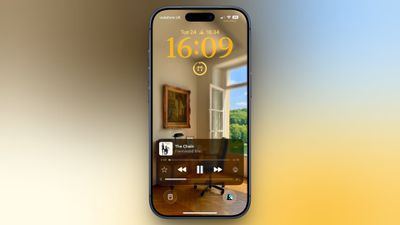
ios 26 volume slider lock screen
Originally, Apple included a volume slider in the Lock Screen media player by default, but it quietly removed the function in iOS 16. It eventually returned as an option in iOS 18.2, but Apple decided to bury it in Accessibility settings, where it's easy to overlook. The setting is still available in iOS 26, and it's super-simple to enable.

Here's how to turn it on:

  1. Open Settings on your iPhone.
  2. Tap Accessibility.
  3. Under "Hearing," tap Audio & Visual.
  4. Toggle on the switch next to Always Show Volume Control.
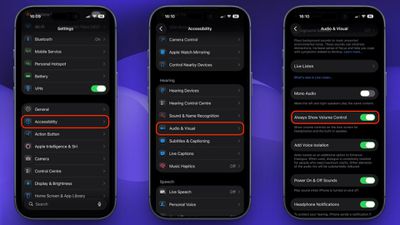
settings

The next time you play audio, a volume slider will appear in the Lock Screen's media player underneath the existing playback controls. It's especially useful when your iPhone is propped up on a desk or sitting on a nightstand, since you don't need to pick it up just to change the volume.

To turn it off again, just head back to Settings ➝ Accessibility ➝ Audio & Visual and toggle off Always Show Volume Control.


Top Rated Comments

8 weeks ago
Accessibility is always just loaded with cool and useful stuff like this. It flies under the radar, but IMO it’s where some of Apple’s best design work is hidden.
Score: 12 Votes (Like | Disagree)
8 weeks ago
Another slider that can be touched accidentally. 👍
Score: 7 Votes (Like | Disagree)
8 weeks ago

Yes. I suspect the reason the slider was removed by default, is because it was too easy to accidentally swipe, and make the volume all of a sudden blast in your ears.
THIS! lol. I have enough heartburn from that time I was singing along with Mariah, and my phone decided to skip to the next song just as I was about to nail that high note, leaving me hanging!
Score: 5 Votes (Like | Disagree)
FlyingToasterStrudel Avatar
8 weeks ago
Yes. I suspect the reason the slider was removed by default, is because it was too easy to accidentally swipe, and make the volume all of a sudden blast in your ears.
Score: 4 Votes (Like | Disagree)
8 weeks ago
You would not believe the amount of times i've blasted my ears on accident when the volume slider was in the lock screen.
Score: 3 Votes (Like | Disagree)
Radeon85 Avatar
8 weeks ago
Things like this should be on by default.
Score: 3 Votes (Like | Disagree)

Popular Stories

airpods pro 3 pink

New Apple Card Holders Can Get Free AirPods Pro 3, But There's a Catch

Monday May 18, 2026 8:11 am PDT by
Apple today launched a new promotion offering new Apple Card holders the chance to earn back the cost of AirPods Pro 3 through monthly cash rebates, but there is a recurring spend requirement attached. Customers who open a new Apple Card account and purchase AirPods Pro 3 directly from Apple by June 15 will qualify. Starting July 1 and running through April 30, 2027, cardholders can earn $25 ...
Foldable iPhone 2023 Feature 1

Foldable iPhone Production Stalls Amid Hinge Issues

Monday May 18, 2026 7:29 am PDT by
Trial production of Apple's long-anticipated foldable iPhone, likely called the "iPhone Ultra," has run into a significant engineering hurdle centered on hinge reliability, according to a known leaker. The leaker known as "Instant Digital" posted on Weibo that the foldable device's hinge is consistently failing to meet Apple's quality control standards under conditions of prolonged,...
wwdc apple park in person

Apple Announces WWDC 2026 Schedule, Sends Media Invites

Monday May 18, 2026 10:23 am PDT by
Apple today provided a schedule for its 2026 Worldwide Developers Conference, which starts on June 8 and ends on June 12. Apple also sent out invites to members of the media who have been invited to attend an in-person keynote viewing at Apple Park. Both the invites and schedule confirm that the keynote will begin at the standard time, 10:00 a.m. Pacific Time or 1:00 p.m Eastern Time....















