

macOS Sequoia Beta 2 Adds Support for iPhone Mirroring - MacRumorsOpen MenuShow RoundupsShow Forums menuVisit ForumsOpen Sidebar
Skip to Content

macOS Sequoia Beta 2 Adds Support for iPhone Mirroring

With the second developer beta of macOS Sequoia, Apple has added support for iPhone Mirroring, one of the main updates coming to the Mac. iPhone Mirroring is a Continuity feature that lets you control your iPhone from your Mac.
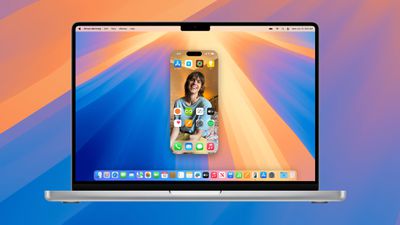
macos sequoia iphone mirroring
When you're signed in to the same Apple ID on a Mac and an iPhone, you can use iPhone Mirroring to interact with your iPhone even when the iPhone is locked. You can open up and use apps, deal with notifications, send messages, and more.

You can use your Mac keyboard, trackpad, or mouse with your iPhone, which is useful for typing up long emails and other documents on the iPhone, and it provides an easy way to keep up with your iPhone notifications without having to pull out your device and check it. When you click on a notification on your Mac when using iPhone Mirroring, it is supposed to open up right into the app on your iPhone.

Though it isn't enabled in this beta, iPhone Mirroring will eventually allow files, photos, and videos to be dragged and dropped between your iPhone and Mac and vice versa. Apple plans to add that iPhone Mirroring feature later in 2024, and it won't be available when macOS Sequoia first launches.
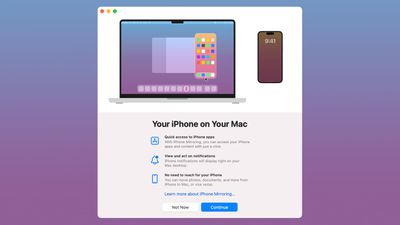
iphone screen mirroring
iPhone Mirroring requires an iPhone running iOS 18 beta 2 and a Mac running macOS Sequoia beta 2, and it is accessible using the new iPhone Mirroring icon in the Dock. It works on Macs that have an Apple silicon chip or a T2 Security Chip, and you'll need to have the devices near each other with Bluetooth and Wi-Fi and you'll need to be signed in to the same ‌Apple ID‌ with two-factor authentication turned on. iPhone Mirroring can't be used when Sidecar or AirPlay are activated.

Today's second beta also adds iOS 18 and iPadOS 18 support for remote control when using the SharePlay screen sharing feature. This option allows you to ask for permission to control someone's device remotely so that you can provide more direct technical assistance for problem solving.

The macOS Sequoia and iOS 18 betas are only available to developers right now, but Apple plans to release a public beta in July that will allow anyone to try out the new iPhone Mirroring feature before it launches. The updates will see a public release this fall.


Related Forums: iOS 18, iPadOS 18, macOS Sequoia

Top Rated Comments

Apple Mac Daz Avatar
23 months ago
iPadOS needs this feature
Score: 9 Votes (Like | Disagree)
xxFoxtail Avatar
23 months ago
For the most part, it seems to work fine. Apps like my banking apps or Journal that require me to authenticate with Face ID, seem to have an issue. I'd expect a passcode prompt to pop up, but I'm not seeing anything, so I can't use them through the mirroring app. I have to go to my iPhone and open the app from there then restart the mirroring.

I tried a couple games, and they worked fine.

(Edit: Restarting the iPhone mirroring session fixed the authentication issues for me)
Score: 8 Votes (Like | Disagree)
furbzv1 Avatar
23 months ago
used it for a few minutes- looked at App Store, did some updates and sent some messages. Works really well. There is a little bit of a lag but nothing too crazy
Score: 8 Votes (Like | Disagree)
23 months ago
The Samsung S24 suffers from alot of the same iPhone problems.
Every time they crank up the frequencies on these ever shrinking CPU chips they run hotter than previous chips and go thru battery life faster. thats why they put even bigger capacity batteries in the phones.
We have been lied to. Shrinking the CPU to 2nm oe smaller does NOT lead to longer battery life.

Same thing with Apple Silicon on the Macs. The Run Hotter and Hotter and use more juice even as they shrink the CHIP

I dont know how the S24 got glowing reviews from YouTubers.
1 poor battery life
2 gets stinking hot just watching video
3 locks up and freezes like once or twice a day
4 it keeps turning the brightness down automatically to save batter juice.

Crappy phone with the latest tech. WE ARE HEADED IN REVERSE

Just give me a $100 Flip Phone

These phones are not worth $1500 PLUS.
Score: 7 Votes (Like | Disagree)
bucknut89 Avatar
23 months ago
So far I would consider this is the best addition to iOS/MacOS in years. Only complaint so far is vertical scrolling doesn't seem to work with third party mice/trackballs. Works fine with the MagicMouse though.
Score: 7 Votes (Like | Disagree)
23 months ago
Has anyone found a workaround for the EU?
Score: 7 Votes (Like | Disagree)

















