Apple Intelligence Settings Visible in iOS 18 Beta 3 Simulator, But Features Still Not Available - MacRumorsOpen MenuShow RoundupsShow Forums menuVisit ForumsOpen Sidebar
Skip to Content

Apple Intelligence Settings Visible in iOS 18 Beta 3 Simulator, But Features Still Not Available

The latest beta of Apple's app development tool Xcode allows developers to simulate an iPhone running the third beta of iOS 18, and this has led to the discovery of some Apple Intelligence settings that are not yet available.
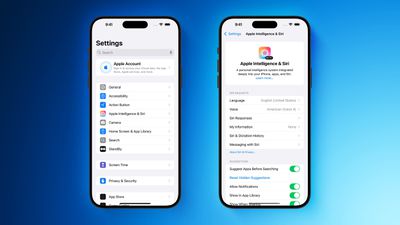
Apple Intelligence Settings in iOS 18 Beta 3 Simulator Feature
Aaron Perris and Matthew Rodarmel are among those who spotted the settings, which can be seen in the screenshots above. However, Apple Intelligence features are still not available for testing in the third beta of iOS 18, released this week.

During its WWDC keynote last month, Apple said that some Apple Intelligence features would be available to try "this summer," but it did not provide a specific timeframe. The features will be available in U.S. English only at launch, and they require an iPhone 15 Pro or iPhone 15 Pro Max, or a Mac or iPad equipped with an M1 chip or newer.

Apple Intelligence will be able to summarize text, prioritize notifications and emails, and generate custom emoji and images, while the technology will also power a smarter version of Siri with richer language understanding, deeper per-app controls, on-screen awareness, and more. Apple said some of the features, along with support for additional languages and software platforms, will be added "over the course of the next year."

iOS 18 should be widely released in September. Even then, the initial Apple Intelligence features will still be considered a "preview" for all users.


Related Forums: iOS 18, iPadOS 18

Top Rated Comments

Laggy Avatar
23 months ago
*Availible in the US starting next year because why not
**Rest of the world comes in not specified future but you still need to pay for device a lot although crucial new features are missing
***Required iPhone 16 Pro or Later because AI can only run properly on such devices and we don't say sorry that we did not think about that 2 years ago
Score: 5 Votes (Like | Disagree)
23 months ago
I wish there was just a big OFF button at the top to simplify matters!
Score: 5 Votes (Like | Disagree)
23 months ago
It’s the PIPELINE that Cook always talks about. Get excited!
Score: 3 Votes (Like | Disagree)
23 months ago

The latest beta of Apple's app development tool Xcode allows developers to simulate an iPhone running the third beta of iOS 18 ('https://www.macrumors.com/2024/07/08/apple-seeds-ios-18-beta-3/'), and this has led to the discovery of some Apple Intelligence settings that are not yet available.

MacRumors content image

Aaron Perris ('https://www.macrumors.com/author/aaron-perris/') and Matthew Rodarmel ('https://x.com/MatthewRodarmel/status/1810777717014732996') are among those who spotted the settings, which can be seen in the screenshots above. However, Apple Intelligence features are still not available for testing in the third beta of iOS 18, released this week.

During its WWDC keynote last month, Apple said that some Apple Intelligence features would be available to try "this summer," but it did not provide a specific timeframe. The features will be available in U.S. English only at launch, and they require an iPhone 15 Pro or iPhone 15 Pro Max, or a Mac or iPad equipped with an M1 chip or newer.

Apple Intelligence will be able to summarize text, prioritize notifications and emails, and generate custom emoji and images, while the technology will also power a smarter version of Siri with richer language understanding, deeper per-app controls, on-screen awareness, and more. Apple said some of the features, along with support for additional languages and software platforms, will be added "over the course of the next year."

iOS 18 should be widely released in September. Even then, the initial Apple Intelligence features will still be considered a "preview" for all users.

Article Link: Apple Intelligence Settings Visible in iOS 18 Beta 3 Simulator, But Features Still Not Available ('https://www.macrumors.com/2024/07/10/ios-18-beta-3-simulator-apple-intelligence/')
The big question -- Is there a way to permanently turn off the "feature" where it asks you if you want to use ChatGPT? Because, I never will, and if that crap pops up constantly, I'll be throwing my phone into the nearest body of open water.

I want an option to only use on-device features unless I change the setting, not be constantly bugged by pop ups.
Score: 2 Votes (Like | Disagree)
23 months ago

Just stick to iOS 17 (most stuff in iOS 18 seems to depend on AI). Problem solved. 😊
I could for now, but planning on getting a 17 Pro next year which is why I want an "Off" switch for it.
Score: 1 Votes (Like | Disagree)
23 months ago
Cannot wait to try this out when it finally launches.
Score: 1 Votes (Like | Disagree)