Revised iOS 18 Beta 3 Reverts Emoji Changes
The revised third beta of iOS 18 that Apple released today eliminates the emoji and sticker changes that Apple introduced with the initial third beta release.
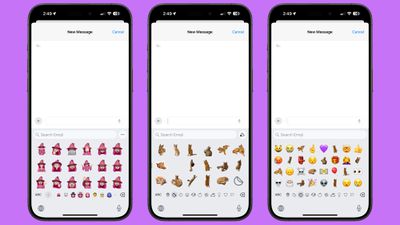
In the prior beta, stickers behaved like emoji and could be added right inline with your messages, rather than only being available as large, stand alone message additions or drag and drop add-ons to texts. You could type a message and add a little sticker or Memoji to the end of it rather than an emoji, but Apple has pulled back this change, along with the interface changes that were introduced.
Emoji, Memoji, and stickers were all combined, and could be navigated using small icons at the bottom of the emoji picker, plus emoji were displayed larger than before, with fewer on a single screen. Apple added dedicated sections for stickers and Memoji rather than showing stickers only in the Recents section, and both stickers and Memoji could be created from the emoji window. It was a design that made both Memoji and stickers quicker to access and use.
With the revised version of beta 3, the emoji picker has been reverted to the beta 2 design. It's not clear why Apple made the change, but it's likely temporary. Sometimes Apple adds features in the beta and then pulls them to implement further refinements before reintroducing them at a later time, so we could see the emoji picker changes re-added in a later beta.
Popular Stories
Bloomberg's Mark Gurman has high expectations for Apple's first foldable iPhone.
In his Power On newsletter today, he said the foldable iPhone will be "the most significant overhaul in the iPhone's history."
"iPhone 4, iPhone 6 and iPhone X were clearly a big deal, but this is a whole new design," he said.
Like Samsung's Galaxy Z Fold 7, the foldable iPhone will reportedly open up like ...
iOS 26.5 is now available for developers, and while it doesn't include any new Siri capabilities, there are some major changes for the European Union, and smaller tweaks for features available worldwide.
Suggested Places
In the Maps app, there's a new "Suggested Places" feature that recommends locations to visit based on trending places nearby and recent searches. When Apple launches ads in ...
Apple today added the MacBook Air (13-inch, 2017) to its "vintage" products list, meaning the device is now only eligible for repairs at Apple Stores and Apple Authorized Service Providers if parts remain available.
The MacBook Air (13-inch, 2017) was the final MacBook Air model released before Apple redesigned the laptop and gave it a Retina display in 2018.
Apple also added all iPad...
Popular Stories
Bloomberg's Mark Gurman has high expectations for Apple's first foldable iPhone.
In his Power On newsletter today, he said the foldable iPhone will be "the most significant overhaul in the iPhone's history."
"iPhone 4, iPhone 6 and iPhone X were clearly a big deal, but this is a whole new design," he said.
Like Samsung's Galaxy Z Fold 7, the foldable iPhone will reportedly open up like ...
iOS 26.5 is now available for developers, and while it doesn't include any new Siri capabilities, there are some major changes for the European Union, and smaller tweaks for features available worldwide.
Suggested Places
In the Maps app, there's a new "Suggested Places" feature that recommends locations to visit based on trending places nearby and recent searches. When Apple launches ads in ...
Apple today added the MacBook Air (13-inch, 2017) to its "vintage" products list, meaning the device is now only eligible for repairs at Apple Stores and Apple Authorized Service Providers if parts remain available.
The MacBook Air (13-inch, 2017) was the final MacBook Air model released before Apple redesigned the laptop and gave it a Retina display in 2018.
Apple also added all iPad...



















