iOS 18 Adds Camera Setting to Allow iPhone Audio Playback When Shooting Video - MacRumorsOpen MenuShow RoundupsShow Forums menuVisit ForumsOpen Sidebar
Skip to Content

iOS 18 Adds Camera Setting to Allow iPhone Audio Playback When Shooting Video

In iOS 18, Apple has added a control in the Camera app's Settings menu that lets you choose whether audio playing on your iPhone should pause or continue when you start recording in Video mode.
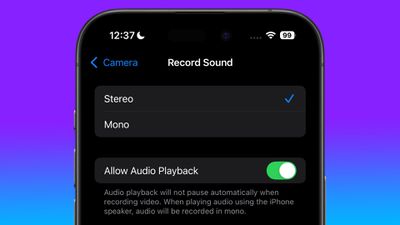
allow audio playback camera setting
In previous versions of iOS, shooting in Video mode in the Camera app automatically pauses any playing audio including music and podcasts. This behavior is based on the assumption that you don't want any sound coming out of your iPhone's speakers to be picked up on the video recording, but it's no good if you want to play a soundtrack to accompany whatever you're shooting.

One way to get around this is to use the QuickTake method of recording video in Photo mode, introduced in iOS 13, which allows any audio playback to continue during shooting. The only issue is that QuickTake records in lower quality than Video mode is capable of.

But that won't matter soon, because iOS 18 lets you control what happens to audio playback in dedicated Video mode, thanks to a new Allow Audio Playback toggle. "Audio playback will not pause automatically when recording video," notes Apple under the setting. "When playing audio using the iPhone speaker, audio will be recorded in mono."

iPhone users can look forward to several new features when iOS 18 arrives in the fall, around mid-September, with new customization options, generative AI features, Siri improvements, and more. For details on everything that's new, be sure to check out our dedicated iOS 18 roundup.


Related Forums: iOS 18, iPadOS 18

Popular Stories

iCloud iPhone 17 Pro

iPhone Users Who Pay for iCloud Storage Get Two New Perks on iOS 27

Thursday July 2, 2026 6:10 am PDT by
If you pay for certain iCloud+ storage plans beyond the 5GB that Apple offers for free, you will receive two more perks on iOS 27 at no additional cost. A summary of the two new iCloud+ perks on iOS 27:Increased daily usage limits for some new Apple Intelligence features, including image generation in the revamped Image Playground app. HomeKit Secure Video cameras receive generated video...
Apple Event Logo

Apple Just Released a New Product

Thursday July 2, 2026 8:04 am PDT by
Apple's first product release of summer 2026 occurred this week, but do not get too excited, as it is merely the Beats Solo Buds in a new color. Beats Solo Buds are now offered in orange through Best Buy in the U.S., with availability set to expand to 7-Eleven stores in Japan on July 4. Apple already offered orange Solo Buds in India for free with the purchase of an iPhone 15 or iPhone 15 ...
iPhone 4 on Black Feature

Apple Facing One of Its Worst Leaks Since the iPhone 4

Thursday July 2, 2026 9:53 am PDT by
Apple supplier Tata Electronics recently suffered a cyberattack that resulted in thousands of confidential files being published on the dark web, and this reportedly included some photos and documents related to the upcoming iPhone 18 Pro. We have elected not to share any of the leaked photos in this story due to the illegal nature in which they were obtained, but they can easily be found...

Top Rated Comments

0-0 Avatar
25 months ago
Now we need iOS 18 to allow for multiple audio simultaneous playback.
Score: 18 Votes (Like | Disagree)
ghostface147 Avatar
25 months ago

Can someone explain this is kindergarten language. LOL.

If i'm recording a video, it's going to pick up sound. Unless i'm missing something
Put a song on, then put your camera in video mode. Song is paused. This overrides that.
Score: 13 Votes (Like | Disagree)
25 months ago
Now can we block apps from pausing my music? Sick of Instagram, AliExpress, Tumblr, and the like turning my music off cos I scrolled past a video thumbnail when the video wasn't even playing.
Score: 7 Votes (Like | Disagree)
maruyama Avatar
25 months ago

Why would you need this out of curiosity. I'm glad it doesn't let you do this. Hurts my brain on my Mac
In my experience, the biggest use case is where you have music playing in the background and you’re scrolling in Safari. Just scrolling a muted video into view will take over the audio, stopping your music. If you’re scrolling on X Twitter, where there’s a lot of videos you’re scrolling past, it’s maddening! It basically makes it impossible to listen to music while using certain sites in Mobile Safari.
Score: 5 Votes (Like | Disagree)
25 months ago
I always thought this was some kind of copy protection/analog hole thing.
Score: 5 Votes (Like | Disagree)
TheGhostWalker Avatar
25 months ago

Now we need iOS 18 to allow for multiple audio simultaneous playback.
Why would you need this out of curiosity. I'm glad it doesn't let you do this. Hurts my brain on my Mac
Score: 2 Votes (Like | Disagree)