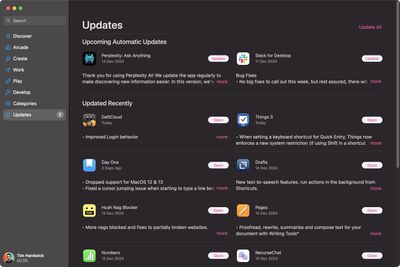
Apple has addressed a longstanding user frustration in macOS Sequoia by fixing how App Store update notifications function. As spotted by TidBits' Adam Engst, the improvement allows you to directly access the Updates screen by clicking anywhere on the notification, streamlining the software update process.
Previously, clicking on App Store update notifications in macOS 12 Monterey and later versions produced no response, while earlier versions would only open the App Store to its main screen rather than the Updates section. This behavior required you to manually navigate to the Updates tab, adding unnecessary steps to a routine maintenance task.
Thankfully, the enhanced notification behavior in macOS Sequoia now takes you directly to the Updates screen when clicking the notification. From there, you can choose to update individual apps or use the Update All button to install all available updates.
It's a welcome quality-of-life improvement, but similar notification functionality issues persist over on iOS, such as the software update notification that makes it look as if there's no way to opt out of the update and that you can only decide when it will happen.
Bloomberg's Mark Gurman has high expectations for Apple's first foldable iPhone.
In his Power On newsletter today, he said the foldable iPhone will be "the most significant overhaul in the iPhone's history."
"iPhone 4, iPhone 6 and iPhone X were clearly a big deal, but this is a whole new design," he said.
Like Samsung's Galaxy Z Fold 7, the foldable iPhone will reportedly open up like ...
iOS 26.5 is now available for developers, and while it doesn't include any new Siri capabilities, there are some major changes for the European Union, and smaller tweaks for features available worldwide.
Suggested Places
In the Maps app, there's a new "Suggested Places" feature that recommends locations to visit based on trending places nearby and recent searches. When Apple launches ads in ...
Tuesday March 31, 2026 10:36 am PDT by Joe Rossignol
Apple today added the MacBook Air (13-inch, 2017) to its "vintage" products list, meaning the device is now only eligible for repairs at Apple Stores and Apple Authorized Service Providers if parts remain available.
The MacBook Air (13-inch, 2017) was the final MacBook Air model released before Apple redesigned the laptop and gave it a Retina display in 2018.
Apple also added all iPad...
Bloomberg's Mark Gurman has high expectations for Apple's first foldable iPhone.
In his Power On newsletter today, he said the foldable iPhone will be "the most significant overhaul in the iPhone's history."
"iPhone 4, iPhone 6 and iPhone X were clearly a big deal, but this is a whole new design," he said.
Like Samsung's Galaxy Z Fold 7, the foldable iPhone will reportedly open up like ...
iOS 26.5 is now available for developers, and while it doesn't include any new Siri capabilities, there are some major changes for the European Union, and smaller tweaks for features available worldwide.
Suggested Places
In the Maps app, there's a new "Suggested Places" feature that recommends locations to visit based on trending places nearby and recent searches. When Apple launches ads in ...
Tuesday March 31, 2026 10:36 am PDT by Joe Rossignol
Apple today added the MacBook Air (13-inch, 2017) to its "vintage" products list, meaning the device is now only eligible for repairs at Apple Stores and Apple Authorized Service Providers if parts remain available.
The MacBook Air (13-inch, 2017) was the final MacBook Air model released before Apple redesigned the laptop and gave it a Retina display in 2018.
Apple also added all iPad...