

ESR Launches $30 Apple Pencil Alternative With Find My - MacRumorsOpen MenuShow RoundupsShow Forums menuVisit ForumsOpen Sidebar
Skip to Content

ESR Launches $30 Apple Pencil Alternative With Find My

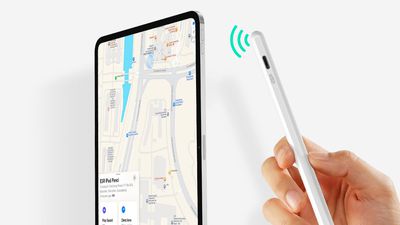
Accessory maker ESR this week introduced the Geo Digital Pencil, a low-cost Apple Pencil alternative that has support for Apple's Find My functionality.
esr geo pencil
Priced at $30, the Geo Digital Pencil connects to an iPad with Bluetooth, and it supports writing, drawing, sketching, and more much like the ‌Apple Pencil‌. The Geo Digital Pencil connects to an ‌iPad‌ using a magnetic attachment to keep it from being lost, but charging is done using a USB-C charger.

Supported features include tilt sensitivity and shortcuts, but pressure sensitivity, ‌Apple Pencil‌ hover, and other ‌Apple Pencil‌ exclusive features are not available.

‌Find My‌ integration allows the Geo Digital Pencil to be located using the Items tab in the ‌Find My‌ app on any Apple device, with options for playing a sound, marking an item as lost, and seeing the last known location of the pencil when Bluetooth is unavailable.

ESR says the Geo Digital Pencil is compatible with all 11-inch iPad Pro models, the third-generation iPad Air and later, the third-generation 12.9-inch ‌iPad Pro‌ and later, the iPad mini 5 and later, and the ‌iPad‌ 6 and later. It is available for purchase from Amazon, and it is priced at $30.
magmouse esr
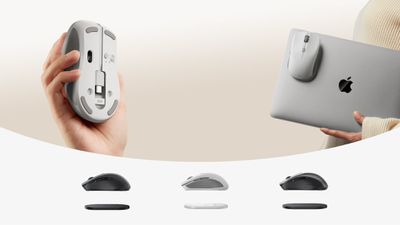
ESR has also introduced a case designed for the iPhone 16 models with Camera Control button and the MagMouse, a mouse with a built-in USB-C cable that can attach magnetically to an ‌iPad‌ or Mac for storage purposes.

Top Rated Comments

mansplains Avatar
16 months ago

That doesn't charge wirelessly.

The Geo Digital Pencil connects to an iPad using a magnetic attachment to keep it from being lost, but charging is done using a USB-C charger.
This isn’t obfuscated
Score: 11 Votes (Like | Disagree)
16 months ago
Nice. Perfect for the kid. I’m surprised there aren’t more 3rd party pencil options.
Score: 9 Votes (Like | Disagree)
16 months ago
Correction: ESR launches a stylus that looks like an Apple Pencil but does almost nothing the Apple Pencil can do.
Score: 8 Votes (Like | Disagree)
16 months ago
God people here are insane and love giving Apple their money.

If you want an Apple Pencil Pro, this is obviously not for you. But it is very comparable to an Apple usb-c pencil (better even) while being significantly less expensive. It’s a good option for a lot of people who are very casual (or occasional) pencil users.

Im using a $12 3rd party pencil right now. The first one I got didn’t write well on my iPad mini 7 without skipping but the second one works like a charm and feels exactly like my old Apple Pencil 1. I don’t think anyone should be buying the usb-c Apple Pencil. Get the Apple Pencil pro if you care about all the fancy features, or get a 3rd party pencil like this one by ESR which is probably going to be slightly nicer than the cheaper one I got.
Score: 5 Votes (Like | Disagree)
AppliedMicro Avatar
16 months ago
Looks like the Goojodoq GD14 that’s been available for a while.

Correction: ESR launches a stylus that looks like an Apple Pencil but does almost nothing the Apple Pencil can do.
It does most of the things the Apple Pencil does.
Save for the pressure sensitivity - though that’s overrated to not really useful for mere note-taking.

Digital artists should get the Pencil Pro (if compatible).
Most other people will be well-served with a good-enough third-party Pencil at a fraction of Apple‘s price.

Plus, they won‘t be subject to Apple‘s whims on making their accessories with future iPad generations.
Prepare to write off your Magic Keyboards and Pencils once Apple yet again changes a few magnets.
Score: 5 Votes (Like | Disagree)
AppliedMicro Avatar
16 months ago

What makes the Apple Pencil unique is the pressure sensitivity, squeeze capability, tapping, automatic pairing
True but largely pointless for simple notetaking.
I need an accurate stylus to write - and few other bells or whistles.


squeeze capability
Only on the „Pro“ pencil.


automatic pairing
My third-part pencil does not even require Bluetooth pairing.
You just turn on and begin to write (with palm rejection).
Score: 4 Votes (Like | Disagree)

















