iOS 18.4 Includes a Small But Useful Change for CarPlay - MacRumorsOpen MenuShow RoundupsShow Forums menuVisit ForumsOpen Sidebar
Skip to Content

iOS 18.4 Includes a Small But Useful Change for CarPlay

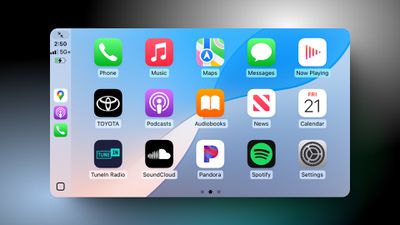
The first beta of iOS 18.4 is now available, and it includes a small but useful change for CarPlay.
ios 18 4 carplay
As we noted in our list of iOS 18.4 features, CarPlay now shows a third row of icons, up from two rows previously. However, this change is only visible in vehicles with a larger center display. For example, a MacRumors Forums member noticed the change in a Toyota Tundra, which can be equipped with up to a 14-inch screen.

In our testing, CarPlay still showed two rows of four icons in a Honda Civic with a 9-inch screen.

While this is only a minor change, CarPlay showing more icons when possible is a nice quality-of-life improvement for Apple's phone mirroring system, allowing drivers to quickly access more apps with less swiping between pages.

Following beta testing, iOS 18.4 is expected to be released to the public in early April.

Related Roundup: CarPlay

Popular Stories

CarPlay Siri AI

Apple Announces New CarPlay Features on iOS 27, Including Video Apps

Monday June 8, 2026 4:17 pm PDT by
Back at WWDC 2025, Apple revealed that it was planning to allow CarPlay users to watch video via AirPlay in their vehicles while they are not driving, but we did not hear many specific details about this functionality until now. In a WWDC 2026 video aimed at developers, Apple said the CarPlay video feature is available in new vehicles that support it. When playing a video in an iPhone app...
CarPlay Siri AI

Seven iOS 27 CarPlay Features You'll Actually Notice

Tuesday June 9, 2026 4:51 am PDT by
WWDC 2026 gave us iOS 27, and most of the attention was on the rebuilt next-generation Siri. But CarPlay also picked up a handful of changes that should make your daily commute a lot more interesting. Here's what's coming: Video apps: Developers can build CarPlay apps that let users browse and play video on the car's display, while apps that support AirPlay video can stream content from ...
macos golden gate wallpaper

Apple Unifies iOS 27, macOS, and Even CarPlay Wallpapers for First Time

Tuesday June 9, 2026 4:44 am PDT by
Apple has taken a new approach to its stock wallpapers with iOS 27 and macOS 27 Golden Gate, using variations of the same artwork across all platforms for the first time. In previous years, most platforms shipped with their own distinct wallpaper. This year, they all share a design called "Celosia," featuring sweeping, overlapping curves and soft shadows inspired by layered flower petals or...

Top Rated Comments

WarmWinterHat Avatar
18 months ago
That's cool, but I can't find enough useful CarPlay apps to fill up one screen.
Score: 25 Votes (Like | Disagree)
18 months ago

So much wasted space on the current carplay layout with the large icons and huge gaps between the icons...
It's spaced out for a reason. You're reaching out a fair distance with one hand in a vehicle that may or may not be bouncing around, and often only looking at it for a second or two. All that points to a design with less information density and more visual and physical separation between UI elements.
Score: 20 Votes (Like | Disagree)
Kobayagi Avatar
18 months ago
Why is this not something that is customizable by the user?

All these cars have different screen sizes and orientations. Why not let users add more columns and/or rows and change their size too? So if you just want a few big ones that are easier to press or more if that's your thing...

It's crazy how little customization Apple allows on things that could actually make it more user friendly and more importantly: safe, since you're using the screen while driving.
Score: 14 Votes (Like | Disagree)
18 months ago
Find My should be on Car Play. How it isn’t is baffling.
Score: 14 Votes (Like | Disagree)
18 months ago

What do the arrows in the upper left corner do?
In my Lexus/Toyota it makes the screen smaller by a little so the car toolbar will always be visible even if CarPlay is up. (see example)

Attachment Image
Score: 9 Votes (Like | Disagree)
SkippyThorson Avatar
18 months ago

Why would you need that? Your phone is literally right there in the car with you, and if you need to track down your AirPods or whatever, you can easily pick it up when you're stopped and do just that. There are already waaayyy too many people pulling boneheaded distracted driving crap without Apple putting toys on the big shiny screen on the dashboard.
Here's a primary example:
With a couple of taps, you're in Find My, select your out of town relative, request directions.
Boom, you're on the highway to Grandmother's house.

Here's another:
Where does my AirTag for my wallet say it is?
Oh crap, that little shop we hit after the restaurant.
Tap, directions back to my wallet without an address.

Just because something doesn't work for you, doesn't mean it doesn't work for someone else.
The point of CarPlay is to leave the phone down in the console or in your pocket.
If you can pick up your phone for all of those features, what is CarPlay's purpose at all then; by your logic?
Score: 6 Votes (Like | Disagree)