iOS 26 Lets You Know How Long It'll Take Your Battery to Charge
iOS 26 adds a new feature that lets you know how long it'll take your battery to charge when it's plugged in or on a wireless charger, with the new option allowing you to better optimize your charging practices.
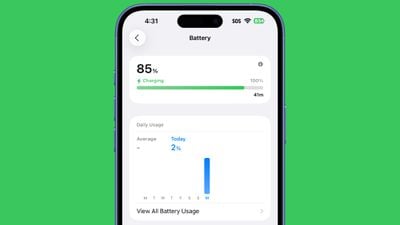
You'll be able to determine how fast a charger is charging your device based on the estimated time to a full charge. If you're charging from a slow connection or a Qi-based charger limited to 5W, the setting will let you know that you're connected to a slow charger.
You can see the time remaining until a full charge in the Battery section of the Settings app. Apple doesn't appear to have added a new widget for the feature as of yet, but it could come in the future. You will see the estimated time remaining for charging on your Lock Screen.
An estimate of the time it takes a device to charge used to be available on the Mac, but Apple removed it long ago.
The iPhone battery charging estimates are available to developers in iOS 26 right now, with Apple set to roll out the new update to everyone this fall.
Popular Stories
Bloomberg's Mark Gurman has high expectations for Apple's first foldable iPhone.
In his Power On newsletter today, he said the foldable iPhone will be "the most significant overhaul in the iPhone's history."
"iPhone 4, iPhone 6 and iPhone X were clearly a big deal, but this is a whole new design," he said.
Like Samsung's Galaxy Z Fold 7, the foldable iPhone will reportedly open up like ...
iOS 26.5 is now available for developers, and while it doesn't include any new Siri capabilities, there are some major changes for the European Union, and smaller tweaks for features available worldwide.
Suggested Places
In the Maps app, there's a new "Suggested Places" feature that recommends locations to visit based on trending places nearby and recent searches. When Apple launches ads in ...
New images of an alleged iPhone 18 Pro prototype and screen protectors have emerged from multiple sources, adding weight to earlier reports that Apple plans to significantly shrink the Dynamic Island later this year.
An X user called @earlyappleleaks recently shared an image purportedly showing a prototype iPhone 18 Pro with a noticeably smaller Dynamic Island. In the picture, the flashlight ...
Popular Stories
Apple has released iOS 26.4, the fourth major point update for iPhones since iOS 26 was released in September, and there are at least 14 notable changes and improvements worth checking out. We've rounded them up below.
The update doesn't have the enhanced Siri feature set we were hoping for – that's likely to arrive in iOS 27 – but there are quite a few other new additions included. They ...
Apple today released iOS 26.3.1 and iPadOS 26.3.1, minor updates to the iOS 26 and iPadOS 26 operating systems. The software comes three weeks after Apple released iOS 26.3 and iPadOS 26.3.
The new software can be downloaded on eligible iPhones and iPads over-the-air by going to Settings > General > Software Update.
According to Apple's release notes, the update adds support for the new...
Apple today seeded the fourth betas of upcoming iOS 26.4 and iPadOS 26.4 updates to developers for testing purposes, with the software coming a week after Apple provided the third betas to developers.
Registered developers can download the betas from the Settings app on the iPhone or iPad by going to the General section and selecting Software Update.
iOS 26.4 and iPadOS 26.4 add multiple...