

Zagg Launches 'Pro Keys Connect' iPad Keyboard Case - MacRumorsOpen MenuShow RoundupsShow Forums menuVisit ForumsOpen Sidebar
Skip to Content

Zagg Launches 'Pro Keys Connect' iPad Keyboard Case

Zagg today announced the launch of the Pro Keys Connect, a new keyboard case that's designed for the iPad, iPad Air, and iPad Pro. The Pro Keys Connect is able to interface with an ‌iPad‌ using USB-C, so a Bluetooth connection is not required and pairing is automatic.
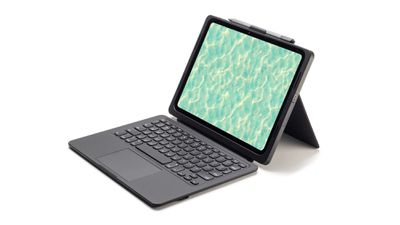
zagg pro keys connect
There is an integrated trackpad, plus an extra USB-C port to connect a mouse or flash drive to expand the available functionality. The trackpad supports full iPadOS gesture controls, so users can swipe, scroll, click, and navigate like they can using Apple's own Magic Keyboard.

The Pro Keys Connect offers protection for an ‌iPad‌ along with adding a keyboard, and Zagg says that it will protect an ‌iPad‌ from drops of up to 6.6 feet. There is an included adjustable kickstand to change the angle of the ‌iPad‌, and the keyboard can be detached so the accessory can be used as a case. There's also a stylus holder that works with the Apple Pencil.

The keyboard was designed with KeyLock Technology to keep keys in place, and Zagg designed a new key shape with indented, backlit keys for a more comfortable typing experience even in low light situations.

Zagg's Pro Keys Connect is compatible with the M2 and M3 ‌iPad Air‌ models, the M4 ‌iPad Pro‌ models, and the 10th-generation ‌iPad‌ with A16 chip.

Pricing ranges from $130 to $150, and the Zagg Pro Keys Connect can be purchased starting today from the Zagg website in the U.S. It will be available on Amazon starting in October.


Tag: Zagg

Top Rated Comments

Mockletoy Avatar
27 weeks ago

What's wrong with Bluetooth at this range?
Also, I assume that the 3 pin connector on the back of the iPad Pro can only be used by apple?
The Logitech Combo Touch line uses the POGO pins just like the Magic Keyboard and has for years.

It’s super simple and efficient: no pairing, no charging, no flaky/dropped connections, no timeouts or slow wake times, no turning keyboards on and off.

The keyboard attaches and detaches instantly and just works every time.
Score: 6 Votes (Like | Disagree)
27 weeks ago
Apple has always got trackpads right. I've used several PC laptops and found the trackpads just infuriating to use. Wrong texture, poor sensitivity.

How do these third-party trackpads stack up against Apple trackpads?
Score: 3 Votes (Like | Disagree)
miamialley Avatar
27 weeks ago
Looks horrendous.
Score: 2 Votes (Like | Disagree)
jjudson Avatar
27 weeks ago

The Logitech Combo Touch...
I tried this one and liked it -- for the most part. But the trackpad action was maddening sometimes. I went with the Magic Keyboard and it has it's own set of maddening quirks.

It seems there's no real perfectly-designed keyboard for the iPad. You gotta learn to live with things for the convenience on all of the brands...
Score: 2 Votes (Like | Disagree)
jimmysalg Avatar
27 weeks ago

The Logitech Combo Touch line uses the POGO pins just like the Magic Keyboard and has for years.

It’s super simple and efficient: no pairing, no charging, no flaky/dropped connections, no timeouts or slow wake times, no turning keyboards on and off.

The keyboard attaches and detaches instantly and just works every time.
Yes, I have one and love it! And its lighter than the apple one, PLUS its an actual case that protects the iPad
Score: 1 Votes (Like | Disagree)
27 weeks ago
Though I am not planning to get one, good to see third party keyboards with support for trackpad. Seems like a good product.
Score: 1 Votes (Like | Disagree)

















