Apple Expands Spotlight Clipboard Settings in macOS Tahoe 26.1
Apple quietly added a small but notable enhancement to Spotlight in macOS Tahoe 26.1, which was released on Monday. The update introduces new clipboard history controls for Spotlight, allowing users to decide how long copied items remain accessible in search results.
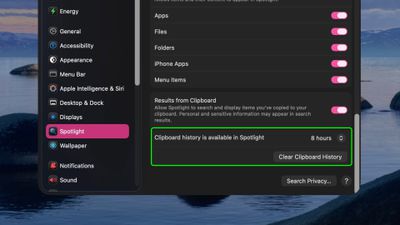
Previously, Spotlight could optionally retain clipboard contents for up to eight hours, but the latest update expands that flexibility with three options – 30 minutes, 8 hours, or 7 days. There's also a new "Clear Clipboard History" button in System Settings ➝ Spotlight, giving users the ability to manually wipe stored clipboard data without having to wipe Spotlight search history wholesale.
The changes should be welcomed by anyone wanting finer control over how long potentially sensitive information is retained by Spotlight, and it puts the feature more on par with third-party clipboard management apps. Apple did not mention the change in its macOS 26.1 release notes, suggesting it may be just one of several under-the-radar refinements to macOS Tahoe 26.
Popular Stories
Bloomberg's Mark Gurman has high expectations for Apple's first foldable iPhone.
In his Power On newsletter today, he said the foldable iPhone will be "the most significant overhaul in the iPhone's history."
"iPhone 4, iPhone 6 and iPhone X were clearly a big deal, but this is a whole new design," he said.
Like Samsung's Galaxy Z Fold 7, the foldable iPhone will reportedly open up like ...
iOS 26.5 is now available for developers, and while it doesn't include any new Siri capabilities, there are some major changes for the European Union, and smaller tweaks for features available worldwide.
Suggested Places
In the Maps app, there's a new "Suggested Places" feature that recommends locations to visit based on trending places nearby and recent searches. When Apple launches ads in ...
Apple today added the MacBook Air (13-inch, 2017) to its "vintage" products list, meaning the device is now only eligible for repairs at Apple Stores and Apple Authorized Service Providers if parts remain available.
The MacBook Air (13-inch, 2017) was the final MacBook Air model released before Apple redesigned the laptop and gave it a Retina display in 2018.
Apple also added all iPad...
Popular Stories
Apple today released macOS Tahoe 26.3.1, a minor update to the macOS Tahoe operating system that came out last September. macOS Tahoe 26.3.1 comes three weeks after Apple launched macOS Tahoe 26.3.
Mac users can download the new software by opening up the System Settings app and navigating to the Software Update section.
According to Apple's release notes for the update, it adds support...
Apple today provided public beta testers with the third release of an upcoming macOS Tahoe 26.4 update for testing purposes. The public beta comes a week after Apple seeded the second beta.
After signing up for beta testing on Apple's beta site, public beta testers can download the updates using the Software Update section in the settings app for each update.
macOS Tahoe 26.4 includes...
Apple today provided the fourth beta of an upcoming macOS Tahoe 26.4 update to developers for testing purposes, with the update coming a week after Apple seeded the third beta.
Developers can download the macOS Tahoe 26.4 update by opening up the System Settings app, selecting the General category, and then choosing Software Update. Beta Updates will need to be enabled, and a free developer...