macOS 27 Golden Gate Reverses a Divisive Tahoe Design Choice
In macOS 27 Golden Gate, Apple has removed many of the menu item icons that are so prevalent throughout macOS 26 Tahoe, as spotted by Nikita "Tonsky" Prokopov (via Daring Fireball). The developer shared before-and-after screenshots on Mastodon to evidence the reversal.
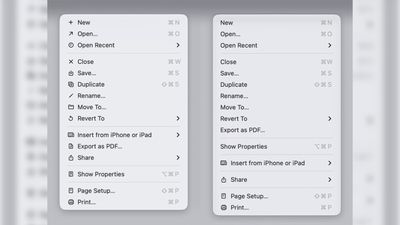
Menu item icons in macOS 26 (left) vs. macOS 27 (image: Nikita Prokopov)
Tahoe was the first version of macOS to place a small icon next to nearly every entry in the menu bar across Apple's apps, but the change drew swift criticism from designers and developers. Many of the icons are inconsistent and often difficult to understand on their own, with different Apple apps showing different icons for the same menu items.
The third-party developer pushback was strong enough that some even adopted open-source code provided by NetNewsWire's Brent Simmons to switch the icons off by default.
In Golden Gate though, they're gone – or only used where genuinely useful. Apple has also revised its Human Interface Guidelines to tell developers to use menu item icons "sparingly and with purpose," reserving them for common actions, file system locations, connected devices, and similar cases.
macOS 27 is currently in developer beta, with a public beta to arrive next month, followed by a general release in the fall.
Popular Stories
Apple today released macOS Golden Gate 27.2, the first major update to the macOS 27 operating system that launched in September.
Mac users can download macOS Golden Gate 27.2 by opening up the System Settings app and using the Software Update option.
macOS Golden Gate 27.2 overhauls the brightness and volume sliders, plus it expands Siri AI to new languages including French, Japanese,...
Upgrading to macOS 27 no longer removes an existing Rosetta installation, according to Apple's enterprise release notes for macOS 27.2. Previously, upgrading to macOS 27 removed existing installations of Rosetta, the translation tool that lets Intel-based apps run on Apple silicon Macs.
macOS 27 remains the final release with full Rosetta support. Apple plans to phase out general-purpose...
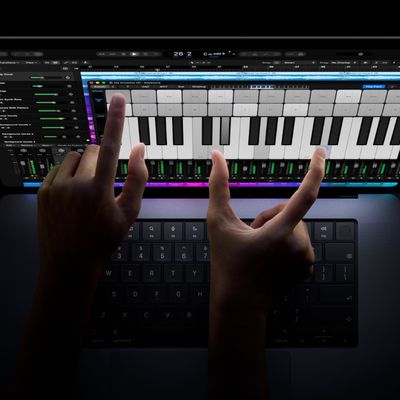
The new MacBook Pro models with OLED displays have an accessibility setting that allows you to turn off touch input entirely, according to MacStories editor-in-chief Federico Viticci.
He also said there is an option to turn on pinch-to-zoom functionality across the macOS Golden Gate...