How to See Which Mac Apps Will Stop Working After macOS Golden Gate - MacRumorsOpen MenuShow RoundupsShow Forums menuVisit ForumsOpen Sidebar
Skip to Content

How to See Which Mac Apps Will Stop Working After macOS Golden Gate

Apple is phasing out support for Rosetta 2, which is a feature that allows Intel-based apps to run on Apple silicon Macs. Rosetta is going to stop working for most apps in macOS 28, and when that happens, apps that use it will stop working.
macos 27 rosetta apps support
Apple began warning customers and companies about the upcoming sunsetting of Rosetta with macOS Tahoe, and the warnings go even further in macOS Golden Gate.

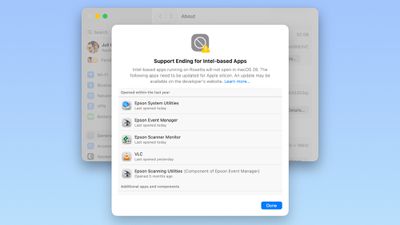
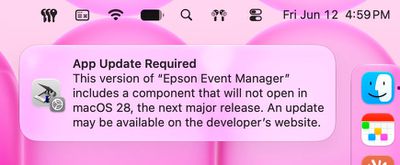
If you have apps that still use Rosetta, you'll get a warning every time you restart your Mac or open an Intel app. ‌macOS Golden Gate‌ also adds a new list where you can check which apps are going to stop working in the future.

You can get to the list by going to Settings > General > About > Intel-Based apps and clicking on the "Details" option.

The interface lists all of the apps that are going to stop working, giving Mac users plenty of time to contact app developers or find alternative apps.
macos 27 rosetta warning
‌macOS Golden Gate‌ does not install Rosetta automatically, so if you still have these outdated Intel apps, there will be a short installation when you try to open one for the first time after upgrading to Golden Gate. Authentication plugins and other pre-login utilities that require Rosetta fail to load in ‌macOS Golden Gate‌ because of the limitation.

Apple designed Rosetta to help users and developers transition from Intel to Apple silicon, but Apple phased out the last Intel-based Mac years ago. Apple only sells Apple silicon Macs, and it is slowly ending support for Intel-based models.

‌macOS Tahoe‌ was the final version of macOS available for Intel Macs, and ‌macOS Golden Gate‌ requires a Mac with an Apple silicon chip.

Related Roundup: macOS Golden Gate

Popular Stories

macOS 27 on MacBook Pro

macOS 27 Will Mark the End of an Era

Tuesday May 26, 2026 7:16 am PDT by
During its Platforms State of the Union segment at WWDC 2025, Apple revealed that macOS 26 Tahoe is the final major macOS version for Intel-based Macs. The upcoming macOS 27 release will be compatible with Apple silicon Macs only, meaning that you will need a Mac with an M-series chip or a MacBook Neo with an A18 Pro chip in order to install the software update. Apple will unveil macOS 27...
macOS 27 Feature Blue

macOS Emerald to macOS Big Bear: What Will Apple Name macOS 27?

Tuesday June 2, 2026 8:20 am PDT by
Every year heading into WWDC, one thought on many Mac fans' minds is what Apple will choose as the name for the next version of macOS. The tradition dates all the way back to the beginning of Mac OS X with big cat names like Leopard, and Apple eventually shifted to California-themed names with the unveiling of OS X Mavericks. Apple has yet to announce the name for macOS 27, but macOS Emerald ...
macOS 27 on MacBook Pro

Apple Says macOS 27 Won't Be Compatible With These Macs

Wednesday June 3, 2026 8:29 am PDT by
During WWDC 2025, Apple revealed that macOS 26 Tahoe would be the final major macOS version for Intel-based Macs. macOS 27 will be compatible with Apple silicon Macs only, meaning that you will need a Mac with an M-series chip or a MacBook Neo with an A18 Pro chip in order to install the software update. Apple will unveil macOS 27 during its WWDC 2026 keynote this Monday, June 8, and the...

Top Rated Comments

13 hours ago at 02:29 pm
that's it, I'm switching to windows
Score: 11 Votes (Like | Disagree)
13 hours ago at 02:28 pm

So this is where Apple forces me to buy a Windoze machine because I can't carry on using the Mac version of Garmin Basecamp.
You can carry on without updating the OS for quite some time, or you can keep an older mac around to run software that hasn't had an update in over a half a decade.
Score: 9 Votes (Like | Disagree)
12 hours ago at 02:50 pm
Install a Mac VM of MacOS 26/27 with UTM and leave the apps in it.
Score: 6 Votes (Like | Disagree)
paulcons Avatar
12 hours ago at 02:36 pm

End of Crossover unless they create an ARM native app.
WINE might have a similar fate...
Score: 5 Votes (Like | Disagree)
Digital Dude Avatar
11 hours ago at 04:14 pm
Well, this thread compelled me to drag out old Betsy, one of the earliest Intel MacBook Pros. Ahh, those were the good old days. 💻

Attachment Image
Score: 4 Votes (Like | Disagree)
Yr Blues Avatar
12 hours ago at 02:37 pm
Someday someone will create an OS that builds upon itself instead of abandoning itself.
Score: 4 Votes (Like | Disagree)