

iOS 27 Revamps App Icons With Sharper Liquid Glass Layers - MacRumorsOpen MenuShow RoundupsShow Forums menuVisit ForumsOpen Sidebar
Skip to Content

iOS 27 Revamps App Icons With Sharper Liquid Glass Layers

Apple has redesigned its first-party app icons for the second year running, with iOS 27 addressing blurriness complaints about iOS 26 by integrating additional layers of Liquid Glass directly into the icon artwork itself.
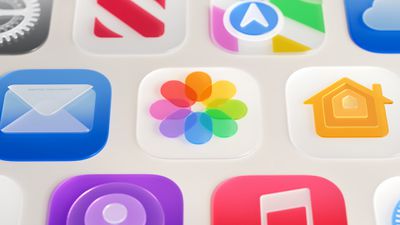
Photos App Icon Liquid Glass
When Apple introduced Liquid Glass with ‌iOS 26‌ last year, it redesigned its entire lineup of first-party app icons to give them a layered glass look with subtle depth. The approach drew criticism from some users who found the results blurry, and in some cases, a heavy specular sheen sat over the icon artwork, obscuring detail and giving icons a washed-out appearance.

The shimmering motion effect that animated icons dynamically as the device was tilted also caused a widely reported optical illusion, with asymmetric highlights in icon corners tricking the eye into reading icons as slanted. With ‌iOS 27‌, Apple is taking the icon design further rather than rolling it back.

The core change to how icons are constructed is the addition of multiple distinct Liquid Glass layers built into each icon's artwork, rather than the thick glass look applied uniformly over the top in ‌iOS 26‌. Apple says the new rendering pipeline adds more visual separation between layers, resulting in sharper edges and more defined refractions.

In practice, artwork is now considerably more visible and detailed with higher contrast and greater definition, with the glass look functioning as a refined finish rather than a dominant overlay. The refraction effects between layers are also selectively applied.

The motion-based shimmer has also been significantly reworked. The gyroscopic specular highlight effect introduced with ‌iOS 26‌ appears to have been removed entirely in the first ‌iOS 27‌ developer beta. Icons still feature highlights around their edges, now positioned at the top and bottom, but they no longer shift with device movement or produce the tilting illusion, and are much subtler overall.

Icon Composer, Apple's dedicated app icon design tool, has been updated to support building icons from multiple layers of Liquid Glass. New annotation features let developers add refraction effects or fine-tune content effects, while an interactive preview shows how a designed icon will render.

The updated icons are part of broader Liquid Glass refinements Apple announced at WWDC 2026, which also include a new system-wide transparency slider and improved material diffusion for better readability. For a full breakdown of all the Liquid Glass changes in ‌iOS 27‌, see our dedicated article.

Related Roundups: iOS 27, iPadOS 27, macOS Golden Gate

Popular Stories

iOS 27 on iPhone 17 1

iOS 27's Biggest New Feature Has 'Beta' Label

Tuesday May 19, 2026 12:12 pm PDT by
Apple has given the more personalized version of Siri a "beta" label on internal versions of iOS 27, according to Bloomberg's Mark Gurman. In his Power On newsletter over the weekend, Gurman said there is a "strong chance" that the revamped Siri will continue to have a "beta" label in the iOS 27 developer beta next month, and potentially even in the final version released to the public....
Apple Says iOS 27 Can Automatically Add Captions to Your Personal iPhone Videos Feature

Apple Says iOS 27 Can Automatically Add Captions to Your Personal iPhone Videos

Wednesday May 20, 2026 9:46 am PDT by
Apple this week previewed new accessibility features that are coming later this year, and one is particularly notable: automatic captions for personal videos. For videos that do not already have captions, Apple said a new on-device speech recognition model can automatically generate them for spoken audio. According to Apple, this feature will be available for videos that you record on your...
iOS 27s New AI Voice Control Feature Hints at Major Siri Upgrade Feature

New iOS 27 Feature Hints at Major Siri Upgrade Coming Soon

Wednesday May 20, 2026 12:20 pm PDT by
Every May, Apple previews new accessibility features coming to devices like the iPhone, iPad, and Mac. The announcement typically occurs a few days before Global Accessibility Awareness Day, and it offers a glimpse into what will be included in the next major releases of Apple's software platforms, such as iOS, iPadOS, and macOS. This year, one of the new capabilities shown off by Apple is...

Top Rated Comments

MinimeJer05 Avatar
2 days ago at 09:23 am
Hopefully some additional tweaking will be done in upcoming betas. Some of the apps (Maps) nailed this fluid Liquid Glass look, while others (Messages, Email) look worse in my opinion.
Score: 14 Votes (Like | Disagree)
Orizaba Avatar
2 days ago at 09:29 am
I do like the look of most of the new icons. The Safari icon, however, looks relatively unchanged since iOS 7. It looks a bit out of place compared to the rest of the aesthetic. Thoughts?
Score: 9 Votes (Like | Disagree)
2 days ago at 09:38 am
the icons look a lot better, but DB1 has over-sharpened edges. I hope they reduce the black border they’ve added between each layer of “glass”
Score: 6 Votes (Like | Disagree)
M4irmidnight Avatar
2 days ago at 09:46 am

I do like the look of most of the new icons. The Safari icon, however, looks relatively unchanged since iOS 7. It looks a bit out of place compared to the rest of the aesthetic. Thoughts?
I wish it broke free from the circle . Give me all blue like iOS 6.

Same with photos. Full flower lol
Score: 5 Votes (Like | Disagree)
Mike_Trivisonno Avatar
1 day ago at 04:33 am
Can we make icons look different from each other? Every icon looks the same, a small rounded box with a small icon of something vague and rounded.

It's like they have Bigfoot designing icons. Well meaning but, well....
Score: 3 Votes (Like | Disagree)
FeliApple Avatar
2 days ago at 03:17 pm
I agree with others, I like some of the icons better, some are worse, but honestly the icons in isolation (I’ve looked at a picture comparing them) are far better than the end result.

When you put them in the whole Liquid Glass interface it just falls apart for me.

The glassy buttons, the translucency, it’s just ugly to me.

Sure, you have tinted now, and I guess I’ll have to check out somebody’s device when 27 launches, and that alongside some of the icons may represent an improvement relative to 26… but I’m running 18 or lower everywhere.

I just can’t get past the whole Liquid Glass look, which I dislike, even if they’ve refined the icons (which for some cases, I agree).
Score: 3 Votes (Like | Disagree)
















