Apple today released new beta firmware for the AirPods Pro 2, AirPods Pro 3, AirPods 4, AirPods 5, and AirPods Max 2. The firmware has a build number of 9B5045a and is rolling out for developers and public beta testers.
There's no word on what's included in the firmware update because Apple doesn't offer notes for AirPods beta releases.
When the AirPods are connected to an iPhone, iPad, or Mac running iOS 26, iPadOS 26, or macOS 26 or later, there is a beta firmware option that can be accessed in the AirPods settings interface. Toggling on beta updates allows users to install the beta firmware.
Firmware updates can then be downloaded by connecting the AirPods to an Apple device and connecting them to power. It can take a few hours for new firmware to be installed because there is no software update option like there is for other Apple devices.
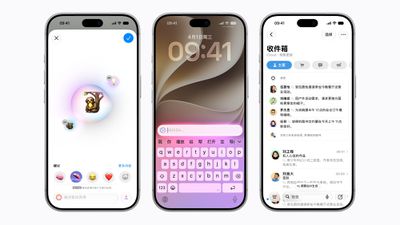
Select Apple Intelligence features are now available in China, with Apple testing the functionality in the iOS 27.3 beta. Developers in China can turn on Apple Intelligence after updating to the new software.
Apple Intelligence first launched in the United States with iOS 18.1, but Apple was not able to bring it to China until it partnered with Alibaba and won approval from Chinese regulators.
Apple Intelligence features like Siri, Writing Tools, and Visual Intelligence integrate Alibaba's Qwen model. Here's what's live:
Live Translation for Messages, FaceTime, and the Phone app. Live Translation also works with AirPods 4 with ANC, AirPods Pro 2, and later models.
Writing Tools for rewriting, proofreading, and summarizing text. With Qwen integration, users can also generate text.
Visual Intelligence for identifying objects, places, and more.
Clean Up in Photos for removing unwanted objects from images.
Natural language search and memory movie creation in Photos.
Email summaries, suggested smart replies, and priority emails in the Mail app.
Notification summaries, urgent notifications, and the Reduce Interruptions Focus mode.
Summaries for audio recordings in the Notes app.
Call transcripts in the Phone app, which are saved to the Notes app.
Type to Siri and more natural Siri responses.
Siri can relay requests to Qwen to give more in-depth answers.
Apple Intelligence in China does not include Siri AI, the Siri app, or the newer Apple Intelligence features in iOS 27.
Apple will likely release a public beta soon, allowing users in China with a compatible device to try the new features. We're expecting iOS 27.3 to launch in December.
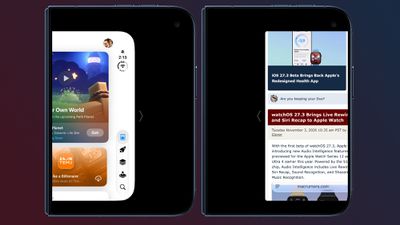
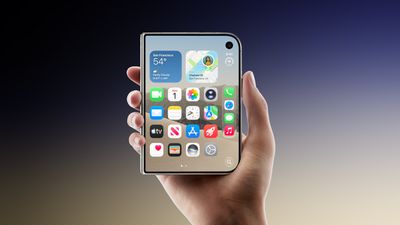
With today's iOS 27.3 beta, Apple expanded Reachability to the iPhone Duo. Reachability lets iPhone Duo users shift the content on the left or right side of the outer screen to make it easier to reach with a thumb.
Reachability can be turned on or off by going to Settings > Accessibility > Touch > Reachability. It is on by default after updating to the new software.
When the iPhone Duo is closed, a short swipe left on the left edge or a short swipe right on the right edge will shift the outer display's content left or right.
Apple is expanding what Siri AI can do in and across apps in iOS 27.3, which is available to developers as of today.
Siri can complete more complex tasks across Calendar, Files, Finder, Journal, Mail, Maps, Messages, Music, Notes, Photos, Preview, Reminders, Safari, Shortcuts, and Weather. You can ask Siri AI what you can do with each app to get more information on what's possible.
In Mail, for example, Siri can unsubscribe you from mailing lists and undo recently sent messages. In Weather, Siri can add locations to your weather list, or control weather notifications. In Safari, Siri can clear browsing history, manage tabs and windows, save articles to a Reading List, and close duplicate tabs. In Files, Siri can organize content, delete files you haven't accessed for a set period of time, and more.
Apple is also expanding Siri AI to Traditional Chinese, Vietnamese, Turkish, and Norwegian, and adding a Developer Preview that lets any developer integrate their app with Siri AI.
Apple says any app can bring its content and actions directly into Siri AI using App Intents. Siri AI can complete any custom actions developers implement, and there are now skills available for teaching Siri AI to combine several actions into a single experience.
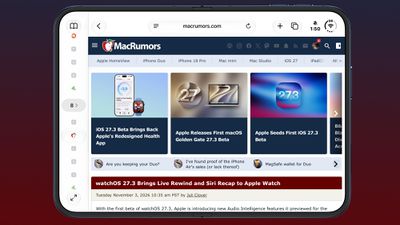
With iOS 27.3, iPadOS 27.3, and macOS Golden Gate 27.3, Apple is making major updates to Safari. The browser is getting a Vertical Tabs layout, which can be used instead of the standard horizontal tab bar. It's a change that pairs well with the iPhone Duo's larger display, but it is available across iPhone, iPad, and Mac.
Vertical Tabs are located on the left side of the display and use icons by default to save space, but there is an option to make the tab bar wider to show website titles as well. Vertical Tabs work with both Topics and Tab Groups to keep things organized. Topics are created when automatic Apple Intelligence tab sorting is turned on in iOS 27. Pinning tabs by dragging, quickly swapping between Tab Groups, and other features also continue to work.
The option to turn on Vertical Tabs is located in the Safari settings or in the View menu on Mac and iPad.
Apple is adding Adaptive Dark Mode for websites that don't have a dark mode design option by default. If you use Dark Mode and then browse to a website with a bright background color, Safari will offer an option to "Try" Adaptive Dark Mode.
After tapping Try, Safari renders a Dark Mode version of the page that makes the background darker, changes text contrast, inverts logos and graphics, recolors vector artwork, lifts raised surfaces, and rebalances layered shadows. Each website will be adapted based on what's needed to make it readable, so not every tweak is applied to every site. You can opt to turn Adaptive Dark Mode on for all sites or on a site-by-site basis after using it.
If a site has a native dark mode or has a dark design already, Adaptive Dark Mode won't activate. Developers can also add a tag that causes Safari to ignore Adaptive Dark Mode and show the website as the developer intended.
Along with these visual changes, Apple is adding new Siri AI actions. Siri can take action on tabs and windows, sorting, moving, closing, and arranging in Tab Groups. Siri also has control over web history, and you can ask it to clear your history for a particular site and for a set time period, such as the last 10 days.
Siri can already see what's on your screen, but soon, Siri will also be able to understand the full content of webpages, including non-active tabs and content not in view. You will be able to ask questions about information across websites, so if you have multiple tabs open when shopping for an item, Siri will be able to sort them by price or give you information on the product that you're looking at. Apple says the Siri awareness feature is coming, but it's not in the first beta.
The changes to Safari are available for developers starting today in the latest betas. An Apple Intelligence-capable device is required for the Siri features.
iOS 27.3, iPadOS 27.3, and macOS Golden Gate 27.3 will launch this December after several rounds of beta testing to refine the new features.
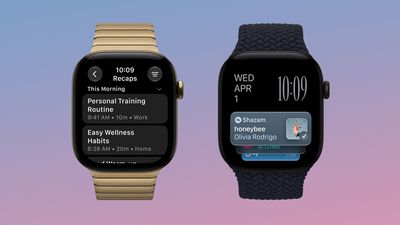
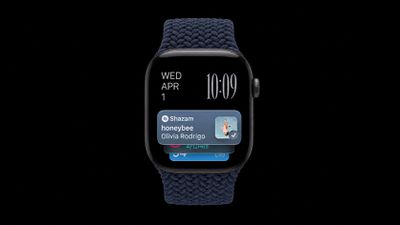
With the first beta of watchOS 27.3, Apple is introducing new Audio Intelligence features it previewed for the Apple Watch Series 12 and Ultra 4 earlier this year. Powered by the S11 chip, Audio Intelligence includes Live Rewind, Siri Recap, Sound Recognition, and Shazam Music Recognition.
Sound Recognition and Shazam are already on the watch, but Live Rewind and Siri Recap are now available in the beta. Live Rewind can show you a transcript of the last 15 seconds of a conversation. If you miss something like a waiter giving you the daily specials at a restaurant, you can press twice on the Digital Crown to see what was said without having to ask the person to repeat themselves.
Unlike Live Rewind, Siri Recap works in the background. The Apple Watch listens to conversations throughout the day and generates a high-level summary that includes a title and key points. Apple says you can use Siri Recap to jog your memory later, allowing you to stay present in the moment. If Siri Recap is turned on, summaries are created automatically and auto-deleted after seven days unless they're saved. It does not include a full transcript of conversations.
Audio Intelligence features are all opt-in. Apple says Live Rewind only activates when the Digital Crown is pressed. Transcription doesn't continue beyond the 15-second snippet, and text is not saved unless you ask Siri about it or save it to the Siri app.
Siri Recap can be scheduled to run based on time, location, or both. You can set it to listen just while you're at work, or add a rule to keep it from activating at night. It can also be turned on and off manually through Control Center, and Siri Recap summaries can be viewed and deleted in the Siri app.
Apple has a long privacy explainer for Audio Intelligence. Audio recordings aren't created or stored, and no audio can be accessed by apps, the operating system, or Apple. Raw audio is never available because it goes into the Secure Exclave on the S11 chip. Apple describes the Secure Exclave as a hardware-isolated compartment that processes sensor data separately from the rest of the system.
No Audio Intelligence features identify or attribute speakers, so text won't say "Eric said..." or label speakers as "Speaker A" and "Speaker B." Siri Recaps filter potentially harmful content and sensitive information.
When using Live Rewind, there is an audible chime that plays from the Apple Watch speaker, even if it's in silent mode. A full-display animation plays on the watch when Live Rewind is used, and a microphone indicator alerts those nearby that it's been turned on.
Live Rewind and Sound Recognition are processed on-device unless a Live Rewind snippet is sent to Siri for a request or saved. Siri Recap summaries are created through Private Cloud Compute.
Along with an Apple Watch Series 12 or Ultra 4, Siri Recap and Live Rewind require an iPhone 16 or later with Apple Intelligence and Siri AI. The new features are in English only to begin with, and they're not available to users under 13. Parental approval is required for Child Accounts under 18.
We're expecting watchOS 27.3 to launch in December alongside iOS 27.3.
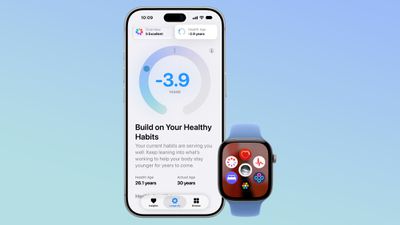
iOS 27.3 reintroduces the redesigned Health app previewed in September. Apple tested the new Health app in the iOS 27.2 beta, but it was removed before the update launched.
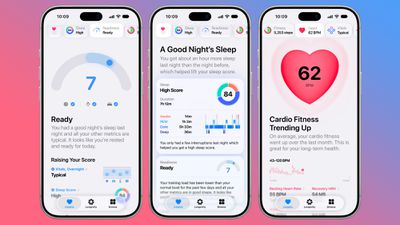
The Health app has been updated, and there are new Insights and Longevity tabs that show more information about your health and fitness metrics.
The Insights tab includes your most recent health data, like Activity Rings, heart rate, sleep score, and vitals. Apple Intelligence will use that information to offer Personal Guidance. The Health app will be able to make suggestions based on your goals and what kinds of activities you do.
Apple Watch Series 12 and Apple Watch Ultra 4 wearers will see their readiness score in the Insights tab as well as on the watch. The readiness score is meant to help you decide whether to push yourself harder, take a recovery day, or work out as usual.
A redesigned Vitals section has overnight and daytime views, and HRV has been added as a metric. There are readings for both overall HRV and recovery HRV.
The Health app's Longevity tab looks at health data over time. It assesses you across seven categories: heart health, sleep, mental wellbeing, movement health, metabolic health, hearing, and nutrition. It also has a Health Age feature that uses info like resting heart rate, VO2 max, HRV, sleep, and biomarkers from blood work to calculate how your health metrics compare to your actual age. Health Age relies on health data collected from the Apple Watch, plus it incorporates fitness assessments you can take at home with tracking via the iPhone's camera.
Apple will offer a $119 laboratory panel from Quest Diagnostics, and that information will contribute to Health Age. You can also upload recent lab results or sync medical records.
The Health app will expand language support to global English, Chinese (Simplified and Traditional), French, Japanese, Korean, Norwegian, Portuguese, Spanish, Turkish, and Vietnamese.
Apple said the new Health app would come in late 2026, which lines up with the expected December release of iOS 27.3. The redesigned app requires an Apple Intelligence-capable iPhone.
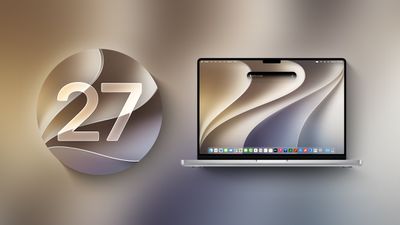
Apple today started testing the next macOS Golden Gate update, and developers can now download the first beta of macOS Golden Gate 27.3. The beta comes a week after Apple launched macOS Golden Gate 27.2.
Registered developers can download macOS Golden Gate 27.3 by opening up the System Settings app, clicking on General, selecting Software Update, and opting into macOS Golden Gate betas.
Rumors suggest Apple will expand Apple Intelligence to China with its .3 updates, but it's not yet known what else might be included in the new software.
Apple today seeded the first betas of upcoming iOS 27.3 and iPadOS 27.3 updates to developers, with the betas coming a week after iOS 27.2 and iPadOS 27.2 were released.
Registered developers can download the betas by going to Settings > General > Software Update and opting in to the developer beta.
We're still waiting on iOS 27 features Apple previously announced, such as the redesigned Health app that adds Apple Intelligence insights and guidance and reachability on the iPhone Duo. Apple also hasn't reintroduced the feature that lets Safari fix weak or compromised passwords using Apple Intelligence.
Alongside new betas of iOS 27.3, iPadOS 27.3, and macOS Golden Gate 27.3, Apple has released the first betas of watchOS 27.3, tvOS 27.3, and visionOS 27.3. The betas come a week after the 27.2 software updates were released.
Registered developers can download the betas through the Settings app on each device.
Two new Apple Intelligence features are coming to the Apple Watch Series 12 and Apple Watch Ultra 4 in late 2026, and Apple could add them in watchOS 27.3. Live Rewind will allow users to double-press the Digital Crown to get a transcription of what was said in the last 15 seconds, while Siri Recap will turn conversations users have had during the day into high-level notes.
There's no word on what might be added in visionOS 27.3 and tvOS 27.3.
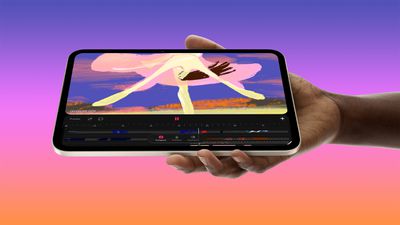
Apple's answer, to Chris Lawley and others, has been something to the effect of "120Hz is irrelevant, OLED's faster pixel response solves the problems." I don't agree. I don't think the lack of ProMotion is an immediate and total dealbreaker, but refresh rates matter! To games and high-touch creative apps, of course, but you notice the difference even with basic swiping and zooming. The Apple Pencil feels more juddery moving across my screen. On a 120Hz screen, I can scroll a browser page and still clearly read the text as it's moving. With 60Hz, it gets blurry. In all these cases, even if you don't explicitly see the difference, you really do feel it.
Of course, an OLED display is still a big upgrade overall.
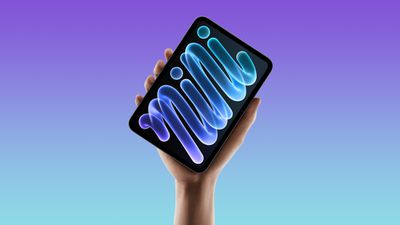
OLED technology allows for higher contrast and more vivid colors, as there is no backlight and individual pixels turn off completely to display true black. Apple also says the new iPad mini can achieve a maximum brightness of 600 nits for standard content, up from 500 nits for the previous model, and up to 1,200 nits for HDR content.
Apple's tech specs indicate the new iPad mini has a 2,000,000:1 contrast ratio.
The new iPad mini is available to pre-order now, with U.S. pricing starting at $699 for a model with 128GB of storage. The device launches Friday.
Tom's Guide ran the new iPad mini through its standard battery test, which involves continuous web browsing over Wi-Fi with the display set to 150 nits of brightness, and the device achieved much better battery life than Apple advertises.
According to the review, the iPad mini 8 lasted for 14 hours and 24 minutes in this test, up from 10 hours and 36 minutes for the iPad mini 7.
Tom's Guide said it typically performs the battery test three times to get an average time, but it only had time for a single run for this review. However, their review said they suspect the final results will be similar to the first run.
This is an interesting finding, as Apple does not advertise longer battery life for the new iPad mini, with its tech specs showing "up to 10 hours of surfing the web on Wi-Fi" for both the iPad mini 7 and iPad mini 8. The new model does have Apple's more power efficient C2 modem for cellular connectivity, but Tom's Guide's test used Wi-Fi.
We will have to see if further tests support this finding, but longer battery life may be an unadvertised benefit of the new iPad mini. The new model actually has a slightly smaller battery compared to the previous model, but power efficiency gains could come from the A20 Pro chip and the OLED display when showing darker content.
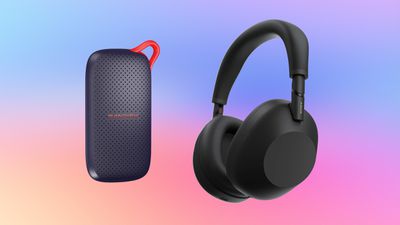
B&H Photo introduced its early Black Friday sale this week, with savings on storage accessories, home and portable audio devices, drones, cameras, Apple products, and more.
Note: MacRumors is an affiliate partner with B&H Photo. When you click a link and make a purchase, we may receive a small payment, which helps us keep the site running.
B&H Photo is matching a few all-time low prices on Apple's Mac mini and Mac Studio, with up to $200 off these computers. You'll find the 256GB M6 Mac mini for $779.00 ($120 off), and the 512GB M5 Max Mac Studio for $2,299.00 ($200 off), both record low prices.
In this sale, there's also great deals on portable SSDs, Bluetooth speakers, noise-cancelling headphones, monitors, and much more. You can also check out our main post to stay up-to-date with all of the best early Black Friday Apple deals.
If you're on the hunt for more discounts, be sure to visit our Apple Deals roundup where we recap the best Apple-related bargains of the past week.
Deals Newsletter
Interested in hearing more about the best deals you can find during the holidays? You can sign up for our Deals Newsletter and we'll keep you updated so you don't miss the biggest deals of the season!
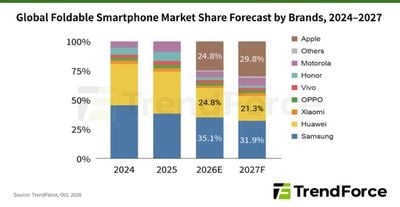
Apple could capture nearly 30% of the global foldable smartphone market in 2027, according to TrendForce's latest forecast.
TrendForce projects Apple's share of shipments rising from 24.8% in 2026 to 29.8% in 2027. Samsung is expected to retain first place, although its share is forecast to fall from 35.1% to 31.9%. Huawei would follow Apple in third place, with its share declining from 24.8% to 21.3%. The research firm estimates approximately five million iPhone Duo shipments in 2026, while overall foldable smartphone shipments are expected to grow just 0.5%.
TrendForce says early feedback on the device has been mixed, with users praising split-screen functionality and the viewing experience when the device is unfolded. However, some apps display black borders or fail to use the full screen, while reports of damaged displays and high repair estimates have drawn attention to ownership costs.
Nevertheless, TrendForce identifies Apple's integration of chips, the operating system, and its developer ecosystem as a significant advantage in improving the foldable experience. As app compatibility and hardware reliability improve, the firm expects the iPhone Duo to help shift competition in the foldable market toward multitasking efficiency.
Ever been in a situation where you hear a song in a cafe, a shop, or a car, and wonder what it is? On the latest Apple Watch models, your watch can work it out for you, and you don't even need to ask. The music doesn't have to be playing on the watch. It just needs to be audible around you. Apple Watch does the rest.
It's all thanks to a new automatic feature in iOS 27 called Music Recognition, which is just one of Apple's new Audio Intelligence features. It uses Shazam to identify songs around you and surfaces the answer in the Smart Stack, including the title and artist, without you tapping anything. It requires an Apple Watch Series 12 or Apple Watch Ultra 4 paired with an iPhone 11 or later (or iPhone SE 2nd generation or later) running iOS 27.
Using Music Recognition on Apple Watch
When you hear music nearby, just swipe up from the watch face (or turn the Digital Crown upward) to open the Smart Stack. Then check the Music Recognition widget. It should show the song title and artist as soon as it has identified the music, which shouldn't take long. The best bit is that you can save the song to your Shazam history or Apple Music library with a tap.
How to Turn On Automatic Music Recognition
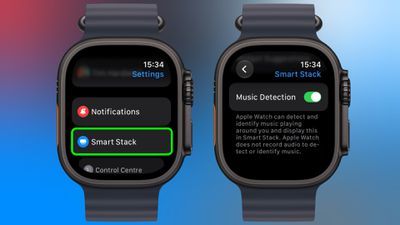
Usually, you can just tap Enable Music Detection when the Music Recognition widget appears for the first time in your Smart Stack – the feature works from then on. But if for any reason you're not seeing it happen automatically after this initial step, here's how to enable it manually:
Open the Settings app on your Apple Watch.
Tap Smart Stack.
Turn on Music Detection.
Older Apple Watch models can still identify songs manually with the Music Recognition app, but the automatic Smart Stack version is limited to Series 12 and Ultra 4.
Privacy
Apple says no audio is recorded or stored in the process of identifying songs. Instead, audio is processed in a protected buffer inside the device's Secure Exclave, and only an acoustic signature of the song – which can't be reversed into the original audio – is sent to Shazam's servers for identification.
Apple's upcoming iPhone 18 will feature a larger battery and potentially a higher price, according to the leaker known as "Digital Chat Station."
In a new post on Weibo today, the leaker claimed that the standard iPhone 18 will continue to feature a high-resolution 6.3-inch OLED display with a refresh rate up to 120Hz, the Dynamic Island, and Face ID. The device is also expected to contain the A20 chip, manufactured using a 2nm process just like the A20 Pro, and a 48-megapixel dual rear camera system.
Crucially, the leaker said the iPhone 18's battery will be larger. The iPhone 17 has a 3,692 mAh battery. Apple already increased battery capacities with this year's iPhone 18 Pro models: Versions with a physical SIM card tray have 4,056 mAh and 5,391 mAh batteries, up approximately 1.7% and 11.8% over the equivalent iPhone 17 Pro and iPhone 17 Pro Max models, respectively.
Digital Chat Station also speculated that the iPhone 18's price could increase. Apple already raised the iPhone 17's starting price in the United States from its $799 launch price to $899 in September 2026. The post does not clarify whether the anticipated increase is relative to the iPhone 17's original launch price or its current price, nor whether it will apply in the United States.
Corroborating other rumors, the leaker expects Apple to launch the iPhone 18 alongside the iPhone 18e and iPhone Air 2 in the first half of 2027, predicting that the standard iPhone 18 will be the best-selling model of the three.
Apple's store inside the Festival Place shopping center opened in 2011, so it had a 15-year run.
In a statement shared with The Reading Chronicle in August, Apple said all employees at the Festival Place store would have the opportunity to work at Apple The Oracle in nearby Reading, England or at other Apple Store locations in the country.
Apple also announced that it would be opening a redesigned store at The Oracle in December. The new store will feature a modern design with a more accessible Genius Bar, a dedicated Apple Pickup area for online orders, and more. Apple did not say why the Festival Place store is permanently closing, but it appears that the company is consolidating its retail presence in the area around the redesigned store at The Oracle.
Apple's research and development (R&D) spending increased by $11.22 billion in fiscal 2026, reaching $45.77 billion, according to the company's financial statements.
The figures represent a 32% increase from $34.55 billion in fiscal 2025. That works out to roughly $125 million a day spent on developing Apple's products and technologies during its financial year, which ended on September 26.
Research spending grew considerably faster than sales. Apple's annual revenue increased 15%, while its R&D expenses rose by nearly a third. The company now spends close to one dollar on research and development for every ten dollars it brings in.
Despite the annual jump, spending barely changed between the final two quarters of the year. Apple recorded $11.730 billion in R&D expenses in the September quarter, just $1 million more than the $11.729 billion reported in its June-quarter results.
Apple previously linked its growing development budget to AI. During its April earnings call, CFO Kevan Parekh said AI investment would come on top of spending already planned for Apple's product roadmap. Then-CEO Tim Cook also highlighted increased R&D spending when asked about the company's AI investments.




 Note: MacRumors is an affiliate partner with B&H Photo. When you click a link and make a purchase, we may receive a small payment, which helps us keep the site running.
 Apple Festival Place