

iOS 27 Wallet App Gets 7 New Features - MacRumorsOpen MenuShow RoundupsShow Forums menuVisit ForumsOpen Sidebar
Skip to Content

iOS 27 Wallet App Gets 7 New Features

Apple is making more of an effort to turn the iPhone into a physical wallet replacement in iOS 27, and there are several upgrades to the Wallet app.
iOS 27 Adds These New Features to Your iPhones Wallet Feature

Pass Upgrades

Apple upgraded airline boarding passes in the Wallet app with iOS 26, and in ‌iOS 27‌, upgrades are coming to additional types of passes. Memberships, gift cards, loyalty cards, and rewards cards can use a bolder "Poster Generic" card style with full background images, primary logo, header fields, footer field, primary fields, and an optional barcode.
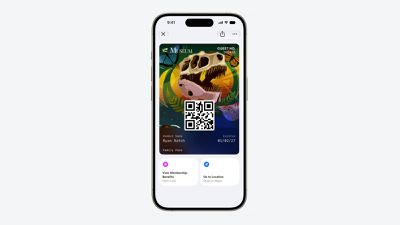
Apple Wallet Enhanced Pass iOS 27
Each pass is able to include up to two actions that can be tapped from the bottom of the pass, such as getting directions to a venue or checking a rewards point balance.

Apple is also allowing users to check the pass issuer certificate to ensure that a digital pass is legitimate (not applicable to Create a Pass), and there are four new barcode types supported, including EAN–13, Code 39, Codabar, and ITF.

There is a new Pass Designer Mac app for developers that makes it easier to create a pass using a WYSIWYG editor.

Create a Pass

There's a "Create a Pass" feature in the Wallet app for adding tickets, memberships, and more using Visual Intelligence. If you have a ticket for an event and there's not a digital version available for the Wallet app already, you can create one using the physical pass.
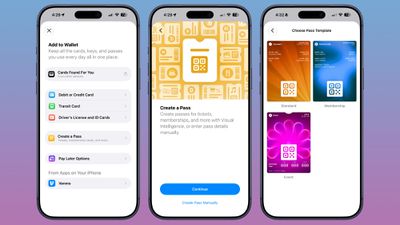
ios 27 wallet create pass

You can scan a pass and add it with Visual Intelligence if there's a barcode or QR code, or a pass can be added manually. Pass templates include Standard, Membership, and Event.

Each type includes relevant information like name, location, or admission type, along with a scannable code drawn from an included barcode or QR code that you take a photo of. There are 12 background colors to choose from with different texture options, or seven custom backgrounds for categories like theater, music, sports, and movies.

Fields can be added or removed as needed when creating a custom pass, with options like label, date, membership, contact, coupon code, VIN, insurance, and more, so most physical cards are able to be stored digitally.

Hotel Keys

When you add a digital hotel key from a participating hotel to the Wallet app, you can now view more details about the trip. Hotels can provide updates on booked activities and allow access to different services.

AI Bill Splitting

Using the new Siri Mode in the Camera app, or a feature in the Messages and Wallet apps, you can take a photo of a bill and use Apple Intelligence to figure out what each person owes. ‌Visual Intelligence‌ scans the receipt and makes a digital copy of everything on the list, and each person can select what they consumed. Tax and tip portions are also calculated automatically.

Payments can be made using Apple Cash, which is a U.S.-only feature.

Insights

‌iOS 27‌ includes an "Insights" feature where you can add financial accounts to the Wallet app to monitor spending.
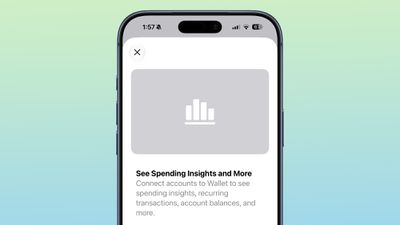
wallet app insights

Insights is an expansion of the Connected Accounts feature in earlier versions of iOS, and it includes spending, recurring transactions, account balances, and more. It works for financial institutions that have implemented Connected Cards support, including several UK banks.

Order Tracking

Order tracking in the Wallet app is expanding to Australia and Canada in ‌iOS 27‌. In ‌iOS 26‌, it was limited to the United States and UK.

Tap to Share

Tap to Share is an ‌iOS 27‌ feature that lets customers connect to a participating merchant's iPhone for quicker digital checkout.

Device Requirements

‌Visual Intelligence‌ is an ‌Apple Intelligence‌ feature requiring an iPhone 15 Pro or newer. Many of the other features should work on all iPhones.

Related Roundups: iOS 27, iPadOS 27

Popular Stories

iOS 27 All the New App Features

iOS 27: All the Rumored App Features

Wednesday June 3, 2026 3:48 pm PDT by
Siri is getting a major overhaul in iOS 27, but Apple also has some big updates planned for apps like Camera, Photos, and Wallet. There are multiple new AI features in the works, plus some non-AI upgrades. Camera Apple is moving Visual Intelligence from the Camera Control button to the Camera app in iOS 27, according to Bloomberg. There will be a Siri mode that will be available alongside...
iOS 27 on iPhone 17 1

Leaker Says iOS 27 Won't Be Compatible With These iPhones

Thursday June 4, 2026 8:25 am PDT by
Apple is set to unveil iOS 27 with an all-new Siri app and more next week, but there are some compatibility details to know about. According to Instant Digital, a known Apple leaker on the Chinese social media platform Weibo, iOS 27 will be compatible with the iPhone 12 series and newer. However, given the more personalized version of Siri will be powered by Apple Intelligence, the revamped...
iOS 27 Wishlist Feature

What's on Your iOS 27 Wishlist Ahead of WWDC 2026?

Wednesday June 3, 2026 2:04 pm PDT by
We're just a handful of days away from Apple's 2026 Worldwide Developers Conference, which will see the introduction of iOS 27, iPadOS 27, macOS 27, and more. We've heard plenty of rumors about iOS 27 and it sounds like most of the new features will focus on Siri and AI, but we want to hear from readers. Are you looking forward to any of the new capabilities? Read our iOS 27 roundup to see...

Top Rated Comments

dontwalkhand Avatar
1 week ago

On the complete opposite, I'm eagerly waiting for the day I don't have to carry a physical wallet in my pockets anymore.
Which is fine, but my physical wallet isn't trying to show me my finances etc either. If they want the Wallet app to behave like a physical wallet, it should do one thing good and that is, allow me to store cards in it. Leave it to other apps for those financial insights etc.
Score: 5 Votes (Like | Disagree)
PsykX Avatar
1 week ago

All I want is secure payments, all these other things just increase the attack surface and make the wallet App bloated and unreliable just like Apple's other Apps.
On the complete opposite, I'm eagerly waiting for the day I don't have to carry a physical wallet in my pockets anymore.
Score: 5 Votes (Like | Disagree)
Elyzien Avatar
1 week ago
I am down for more color saturation and warmer/darker tones. I'm a bit stretched on seeing pastel-ish/like wispy colors.
Score: 4 Votes (Like | Disagree)
1 week ago
I just want a way to customize cards so I can differentiate them..... (I got several Business ramp cards)
Score: 3 Votes (Like | Disagree)
CarlJ Avatar
1 week ago

Apple is also allowing users to check the pass issuer certificate to ensure that a digital pass is legitimate (not applicable to Create a Pass), and there are four new barcode types supported, including EAN–13, Code 39, Codabar, and ITF.
I'm pleased to see they're adding additional barcode types (including Codabar, which is used by many library systems, apparently), but they really need to add a system to support QR/bar codes that update based on time - lots of places, like Target and Costco, and some transit systems, use codes that update every minute or so, so that you can't just share a screenshot to other people. Which is fine, I guess, except it means you have to open that app every time,minstead of using Wallet.

So, add an API that app developers for the various store apps can use to register a callback - so you can have the pass in Apple Wallet, and when you bring up that card, Wallet asks the app "what's the right code for right now?". It preserves their security (no one can screenshot your card to use), but makes it just as frictionless as other cards in Wallet (just idly checked, and to get to my Target barcode in the Target app took 9 actions plus a bit of waiting, from a locked iPhone, while getting to my IKEA card in Apple Wallet took 3).
Score: 2 Votes (Like | Disagree)
d-klumpp Avatar
1 week ago
I hope I'm never so cheap or desperate that I need an AI tool to split a tab so precisely. Have some grace, people!
Score: 2 Votes (Like | Disagree)















