

How to Add an Alternate Appearance to Face ID in iOS - MacRumorsOpen MenuShow RoundupsShow Forums menuVisit ForumsOpen Sidebar
Skip to Content

How to Add an Alternate Appearance to Face ID in iOS

by

When the iPhone X launched, there was no option to record multiple faces like there was to enter in multiple fingerprints with Touch ID, but that's something Apple changed in iOS 12 and later.

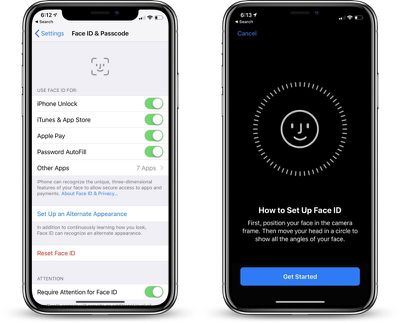
Now you can add a second face to Face ID, which is useful if you have a job where your face dramatically changes, such as with a surgeon's mask or protective goggles.
faceidalternateappearancesetup
Face ID can learn to overcome items like hats, sunglasses, and scarves, recognizing you anyway, but having the option for a second face while you're wearing frequently worn items makes sure Face ID works more seamlessly.

  1. Open the Settings app.
  2. Scroll down to Face ID & Passcode and tap it.
  3. Enter your passcode.
  4. Choose the "Set Up an Alternate Appearance."

From there, you can set up Face ID as you did when you first purchased and set up your iPhone X for the first time.

The iPhone will walk you through the steps of positioning your face in the camera and then moving your head in a circle.

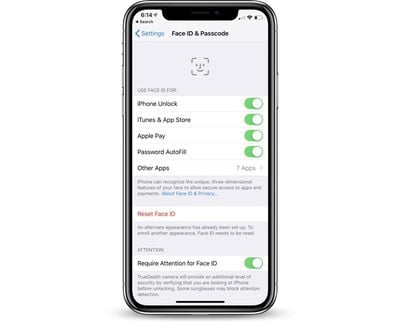
Once your alternate appearance has been entered, there's no option to delete it. To re-add an appearance, you will need to tap the "Reset Face ID" button that has replaced the "Set Up Alternate Appearance" option.
alternateappearancesetup
Be aware, there's no confirmation screen when you tap the "Reset Face ID" option. Once it's tapped, all of your Face ID data is cleared.


Top Rated Comments

99 months ago
Why not just bring back Touch ID? Whatever alleged inconvenience bezels are, the trade-off for the inclusion of Touch ID, not having to deal with the troubles of Face ID not working under certain conditions, and elimination of that hideous notch are well worth it.
Greasy fingers, wet fingers kind of made Touch ID difficult to use, Face ID seems better
Score: 7 Votes (Like | Disagree)
KazKam Avatar
99 months ago
This is a hack for adding another "identity" to Face ID. One of the things I liked about Touch ID was being able to register one of my fingers on the phones of my other family members (since I'm their IT support specialist) and being able to easily unlock. I also was able to put my wife's fingerprint on mine.

Face ID may be technically more secure, but I find it a helluva lot less convenient for my use cases, and in several cases, a downright nuisance.
Score: 4 Votes (Like | Disagree)
99 months ago
Why not just bring back Touch ID? Whatever alleged inconvenience bezels are, the trade-off for the inclusion of Touch ID, not having to deal with the troubles of Face ID not working under certain conditions, and elimination of that hideous notch are well worth it.
There are many features that make Face ID a much better form of authentication. For one, Face ID is far more secure than Touch ID ever was. The massive amount of saved screen space is also a factor. As for the notch, I think that will go away as tech improves and lets them hide the sensors and camera under the screen.
Score: 4 Votes (Like | Disagree)
Blizzardman Avatar
99 months ago
Greasy fingers, wet fingers kind of made Touch ID difficult to use, Face ID seems better
And for me a very unique scenario where FaceID is MUCH better is trying to use my phone while having my Ski gear on. I have gloves which work with touchscreens but it was always a hassle with TouchID.
Score: 3 Votes (Like | Disagree)
ThomasJL Avatar
99 months ago
Why not just bring back Touch ID? Whatever alleged inconvenience bezels are, the trade-off for the inclusion of Touch ID, not having to deal with the troubles of Face ID not working under certain conditions, and elimination of that hideous notch are well worth it.
Score: 3 Votes (Like | Disagree)
ghostface147 Avatar
99 months ago
I think the only thing Apple could do to make FaceID better, would be a setting to allow full access to the home screen without having to swipe up. It's not like there aren't the same number of conditions when TouchID doesn't work - wearing gloves, wet fingers, etc.
I agree in a little. Sometimes I just want to glance at the lock screen to see who emailed me or sent me a text. Yes it is unlocked with FaceID automatically, but then I'd lose what I'm looking at if it unlocked straight to the home screen. So if I want to unlock and go to the home screen, out of habit I just swipe up as soon as I want to use the phone and it unlocks and goes home.
Score: 2 Votes (Like | Disagree)
















