

In macOS Sequoia 15.2, Apple has introduced a new option that adds a weather report to your Mac's menu bar. Keep reading to learn how to get it.
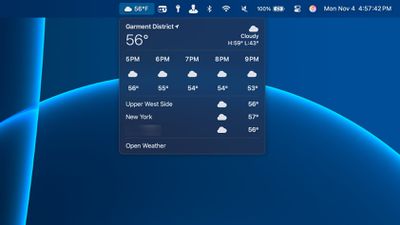
Mac users who update to macOS 15.2 can now add a handy weather icon to the menu bar, showing the current temperature alongside a visual indicator of the conditions — such as a sun for sunny skies or a cloud for overcast weather.
Clicking the icon provides a detailed hourly forecast, upcoming temperatures, and weather updates for saved locations. It also offers quick access to the full Weather app with just a click.
You can enable this feature on your Mac by following the steps below.
- Click the Apple () symbol in the menu bar and select System Settings....
- Navigate to Control Center using the sidebar.
- Locate the "Menu Bar Only" section near the bottom.
- Alongside Weather, click the chevrons and select Show in Menu Bar.
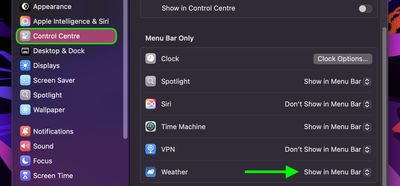
That's all there is to it. If you later decide that you can live without the weather menu bar item, you can use the same settings menu to select Don't Show in Menu Bar, or alternatively you can simply hold the Command key and click-drag the icon out of the menu bar and onto your desktop, and it will vanish.




















