

When an over-the-air iOS update starts downloading on your iPhone or iPad, you can monitor its progress in the Settings app via General -> Software Update.
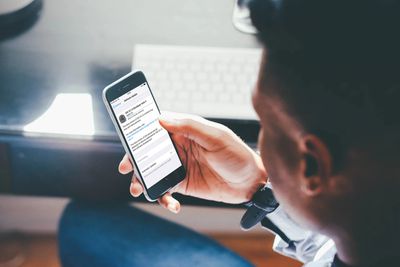
The lack of a cancel option on this screen seems to imply that there's no way to prevent a software update from downloading once it's started, but don't be fooled. You can stop the update process in its tracks at any time and even delete the downloaded data from your device to free up space. Here's how.
First, you'll want to pause the download by temporarily disconnecting your iPhone or iPad from your Wi-Fi network. The easiest way to do this is by enabling Airplane mode: swipe down from the upper right of your device's screen (on iPhone 8 or earlier, swipe up from the bottom of the screen) and tap the Airplane button in the top left of the Control Center grid.
Now that's done, follow these steps.
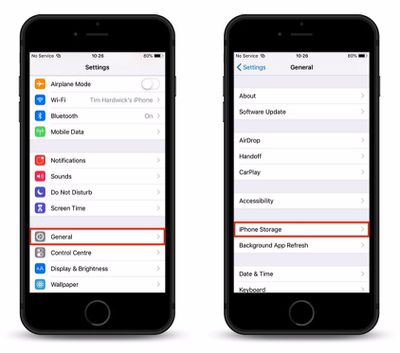
- Launch the Settings app on your iPhone or iPad.
- Tap General.
- Tap iPhone Storage.

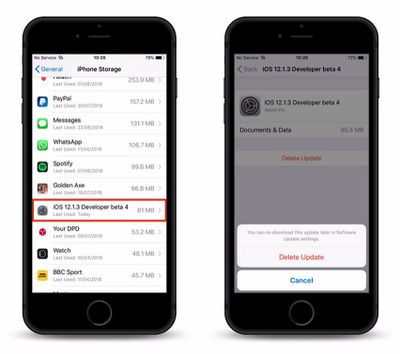
- Locate and tap the iOS software update in the app list.
- Tap Delete Update and confirm the action by tapping it again in the pop-up pane.
How to Turn off Automatic Updates
As some of our readers have pointed out, there's currently no option in Settings to prevent iOS software updates from re-downloading the next time your device is connected to Wi-Fi. What you can do though is prevent an update from automatically installing once it has downloaded: To so, simply launch the Settings app, tap Software Update, and toggle off the switch next to Automatic Updates.




















Top Rated Comments
To prevent iOS from automatically downloading system updates, you need to go to General, Software Update and then disable Automatic Software Update here. This option is only available on iOS 12 though so if you are on a lower version your only option is to install a tvOS profile (or watchOS) to prevent the device from searching for updates.
Apple dictates when and how they try to push an iOS update to your device. I have complained to them many times regarding this matter. This is EXACTLY why they love to brag about their adoption rate.
And another nuisance is it downloads iOS updates when I'm using my cellular hotspot device wasting data and costing me money. No way to disable wifi internet for apps like you can do with cellular settings.
I lose functionality more often than I gain it, in apps, as well as OSes.
I'm not sure why this is happening, but it is.