iOS 17: How to Control Which Apps Have Access to Your Calendars - MacRumorsOpen MenuShow RoundupsShow Forums menuVisit ForumsOpen Sidebar
Skip to Content

iOS 17: How to Control Which Apps Have Access to Your Calendars

by

In iOS 17, Apple offers finer-grained control over what apps can see in terms of your calendars. Keep reading to learn how to manage app calendar access on a per-app basis.

General Calendar Feature
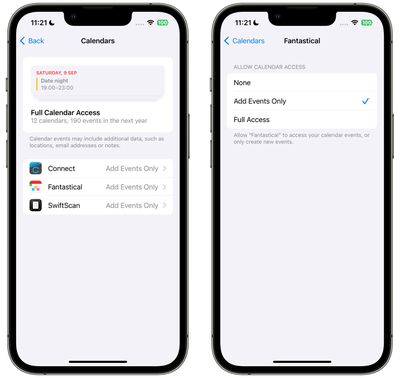
In iOS 16, Apple allowed users to enable or disable individual app access to their calendars using a simple on/off toggle, but that was about all you could do. In iOS 17, by contrast, there are now three options instead of just two. You can give apps Full Access to your calendars, allow them to Add Events Only, or revoke access completely with a None option.

Here's how to better manage the access that individual apps have to your calendars in iOS 17. Note that apps that have Full Access to your calendars can see location, invitees, attachments, and notes, according to Apple.

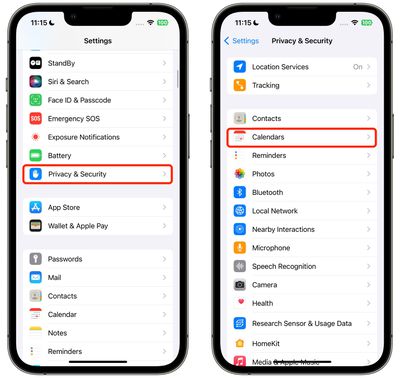
  1. Open the Settings app.
  2. Tap Privacy & Security.
  3. Tap Calendars.
    settings

  4. Tap the app that you want to change access for. (Note that this section also details how many calendars you have and how many accounts you're signed in to.)
  5. Choose from None, Add Events Only, and Full Access.
    settings

That's all there is to it. When you download a new app that wants calendar access, you will be prompted to choose from the same three options, and the app will be added to the same Calendars list in Settings, allowing you to change access at any time in the future.

Your ‌iPhone‌ will also periodically remind you about apps that have access to your calendars, offering up the option to limit access to events only.


Popular Stories

apple lock security bug vulnerability fix privacy

Apple Warns Canada's Bill C-22 Could Force Encryption Backdoors

Friday May 8, 2026 4:22 am PDT by
Apple and Meta have opposed a Canadian bill that the companies say could force them to create backdoor access to encrypted user data, should it pass through the country's parliament. Proposed by Canada's ruling Liberal Party, Bill C-22 contains provisions that could be similar ​to a UK data access provision order sent to Apple last year, depending on how they are implemented. Back in Feb...
Apple Card iPhone 16 Pro Feature

Apple Card Promo to Offer Free AirPods Pro 3

Friday May 15, 2026 8:59 am PDT by
Starting as early as next week, customers who sign up for an Apple Card at Apple's retail stores in the U.S. will receive $249 cash back when they purchase AirPods Pro 3, according to Bloomberg's Mark Gurman. The promotion has yet to be officially announced by Apple, so exact terms and conditions are not available at this time. AirPods Pro 3 are priced at $249 in the U.S., so customers who...
Apple WWDC25 iOS 26 CarPlay Light mode 250609

Six Popular iPhone Apps Now Available on CarPlay

Thursday May 14, 2026 9:10 am PDT by
Apple's CarPlay system for accessing iPhone apps on a vehicle's dashboard screen has received six popular apps in recent weeks: ChatGPT, Perplexity, Grok, Google Meet, WhatsApp, and the indie artist streaming platform Audiomack. Make sure you have the latest version of each app and they will automatically appear on CarPlay. ChatGPT Starting with iOS 26.4, CarPlay supports voice-based...