iOS 16: How to Create Favorites Within a Safari Tab Group - MacRumorsOpen MenuShow RoundupsShow Forums menuVisit ForumsOpen Sidebar
Skip to Content

iOS 16: How to Create Favorites Within a Safari Tab Group

by

In iOS 16, Apple has made several enhancements to its Safari browser, including some new features when working within Tab Groups. One of these is the ability to select webpages from your bookmarks so that they appear as Favorites in the Start Page of any new tab that you open within a specific Tab Group. Here's how it works.

iOS 16 Safari Guide Feature
If you're unfamiliar with Tab Groups, they provide a handy a way to easily save and manage related tabs, such as those used when planning trips or shopping. Apple introduced the feature in iOS 15 and you can check out our dedicated how-to article for more information.

When it comes to adding Favorites to specific Tab Groups, you'll first need to have some webpages in your bookmarks, and have created at least one Tab Group. Then you can follow these steps.

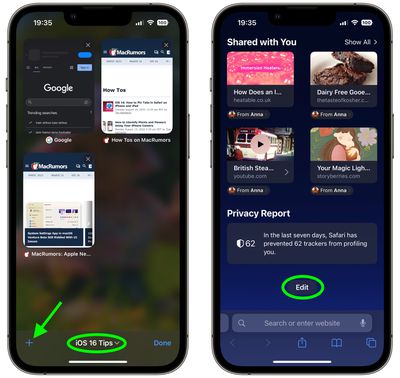
  1. In the Safari tab browser, make sure your Tab Group is active by tapping the middle of the tab bar at the bottom of the screen and then selecting its name.
  2. Next, tap the plus (+) icon in the bottom-left corner to open a new tab showing a Start Page.
  3. Scroll to the bottom of the Start Page and tap Edit.
    safari

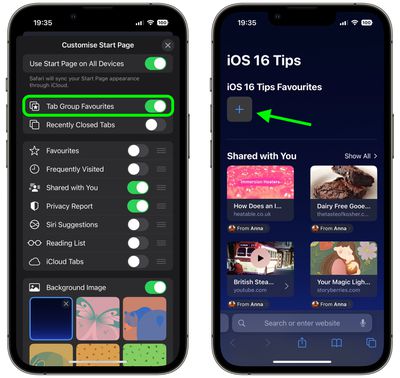
  4. Toggle on the switch next to Tab Group Favorites, then tap the X in the top-right corner to close the Customize Start Page menu.
  5. At the top of the Start Page, tap the plus (+) in the square to add a Tab Group favorite.
    safari

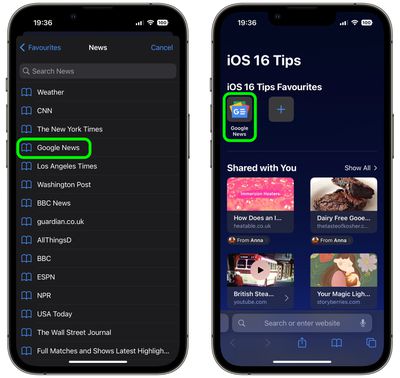
  6. Add a Favorite by tapping a webpage from your Bookmarks list.
  7. Repeat steps 5 and 6 to add more Favorites.
    safari

And now you're done. Your Tab Group favorites will now appear in the Start Page of every new tab that you open in the Tab Group.


Tag: Safari

Popular Stories

MacBook Pro Low Angle Wide Lens

macOS 27: Two More Changes Leaked Ahead of WWDC Next Month

Sunday May 10, 2026 9:45 am PDT by
macOS 27 will have a "slight redesign" compared to macOS Tahoe, according to the latest word from Bloomberg's Mark Gurman. In his Power On newsletter today, Gurman said the design changes will help to improve the readability of macOS Tahoe's Liquid Glass interface:If you've used Tahoe, you're likely familiar with some of the quirks — particularly the transparency effects and shadows that...
macOS 27 on MacBook Pro

Apple Says macOS 27 Won't Be Compatible With These Macs

Wednesday June 3, 2026 8:29 am PDT by
During WWDC 2025, Apple revealed that macOS 26 Tahoe would be the final major macOS version for Intel-based Macs. macOS 27 will be compatible with Apple silicon Macs only, meaning that you will need a Mac with an M-series chip or a MacBook Neo with an A18 Pro chip in order to install the software update. Apple will unveil macOS 27 during its WWDC 2026 keynote this Monday, June 8, and the...
MacBook Neo on Yellow Feature

MacBook Neo is So Popular That Apple Reportedly Doubled Production

Wednesday June 3, 2026 9:24 am PDT by
On an earnings call in late April, Apple's CEO Tim Cook said that customer response to the MacBook Neo was "off the charts," and the popularity of the laptop has reportedly led the company to significantly boost production. Apple supply chain analyst Ming-Chi Kuo this week said he believes that MacBook Neo shipments to Apple were doubled from an initial target of 5 million units to 10...